How to Win Back Inactive Loyalty Customers
Only 11% of inactive loyalty customers return on their own. Here's how to target the rest, using filters and messages through their loyalty card.
Key Takeaway: On a paid plan, FaveCard includes four customer filters (All, Registered, Inactive, and Manual) that let you send targeted messages to the right people at the right time. Messages appear on customers' phones through their Apple or Google Wallet loyalty card. No app, no phone numbers, no technical setup required.
FaveCard Team
Published April 7, 2026

Last updated: April 2026
On a paid plan, FaveCard lets you filter your loyalty customers into four segments (All, Registered, Inactive, and Manual) and send targeted messages directly to their phones through their Apple or Google Wallet card. No app required. No phone numbers needed. Messages go to the customers you choose, not everyone at once.
Key Takeaway: FaveCard is not just a stamp card. A paid plan includes customer segmentation and targeted messaging, letting you reach inactive customers with a win-back message, reward your most loyal regulars with exclusive offers, and contact specific groups with the right message at the right time.
Here is the problem most loyalty apps do not solve: your best tool for bringing customers back is telling them to come back, but most loyalty apps either cannot do this at all, or they send the same message to every customer regardless of what that customer actually needs to hear.
A customer who visited yesterday does not need a “we miss you” message. Your top regular who comes in every week does not need the same offer as someone who has not been in for two months. Sending the same message to everyone is better than nothing, but it leaves a lot on the table.
According to Opensend, only 11% of inactive customers re-engage on their own without any proactive contact. That means if 100 customers go quiet, 89 of them stay quiet unless you reach out. Targeted win-back messages, sent specifically to inactive customers, recover 20–30% of lapsed customers, according to research by Propello Cloud.
The customers already in your loyalty programme are far easier to bring back than strangers. You just need a tool that lets you reach them.
The Four Customer Segments in FaveCard
On a paid plan, FaveCard includes a Customer Messages feature with four targeting filters. Each one lets you send a message to a specific group, not everyone at once.
| Segment | Who it includes | Best used for |
|---|---|---|
| All | Every customer who has scanned your loyalty card | Announcements, promotions, seasonal events |
| Registered | Customers who signed up with an email address | Verified audience, email-based offers, surveys |
| Inactive | Customers who have not visited recently | Win-back messages, re-engagement incentives |
| Manual | Customers you hand-pick from your list | VIP rewards, private event invitations, family offers |
Messages go to customers’ phones through their Apple or Google Wallet loyalty card, the same card they already have. No app to download, no phone number required.
Win Back Customers Who Have Gone Quiet
The most common use for targeted messaging is the win-back: a message to customers who were regulars, then stopped coming in.
Say you run a hair salon. A customer who used to book every six weeks has not been in for four months. They have not uninstalled an app or opted out of anything: their loyalty card is still sitting in their Google Wallet. With the Inactive filter, you can send them a message directly: “We haven’t seen you in a while, come back this month and get double stamps on your next visit.”
That message reaches people who already know you, already trust you, and already have your loyalty card on their phone. The barrier to returning is low. The message is personal. And according to Propello Cloud, nearly half of reactivated customers go on to spend more than they did before going inactive, sometimes doubling their lifetime value.
This is not possible with a simple stamp card app that has no messaging feature. And it only works when the message goes to inactive customers specifically, not to your regulars who were in last week.
Reward Your Best Customers Differently
Your most loyal customers, the ones who visit weekly, who refer friends, who have already earned multiple rewards, deserve something more than the same message as everyone else.
With the Manual filter, you can hand-pick a group of customers from your loyalty list and send them something exclusive: early access to a new service, a private event invitation, a thank-you offer for your top ten regulars, or a special reward for families who visit together. The message feels personal because it is: only the people you select receive it.
This kind of targeting matters. Opensend research shows that repeat customers represent 21% of a typical business’s customer base but drive 44% of its revenue. Sending your best customers a message that acknowledges their loyalty, rather than treating them the same as a first-timer, builds the kind of relationship that holds even when a competitor opens nearby.
A paid plan also gives you full access to your customer email list (not masked, fully exportable as CSV), so you can identify your most frequent visitors before sending.
Message Only Registered Customers
The Registered filter targets customers who signed up with an email address, as opposed to those who simply scanned a QR code as a walk-in.
This is useful when you want to reach your most engaged audience: a survey, a pre-launch offer, a referral incentive, or anything that works better with customers who have already taken an extra step with your business. Registered customers are your warmest audience, and reaching them separately keeps your messaging relevant.
Automatic Reminders and Birthday Campaigns
Beyond manual messages, a FaveCard paid plan includes two automatic features that run without any action on your part:
Automatic visit reminders go out to customers who have not visited after a set period. You configure the trigger once; FaveCard sends the message when the condition is met. This means win-back outreach does not rely on you remembering to send something, which is useful for busy periods or weeks where follow-up falls off the to-do list.
Birthday wishes are sent automatically to customers on their birthday. This matters more than it might seem: a birthday message is one of the most natural reasons to reach a customer you haven’t seen in a while. A customer who visits twice a year, has a family, and hasn’t been in for three months is much more likely to return when they receive a birthday reward than a generic promotional message. The occasion makes the outreach feel personal rather than automated, even when it is.
How to Send a Targeted Message: Step by Step
Sending a targeted message in FaveCard takes about two minutes:
- Open your FaveCard dashboard
- Go to Customer Messages
- Select your filter: All, Registered, Inactive, or Manual
- Write your message (one line is enough: “Double stamps this week, come in before Sunday”)
- Send
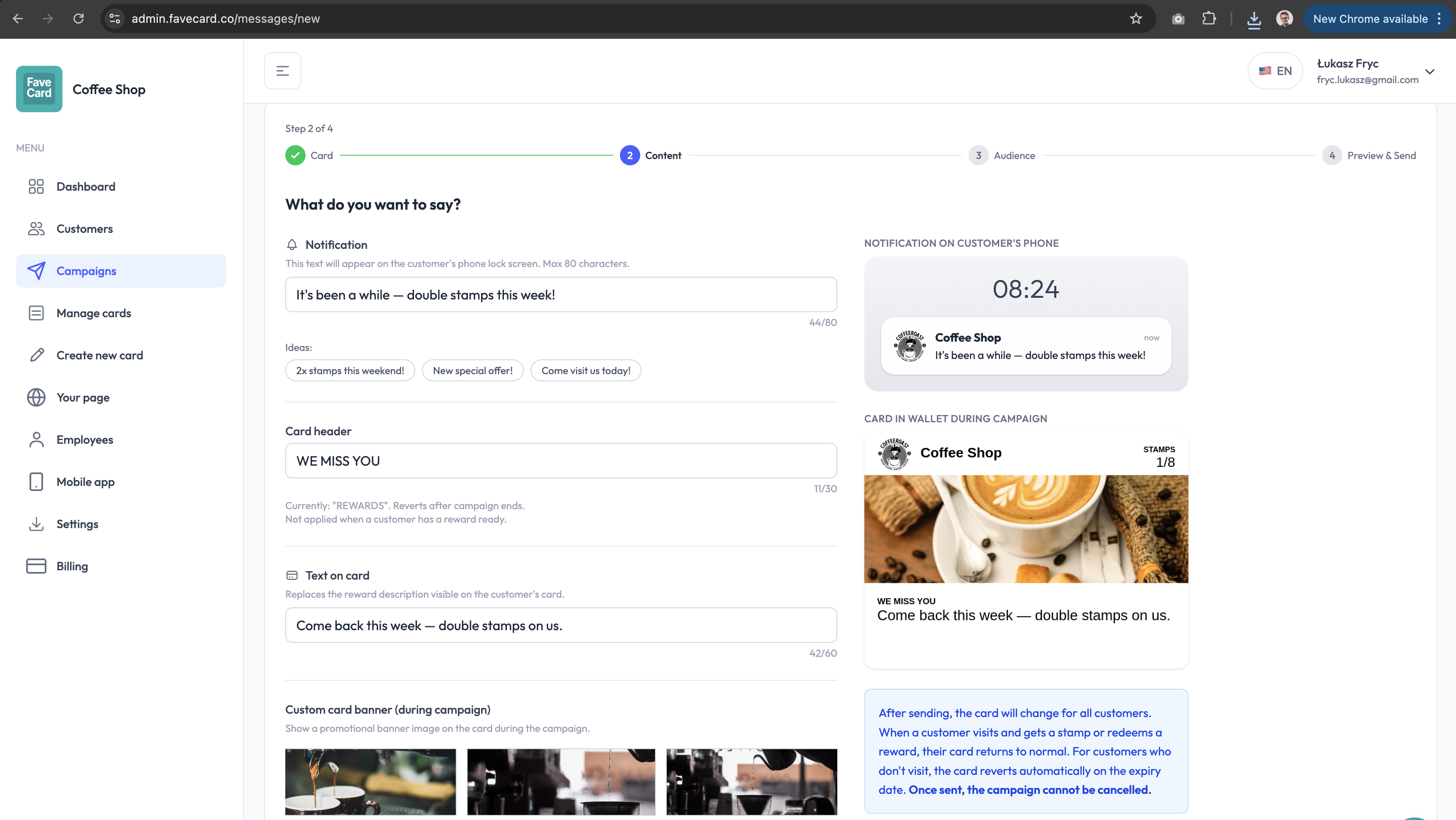
The message appears on the customer’s phone through their Apple or Google Wallet card. It shows up like a wallet notification: immediate, visible, and connected to something they already use. No SMS charges, no third-party tools, no phone numbers.
How FaveCard Compares to Simple Stamp Card Apps
Many digital stamp card apps replace the paper card and stop there. They track visits, trigger rewards, and give customers a digital stamp. That is the baseline, and FaveCard includes it on the Free plan.
A paid plan adds something most stamp apps do not offer at all: the ability to reach customers between visits, filtered by who they are and how recently they came in.
| Feature | Simple stamp apps | FaveCard (paid plans) |
|---|---|---|
| Digital stamp card | Yes | Yes |
| Apple + Google Wallet passes | Sometimes | Yes |
| Basic visit analytics | Usually | Yes |
| Customer list (email access) | Rarely | Yes, full access + CSV export |
| Message all customers | Sometimes | Yes |
| Filter by inactive customers | No | Yes |
| Filter by registered customers | No | Yes |
| Manual / custom group targeting | No | Yes |
| Automatic visit reminders | No | Yes |
| Win-back message capability | No | Yes |
The difference matters most when a customer stops coming in. A stamp card with no messaging cannot bring them back. A targeted message sent directly to their phone can.
The Numbers Behind This
A few figures that put this in context:
- Only 11% of inactive customers return without any contact (Opensend)
- Targeted win-back messages recover 20–30% of lapsed customers (Propello Cloud)
- Repeat customers represent 21% of customers but drive 44% of revenue (Opensend)
- Retaining customers costs 5–7x less than acquiring new ones (Opensend)
- Loyalty programme members spend 37% more after joining, according to Square
For a café, salon, or barbershop with 200 loyalty customers, getting 40 inactive ones back once a month each, at an average spend of £18, is an extra £720/month. From people already in your system, already on your card, already one message away.
Frequently Asked Questions
Does FaveCard support customer segmentation for loyalty messages?
Yes. On a paid plan, FaveCard includes four customer filters for targeted messaging: All, Registered, Inactive, and Manual. Each filter controls who receives your message, for example sending only to customers who have not visited recently, or only to individuals you select by hand. Messages reach customers through their Apple or Google Wallet loyalty card, directly on their phone.
How do I send a win-back message to inactive customers on FaveCard?
In your FaveCard dashboard, go to Customer Messages, select the Inactive filter, write your message (for example, “We miss you, come back this week for double stamps”) and send. The message appears on the customer’s phone through their existing loyalty card. No phone numbers or app required.
What is the difference between targeted and mass loyalty messages?
A mass message goes to every customer on your loyalty list. A targeted message uses a filter: only inactive customers, only registered customers, or only a hand-picked group. Targeted messages are more relevant to the recipient, which makes them more likely to prompt a return visit.
Can I send exclusive messages to my most loyal customers on FaveCard?
Yes. On a paid plan, the Manual filter lets you hand-pick specific customers from your loyalty list, for example your top regulars or customers with families, and send them an exclusive message or offer. A paid plan also gives you full access to your customer email list so you can identify your highest-value customers before selecting them.
Is customer segmentation available on FaveCard’s free plan?
No. Customer messages and segmentation filters are a paid feature (see the pricing page for current rates). The Free plan includes unlimited customers, a loyalty card that opens in the phone browser, and basic analytics. Every new account starts with premium tools until the first 30 customers are on the card, no credit card required, so you can test targeted messaging before committing.
For five proven tactics to win back lapsed customers using different channels, see our guide to bringing back inactive customers. For a comparison of loyalty apps that include and exclude messaging features, see our loyalty app guide for small businesses. For general strategies to increase repeat visits, see how to get repeat customers.
FaveCard’s premium tools until the first 30 customers are on the card includes full access to all four customer filters and targeted messaging, no credit card required. Start free at favecard.co.
Frequently Asked Questions
Does FaveCard support customer segmentation for loyalty messages?
Yes. On a paid plan, FaveCard lets you filter your loyalty customers into four segments before sending a message: All customers, Registered customers (those who signed up with an email address), Inactive customers (those who haven't visited recently), and Manual selection (hand-picked individuals). Messages reach customers through their Apple or Google Wallet loyalty card, directly on their phone.
How do I send a win-back message to inactive customers on FaveCard?
In your FaveCard dashboard, go to Customer Messages, select the Inactive filter, write your message (for example, 'We miss you, come back this week for double stamps') and send. The message appears on the customer's phone through their existing Apple or Google Wallet loyalty card. No phone numbers or app required.
What is the difference between targeted and mass loyalty messages?
A mass message goes to every customer on your loyalty list regardless of their visit history. A targeted message uses a filter: for example, only inactive customers, only registered customers, or only a hand-picked group. Targeted messages are more relevant to the recipient, which makes them more likely to prompt a return visit.
Can I send exclusive messages to my most loyal customers on FaveCard?
Yes. On a paid plan, the Manual filter lets you hand-pick specific customers from your loyalty list, for example your top regulars, and send them an exclusive message or offer. A paid plan also gives you full access to your customer email list so you can identify your most frequent visitors and highest-value customers.
Is customer segmentation available on FaveCard's free plan?
No. Customer messages and segmentation filters are a paid feature (see the pricing page for current rates). The Free plan includes unlimited customers, a loyalty card that opens in the phone browser, and basic analytics, but does not include messaging. Every new account starts with premium tools until the first 30 customers are on the card, no credit card required, so you can test targeted messaging before committing.