

FaveCard
Start for free

FEATURES

Digital Loyalty Cards

FaveCard combines an intuitive card creator, instant digital loyalty cards, and live totals of cards, stamps and rewards. Launch a digital loyalty programme in minutes and make customers come back more often.

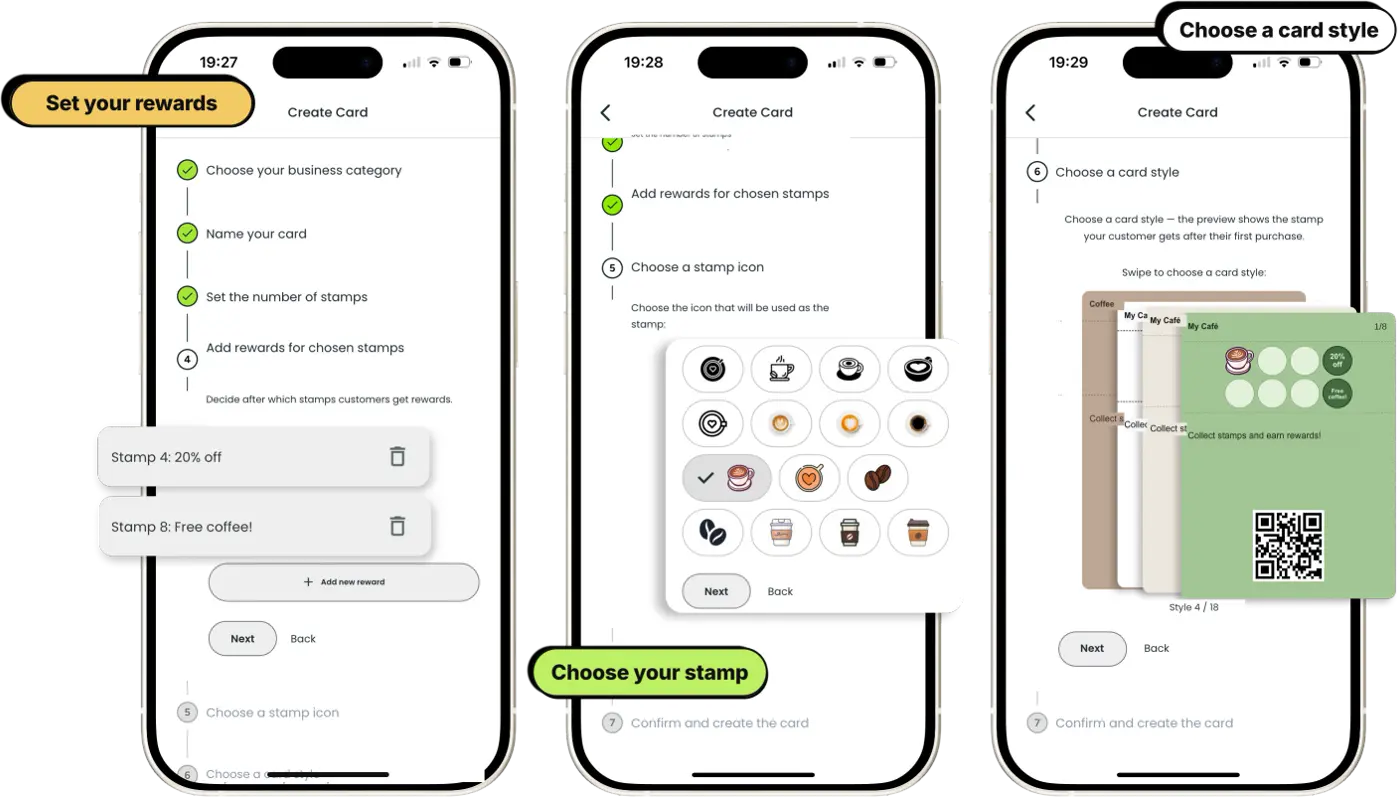
Design your own card in a few steps

Easy creation

Design your own card in a few steps

Choose the card style and stamp icon, set any rewards. Ready in minutes, without the help of a graphic designer.

  • Templates in your brand's colors
  • Custom stamps and reward texts
  • Live card preview
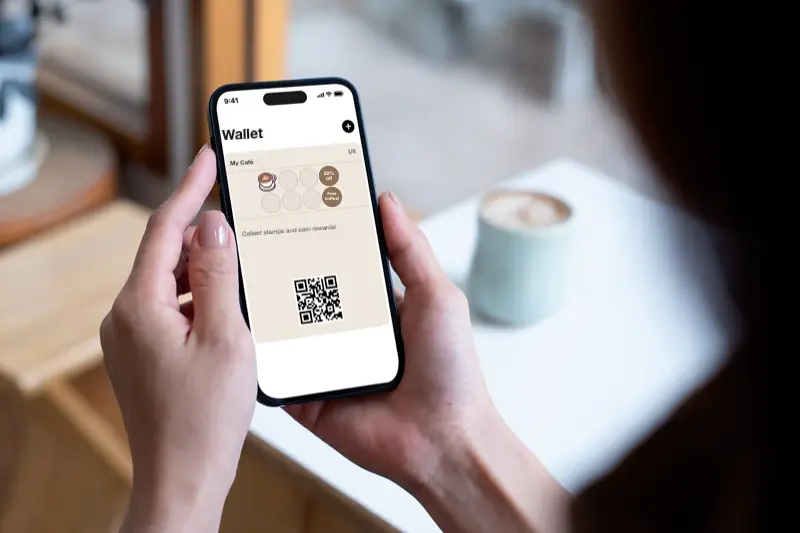
The customer always has the card at hand

No extra apps on the customer's side

The customer always has the card at hand

The customer gets a digital loyalty card on their phone, and a paid plan also installs it into Apple or Google Wallet. No app download or login required.

  • One click and the customer can start collecting stamps immediately
  • Works on iOS and Android
  • Automatic updates after each stamp
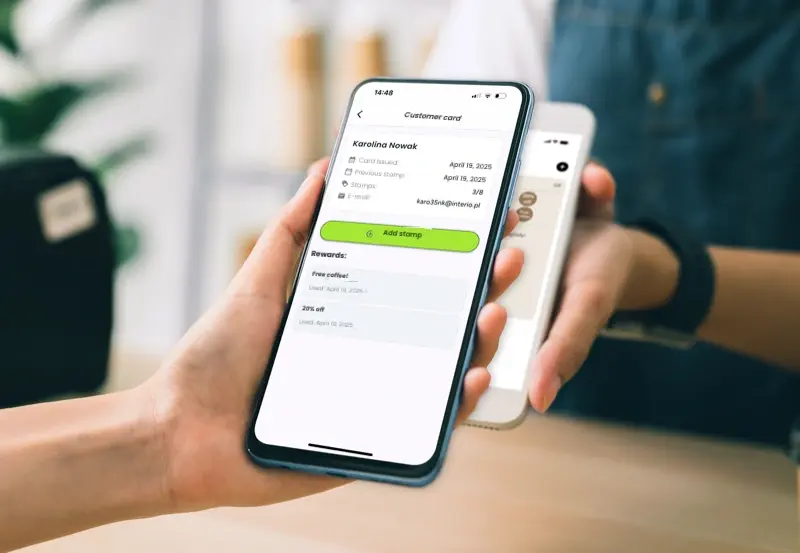
Staff scans stamps, and you see who comes back

Live totals

Staff scans stamps, and you see who comes back

The FaveCard dashboard counts issued cards, stamps and rewards as they happen. The staff app scans codes and adds rewards in a second.

  • Totals of cards issued, stamps and rewards
  • Customer profile – name and date of last visit
  • Unlimited staff accounts (Business plan)

FREE

One card, as many rewards as you like

Reward customers along the way, not just at the end. Place rewards at any stamp, design the card to match your brand, and give new customers a head start. Rewards and head-start stamps are on the free plan.

  • Unlimited rewards, placed at any stamp you choose
  • Your stamp icon, colours and reward wording (logo and banner on a paid plan)
  • Head-start stamps to get customers collecting sooner
  • Works on every phone; Apple and Google Wallet on a paid plan
Explore loyalty cards
  • Brew & Bean

    50% off your 3rd coffee, free coffee at 6

  • Polish & Co

    20% off at 4 stamps, free manicure at 8

  • Rise Bakehouse

    20% off at 4, free pastry at 8 visits

Example rewards on a customer's loyalty card

BUSINESS PLAN

Bring customers back with a message

Send a message straight to their phone through the loyalty card they already have. No app. No phone numbers. A message pops up on their screen, and they're back.

  • Message appears on their lock screen, like a text
  • Send to all customers or pick who gets it
  • Reward-focused: "Free pastry with any coffee this weekend!"
  • Included with the Business plan. No per-message cost
See how it works
  • Joe's Coffee

    Free pastry with coffee before noon!

  • Bella Salon

    We miss you! Free coffee this week

  • Sharp Cuts

    Happy Birthday, Tom! Free haircut on us

Example messages on the customer's lock screen

BUSINESS FEATURE

Campaigns: turn cards into limited-time deals

Run a slow-day, happy-hour or win-back promotion straight on your customers' loyalty cards. Pick a template, choose who gets it, and every card reverts to normal on its own when the campaign ends.

  • Ready-made templates: Slow Day, Happy Hour, Win Them Back and more
  • Send to everyone, lapsed customers, or specific people you pick
  • Offers land on the card, with a notification to customers who keep it in their wallet
  • Every card reverts automatically when time's up
See how Campaigns work
  • Slow Day

    Quiet Tuesday? 2-for-1 today only

  • Spend & Get

    This weekend: buy two coffees, get a free pastry

  • Last Chance

    Final hours, offer ends tonight

Example campaigns on the customer's loyalty card

FREE TO START

Business Page: your menu, loyalty card and reviews on one QR code

One link and one QR code for your menu, services and events, with your loyalty card as the first button and a Google review link. The basic page is free on every plan; the menu and the other content sections come with Business.

  • Your loyalty card, always the first button
  • Menu, products, services, updates and events (Business)
  • A 'Leave a review on Google' link, on every plan
  • One printed QR code that keeps working as the page changes
See how the business page works
  • Loyalty card

    Join in one tap, no app

  • Your menu

    Prices, sizes, dietary tags

  • Google reviews

    Leave a review on Google

What's on a FaveCard business page

BUSINESS FEATURE

Hear what customers really think

FaveCard asks your customers for feedback at the right moment, right on their loyalty card. Never spam. You see every rating and comment, plus the average score, in one place.

  • Build your own survey: a star rating plus your questions
  • Optional anonymous replies for more honest answers
  • Asked at the right moment, automatically. Never spam
  • Ratings, comments and the average score in one dashboard
See how surveys work
  • Joe's Coffee

    How was your coffee today?

  • Bella Salon

    Happy with your colour?

  • Tony's Pizza

    How was your meal tonight?

Example survey questions on the customer's loyalty card

BUSINESS FEATURE

Turn happy customers into Google reviews

FaveCard asks every customer to leave a Google review at the right moment, right on their loyalty card. One tap, straight to Google. No screening, no chasing.

  • Asks at a happy moment: right after a reward
  • One tap straight to your Google listing
  • Asks everyone, never screens. Stays inside Google's rules
  • Track requests from your dashboard
See how it works
  • Joe's Coffee

    Enjoyed your free coffee? Tap to review

  • Sharp Cuts

    Happy with your cut? Leave a Google review

  • Tony's Pizza

    Loved dinner? A quick Google review helps

Example review requests on the customer's loyalty card

BUSINESS FEATURE

Turn birthdays into repeat visits

FaveCard remembers your customers' birthdays and puts your offer on the loyalty card they already carry, with an optional email. Switch it on once and it takes care of every birthday.

  • Birthday offer appears on the customer's loyalty card
  • Optional birthday email as a reminder
  • You choose the offer and how long it lasts
  • Runs automatically in your business time zone
See how birthday automation works
  • Joe's Coffee

    Happy birthday! A free coffee is on us

  • Bella Nails

    It's your birthday: enjoy a free add-on

  • Tony's Pizza

    Happy birthday! Free dessert this week

Example birthday offers on the customer's loyalty card

SELF-SERVICE

Kiosk Mode: stamps without staff

Put a phone or tablet on the counter and customers stamp their own cards. Between scans, the screen shows your promos.

  • Customers scan and stamp themselves, zero staff time
  • Works on any phone or tablet you already own
  • The screen doubles as a promo display between customers
See how Kiosk Mode works
  • Kiosk headline

    Grab a coffee, get a stamp!

  • Promo between scans

    Happy hour: 2 for 1 until 5pm

  • Stamp confirmed

    A sound plays for every stamp

What customers see on your counter screen

BUSINESS FEATURE

Know your regulars, not just their names

Customers answer a couple of optional questions when they take your card, on their own phone and in their own language. Your team sees the answers at the next visit, on the same screen as the stamp button.

  • 20+ ready-made questions, translated into 30 languages
  • Or write up to five questions of your own
  • Answers saved on the customer's profile, ready for the next visit
  • An ease-of-signup reading, so you see what each question costs
See how customer memory works
  • Joe's Coffee

    Favourite drink: flat white, oat

  • Bella Hair

    Who you usually see: Marta

  • Paws & Co

    Pet's name: Biscuit

Example answers on a customer's profile

FREE ON EVERY PLAN

QR code signs and Instagram posts

Turn your loyalty card into a label, a table card or an A4 sign, and into Instagram posts and stories. Pick a design, change the words, download.

  • Four designs, three print sizes and a QR image for your own design
  • Print-ready PDFs for your own printer or a print shop
  • Instagram post, Story and Facebook sizes from the same card
  • Suggested wording for your type of business
See the print and social editors
  • A6 table card

    Good coffee. A little more rewarding.

  • Small label

    Make yourself a regular.

  • Instagram post

    Your coffee spot, now on your phone

Suggested wording for a coffee shop

MORE BENEFITS

What else you'll gain with FaveCard

In addition to an easy creator and instant card setup, we offer a full package of additional advantages to help you run an effective loyalty programme.

  • Always at hand

    The card is always on their phone, so the customer won't forget or lose it.

  • Know who's coming back

    Your dashboard shows each customer's stamps and last visit, so you can see who your regulars are and who stopped coming.

  • Custom reward texts

    Set a unique name and description for each reward on a specific stamp.

  • Full branding

    You can customize the stamp, colors, and card background in the creator in just a few clicks.

  • Reach customers between visits

    Send a message to their phone through the loyalty card. "Free pastry with your coffee today!" and they're back. A paid feature.

  • Your own business page

    A branded page with your links, social media, and loyalty card. Share one link on Instagram, Google Maps, or WhatsApp.

App Store review

I never write reviews but…

I just had to write a review for this app. Everything was super simple and cute! Everything was free and honestly had so much to offer! Everything was super customizable. It was super easy to use and they even had a thing where they make a page for you to share to others that includes your website and social links! And last of all, the client doesn't even need to download anything! It can just be added straight to the wallet app. Thank you for making this wonderful app!

Read it on the App Store

Ready to see your customers more often?

FaveCard has a Free plan with no time limit and paid plans with custom branding and customer messages.

Create my free card

Create a card, share it with customers, and watch your stamps and rewards add up live. No code, no paper, no extra apps.

  • Set up in 5 minutes
  • No app for your customers
  • Start free, no credit card needed