Loyalty Card Without an App or a Phone Number
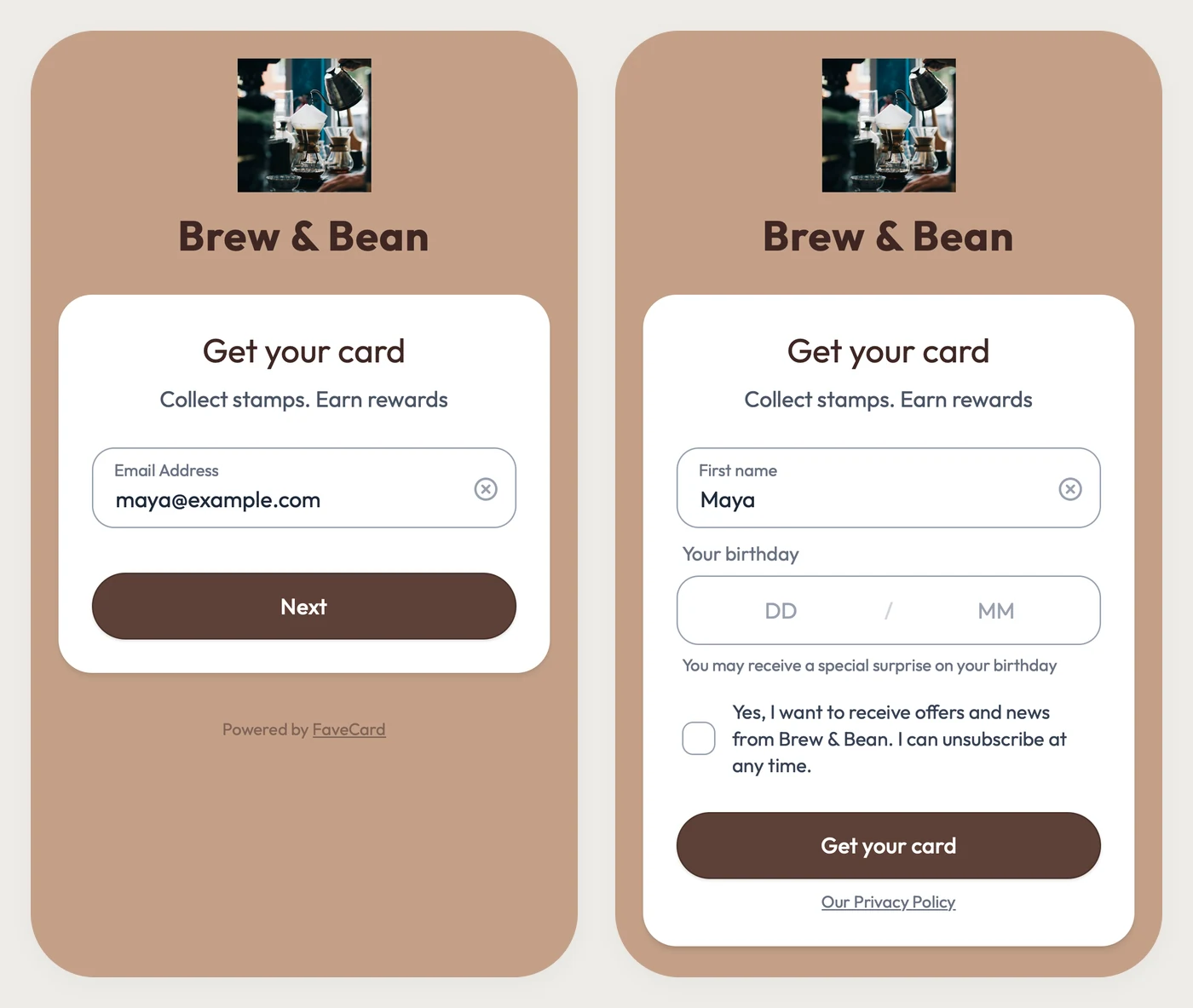
Yes, you can run a loyalty card with no app and no phone number. The real sign-up screen: an email and a first name, with the birthday optional.
Key Takeaway: You can run a loyalty card with no app and no phone number. On FaveCard the customer scans a QR code, types an email and a first name (the birthday box is optional) and the card opens in the phone's browser, or saves to Apple Wallet or Google Wallet on a paid plan. Staff stamp it by scanning its QR code in the staff app, free on every plan. A phone number is only asked for if the business adds it as an extra question, which is a Business plan setting.
FaveCard Team
Published June 19, 2026 · Updated September 29, 2026
Last updated: September 2026
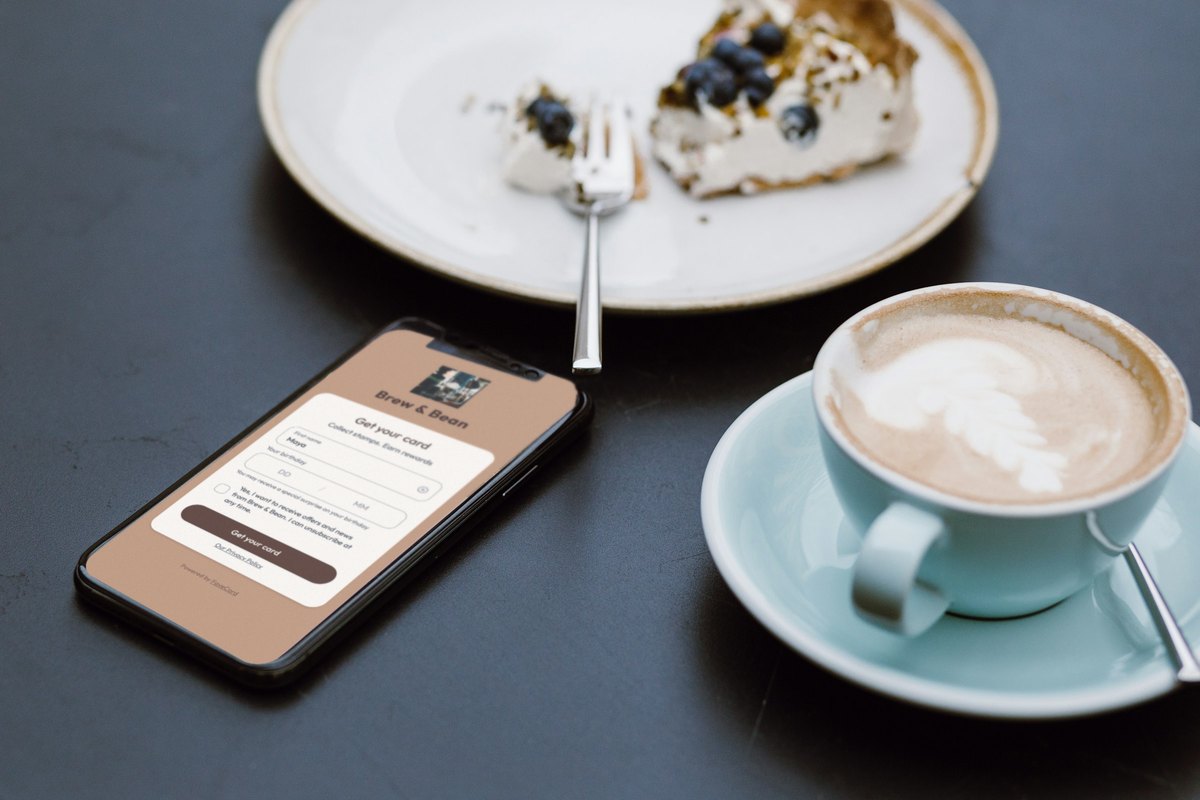
Yes. A loyalty card can live in the customer’s phone browser, or in Apple Wallet or Google Wallet, so nobody downloads an app. It can also be tied to an email address instead of a phone number. With FaveCard, the customer scans a QR code at your counter, types an email and a first name, and the card opens. A birthday box is there too, but optional. There is no password, no text-message code and no phone number, unless you decide to ask for one.
Below are the real sign-up screens, what each field is for, and which parts are free. After that: why so many other programs ask for a phone number, how staff find a customer without one, and the cases where “no app, no phone number” stops working.
What does the customer actually have to fill in?
Two screens, and two required fields: an email address and a first name.
- Email address, then Next. The form checks the address is written correctly and that its domain can receive mail, so “gmial.com” gets caught before the card is made.
- First name. Required. The card greets them with it (“Hey Maya!”) and it is what staff see when they scan the card.
- Birthday, day and month only, no year. Optional. The box says “You may receive a special surprise on your birthday”, and the card is issued with it left empty.
- A box for marketing: “Yes, I want to receive offers and news from Brew & Bean. I can unsubscribe at any time.” It starts unticked. A customer who leaves it that way still gets the card and the email with their card link; they just don’t get your promotional emails.
- Get your card.
That is the whole form, unless the business adds questions of its own (more on that below). We filled it in the way a customer would, and what the page sends is an email address, a first name and the unticked box. No phone number, and no birthday when the box is left empty.
Why ask for an email at all? Because the card has to belong to something. The email is how the customer opens the card again later, how they get it back on a new phone, and how two people called Maya stay two different customers.
Why do other loyalty programs ask for a phone number?
Because in a program that lives in the till, the phone number is the lookup key. The customer types it on the terminal, the point-of-sale system finds their account, and the visit counts. For the cashier that is quick, with nothing to scan, but it only works for customers who are happy to share their number.
Square Loyalty works this way, going by answers on the Square Seller Community. In April 2023 a seller asked whether customers could sign up with an email address instead of a phone number. A Square Champion replied: “Currently this is not possible,” adding that “Loyalty signup requires a two-step process of receiving a code at the customer’s phone number to confirm any phone number entered actually belongs to them.” (thread) In February 2025 a Square employee described enrolment the same way: “Ask your customer to enter their phone number to enroll or sign in to your loyalty program.” (thread)
Because these are forum answers, Square’s exact workflow may have changed since, so check its current documentation if you are comparing the two. Our Square Loyalty guide covers the rest of how it works.
A card on the phone doesn’t need a number typed at the till, because the card is the key. It carries a QR code that points to that one customer’s card. The customer shows it and staff scan it.
Can I still collect phone numbers if I want them?
Yes, as an optional extra question. On FaveCard’s Business plan you can add up to 10 fields to the sign-up form. “Phone” is one of 33 ready-made fields, next to last name, favourite drink, usual order, who they usually see, number plate, pet’s name, size and more, and you can write your own. The ones that suit your trade are listed first, like the pet’s name for a groomer.
Every field you add is optional unless you mark it as required. With the phone field added and left optional, the form looks like this:
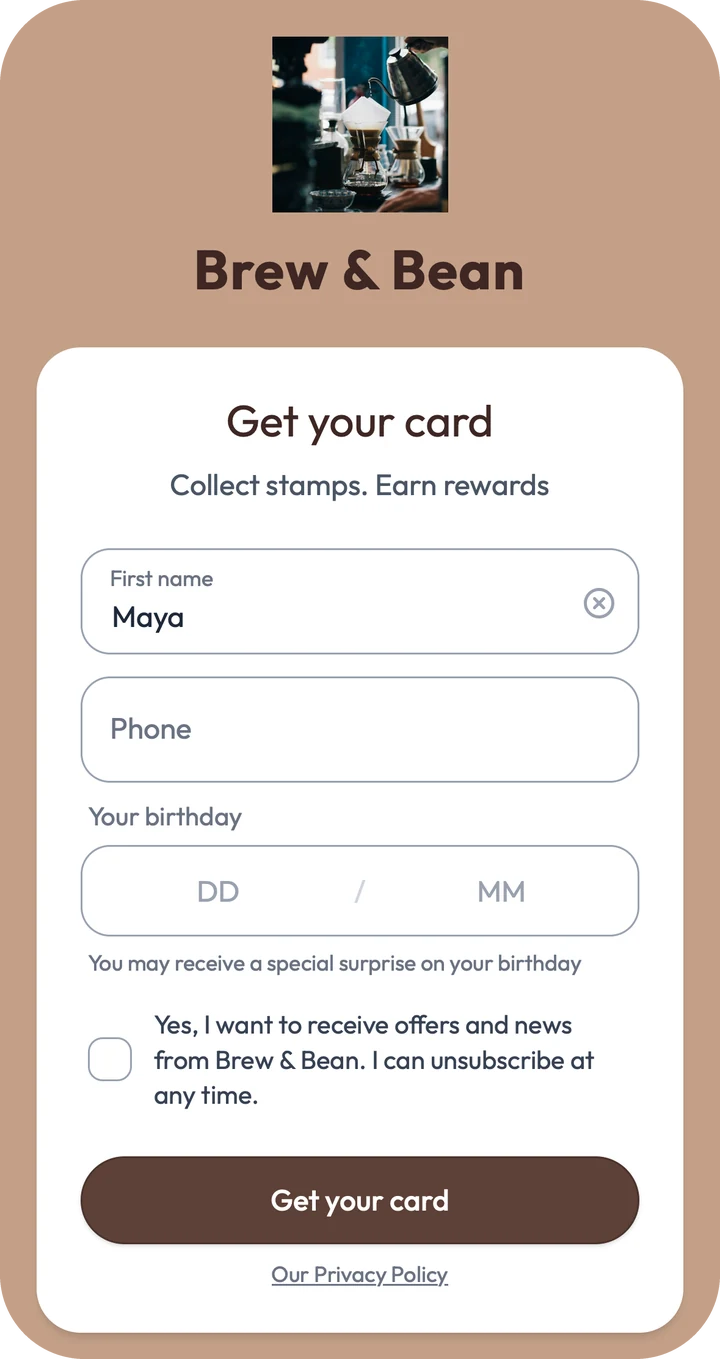
“Phone” sits under the first name with no asterisk, and a customer who leaves it blank still gets the card. The same Business setting can make the birthday required, if a birthday offer matters more to you than a quick sign-up.
Each extra question is one more reason to give up halfway, and FaveCard’s dashboard says so next to the setting: “The fewer fields you ask for, the more likely a customer is to download your card.” If you do want to ask more, our list of sign-up questions by trade covers which ones earn their place.
What happens after they tap “Get your card”?
That depends on your plan and on the customer’s phone.
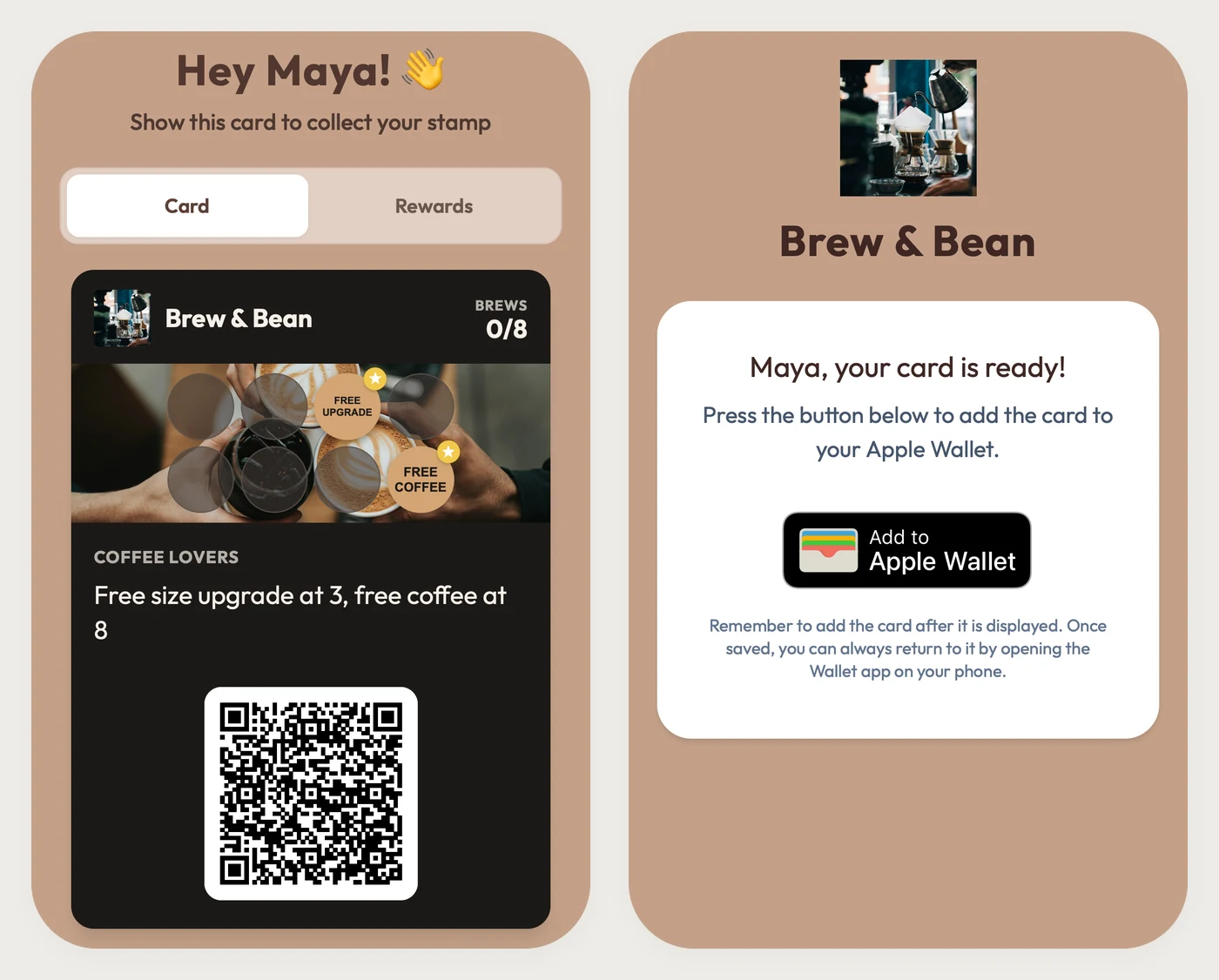
- On the Free plan, the card opens straight away in the phone’s browser: “Hey Maya! Show this card to collect your stamp”, the card itself, and its QR code. In the example that is Brew & Bean’s 8-stamp card, with a free size upgrade at stamp 3 and a free coffee at 8, still at 0.
- On Pro and Business, an iPhone shows “Maya, your card is ready!” and an Add to Apple Wallet button, which saves the card to the Wallet app that is already on the phone. On Android the card opens in the browser with an Add to Google Wallet button.
Either way, the customer also gets an email titled “Your card is ready” with a View your card button, so the card is a tap away even after they close the page. A Wallet pass is quicker to pull up at the counter and updates itself when a stamp is added; our Apple Wallet vs loyalty apps comparison goes into what else changes.
How do staff give stamps without a phone number?
They scan the card. A digital stamp card carries its own QR code, and scanning it is how the stamp lands. With FaveCard, staff open the staff app on their phone, scan the customer’s card, in the browser or in Wallet, and add the stamp. So there is an app involved, but it is on your side of the counter, not the customer’s.
If a regular turns up without their phone, staff can look them up by first name or email in the staff app and stamp the card from there.
If you’d rather customers stamp themselves, the Business plan has a kiosk mode. An iPad at the counter shows a QR code; the customer scans it with their own phone and confirms who they are with a 4-digit code sent to their email. The code is valid for 5 minutes. Someone new gets the same first name and birthday form as above. Our iPad kiosk guide walks through the set-up.
How can a retailer run loyalty without a mobile app?
With a QR code at the checkout instead of an app store link. A small sign with the join code sits by the till (how big it needs to be), the shopper scans it while you wrap their purchase, and on the next visit they show the card on their phone. Any digital card that customers join by QR code works this way; the part to check is what staff need at the counter. With FaveCard it is the staff app on an ordinary phone, so there is no terminal to buy and nothing to connect to your till.
Shops can also ask a retail question at sign-up. In FaveCard’s Business sign-up settings, a clothing shop can ask for a size, a gift shop for a favourite product, a bike shop for the bike model, all optional. For ideas on getting shoppers to scan in the first place, see how to promote your loyalty program.
What about card-linked loyalty?
Card-linked loyalty skips the sign-up form altogether: the customer’s payment card is the ID, and purchases made with it count automatically. It needs a payment processor or bank program behind it, and it only counts visits paid with a linked card, so cash payments and any card the customer hasn’t linked are missed.
Owners do ask for it. In a January 2022 Square Seller Community thread, a seller wrote that “a lot of people choose to not join the loyalty program because they don’t want to give out their phone number” and asked: “Why not allow businesses to choose to offer rewards when using the same card?” A moderator passed it to the feature-request board, with “no time frame for when it will be implemented.” (thread)
FaveCard doesn’t link to payment cards and doesn’t connect to a till. Its card is separate from how the customer pays, so it works the same for cash, card or phone payments.
What if a customer won’t give an email, or doesn’t have a smartphone?
Then a FaveCard card isn’t for them. Every card is tied to an email address and opens on the customer’s own phone, and there is no nameless card and no way for staff to make one at the counter. Keep a small stack of paper cards for those customers; our paper vs digital guide covers when paper is still the better call.
What if they lose or change their phone?
The card belongs to the email, not the phone. On a new phone the customer opens the “Your card is ready” email, or signs in with their email address, which lists their cards from every FaveCard business they have joined. Joining again with the same address never creates a second card. On the Free plan the page tells them the card was already sent to that address, and when. On Pro and Business it sends a 4-digit code to the email and then opens the original card, stamps included.
What’s free and what’s paid?
| What | Plan |
|---|---|
| The card in the phone’s browser, the email and first name sign-up, QR stamping in the staff app | Every plan, including Free |
| Apple Wallet and Google Wallet passes | Pro and Business |
| Extra sign-up questions (a phone number, a required birthday and others) and the self-service kiosk | Business |
Wallet passes, the extra sign-up questions and the kiosk are all switched on during the free trial. Current prices are on the pricing page.
Want to see the form for your own business? Create your card on the free plan and scan it with your own phone, or compare plans first.
Frequently Asked Questions
Do customers need to download an app to join a loyalty program?
No, not for a digital stamp card that opens in the phone's browser or in Apple Wallet or Google Wallet. Those are joined by scanning a QR code. A download is only needed when a business has built its loyalty program into its own app.
Can customers join a loyalty program without giving a phone number?
Yes, if the program identifies customers by an email address or by the card itself. Point-of-sale programs often use the phone number as the sign-in, as Square Loyalty does according to Square Community answers from 2023 and 2025. A phone card with its own QR code needs no number: staff scan the card instead.
Is the birthday required on FaveCard's sign-up form?
No. The form shows a day and month box (no year) with the line 'You may receive a special surprise on your birthday', and the card is issued if it is left empty. It becomes required only if the business marks it as required, which is part of the Business plan's sign-up settings.
Can I put a store's loyalty card on my phone?
If the store uses a digital card, yes: scan its QR code, fill in the form and the card opens on your phone. Where the store offers it, you can also save the card to Apple Wallet on an iPhone or Google Wallet on Android.
Does a no-app loyalty card work on Android?
Yes. The browser version works on any smartphone that can scan a QR code. On a paid FaveCard plan, Android customers also get an Add to Google Wallet button, and iPhone customers get Add to Apple Wallet.
What if a customer forgets their phone?
The stamps are not on the phone, so nothing is lost. In FaveCard, staff search the customer by first name or email in the staff app and add the stamp there.
What if a customer has no email address or no smartphone?
They can't use a digital card that is tied to an email and opens on their own phone, and FaveCard has no nameless or staff-made card. A few paper cards behind the counter cover them.