Can You Incentivize Google Reviews? The Rules, Explained
No. Google bans stamps, discounts and freebies for reviews. What US and EU law add, what you can do instead, and scripts to ask every customer.
Key Takeaway: You can't give a stamp, discount, freebie or prize-draw entry in exchange for a Google review, whether the review is positive or not. Google's policy prohibits it and says incentivized reviews will be removed. What you can do: ask every customer, make it one tap with a review link or QR code, ask at a good moment, and thank reviewers with a reply rather than a reward. Keep loyalty stamps for visits and purchases, and keep review requests separate.
FaveCard Team
Published September 29, 2026 · Updated September 29, 2026
Last updated: September 2026
No, you can’t give a loyalty stamp, a discount or any other reward in exchange for a Google review. That applies whether the review is positive, negative or neutral. Google’s policy lists “payment, discounts, free goods and/or services” as incentives merchants may not offer for posting a review, and it says incentivized reviews will be removed. You can ask every customer for a review, make it one tap to leave one, and ask at a good moment. You just can’t pay for it, in cash or in stamps.
This guide covers what Google’s policy says word for word, what US and EU law add, why only asking happy customers is also off limits, and how to ask for reviews without an incentive. It ends with how FaveCard handles review requests, but everything before that works with any loyalty program, paper or digital.
This article explains the rules as published by Google, the FTC and the EU. It isn’t legal advice.
The short answer:
| Not allowed | Allowed |
|---|---|
| A bonus stamp or points for a review | Asking every customer for an honest review |
| A discount, freebie or dessert for a review | A review link or QR code that makes it one tap |
| A prize-draw entry for reviewers | Asking at a natural high point in the visit |
| A reward for “any review, good or bad” | Thanking reviewers in a public reply |
| Asking only customers you think are happy | A private feedback option offered alongside the review ask, to everyone |
| Staff quotas for a number of reviews | Training staff to ask everyone, the same way |
What Google’s policy actually says
Google’s rules for reviews are in its Maps user-generated content policy, on the page for prohibited and restricted content. Three parts matter for a local business.
1. Paid reviews count as fake engagement. The policy’s list of fake engagement includes “Reviews or ratings that have been paid for, directly or in kind.” The words “in kind” matter here: a review doesn’t need to be paid for in money to count.
2. Merchants may not offer incentives. Under “We do not allow merchants to”, the policy lists:
Offer incentives – such as payment, discounts, free goods and/or services - in exchange for posting any review or revision or removal of a negative review.
Note the word any. The rule isn’t limited to five-star reviews.
3. Merchants may not steer the result. The same list continues:
Discourage or prohibit negative reviews, or selectively solicit positive reviews from customers
When soliciting reviews, merchants should not require or pressure users to leave ratings or write reviews while on the premises, nor should they request that specific content be included.
It also names two staff practices as examples: “Merchants requesting that staff solicit a certain number of reviews” and “Merchants requesting that staff solicit reviews that include specific content, including content that identifies a staff member.”
What is allowed, in Google’s words: “Solicit or encourage the posting of content that does represent a genuine experience, without offering incentives to do so or attempting to influence the rating or the contents of the review.”
What Google does about it
The policy says “Rating Manipulation includes Incentivized or Biased Reviews, which are not allowed and will be removed from Maps.” That includes “Content that has been posted due to an incentive offered by a business - such as payment, discounts, free goods and/or services.”
Google’s Business Profile help page on restrictions for policy violations goes further. If Google decides a business owner has broken the fake engagement policy, it says it “might place restrictions on their Business Profile (in addition to removing the violative reviews)”. The examples it lists are:
- the profile can’t receive new reviews or ratings for a set period
- the profile’s existing reviews or ratings are unpublished for a set period
- the profile displays a warning telling people that fake reviews were removed
Google says it emails the owner before applying a restriction and that businesses can appeal.
Does a loyalty stamp count as an incentive?
Yes. A stamp moves a customer closer to a free coffee or a free haircut, so it is a step toward “free goods and/or services”, which is exactly what the policy names. It is also payment “in kind”. The same goes for loyalty points, a bonus punch on a paper card, or anything else with value.
Here are the ideas owners ask about most, and where they land on Google:
| Idea | On Google | Why |
|---|---|---|
| ”Leave a review, get a bonus stamp” | Not allowed | A stamp has value: free goods or services, paid in kind |
| ”Show us your review for 10% off” | Not allowed | ”Discounts” are named in the policy |
| ”Reviewers go into our monthly prize draw” | Not allowed | A prize entry is still an incentive offered for a review |
| ”A free dessert for any review, good or bad” | Not allowed | The policy covers “posting any review”, not only positive ones |
| A surprise thank-you gift after someone reviews | Avoid | Once people learn reviews get rewarded, it works as an incentive |
| A staff bonus per review collected | Avoid | Google names staff review quotas as not allowed, and a per-review bonus pushes staff the same way |
| Asking everyone, with a QR code by the register | Allowed | Google’s own tips suggest a link or QR code |
What US law says: the FTC’s rule on reviews
In the US, the Federal Trade Commission’s rule on the use of consumer reviews and testimonials (16 CFR Part 465) was announced on August 14, 2024 and went into effect on October 21, 2024. Section 465.4 is the one about buying reviews:
It is an unfair or deceptive act or practice and a violation of this part for a business to provide compensation or other incentives in exchange for, or conditioned expressly or by implication on, the writing or creation of consumer reviews expressing a particular sentiment, whether positive or negative, regarding the product, service, or business that is the subject of the review.
The FTC’s press release says the rule allows the agency “to seek civil penalties against knowing violators.”
The key words are a particular sentiment. The FTC’s questions and answers on the rule spell out what that means:
- The condition can be implied. The FTC gives this as an example of implying a review has to be positive: “Tell us how much you loved your visit to John’s Steakhouse and get a $5 coupon”.
- Neutral incentives aren’t banned by this rule, but that isn’t the end of it. The FTC’s answer: “The rule does not prohibit giving incentives for reviews, as long as there isn’t an express or implied requirement that the reviews have to express a particular sentiment. But remember that failing to disclose incentives could be a violation of the FTC Act.”
- A disclosure doesn’t fix a sentiment condition. Asked whether a business can pay for 5-star reviews on third-party platforms if reviewers disclose the incentive, the FTC answers: “No. That conduct would violate Section 465.4.”
What this means for a Google review: the FTC rule is narrower than Google’s policy. A “free coffee for any honest review” offer may not break the FTC rule, but it still breaks Google’s policy, which bans incentives for “posting any review”. For a Google review, Google’s policy is the stricter of the two, so it’s the one to follow.
What EU law says
In the EU, the Omnibus Directive (Directive (EU) 2019/2161) added consumer-review rules to the Unfair Commercial Practices Directive. They have applied since 28 May 2022. Two new practices were added to the blacklist of practices banned in all circumstances:
Stating that reviews of a product are submitted by consumers who have actually used or purchased the product without taking reasonable and proportionate steps to check that they originate from such consumers.
Submitting or commissioning another legal or natural person to submit false consumer reviews or endorsements, or misrepresenting consumer reviews or social endorsements, in order to promote products.
The directive also says that if a business gives access to consumer reviews, for example on its own website, information about whether and how it checks that those reviews come from real customers counts as material information.
Each EU country writes these rules into its own national law, so the details and enforcement differ from country to country.
Why asking only happy customers is a problem
Review gating means asking a customer how their visit went first, then sending only the happy ones to Google and giving the unhappy ones a private form instead. It runs into problems on three fronts:
- Google: merchants may not “selectively solicit positive reviews from customers” or “discourage or prohibit negative reviews.”
- US: the FTC’s guidance on its Endorsement Guides answers a company that wants to send its review link only to customers in the regions where satisfaction is highest: “Only asking for reviews from customers who you think are more likely to be happy with your product would be misleading if it substantially skews the favorability of the reviews.” The Guides themselves (16 CFR 255.2, Example 11) add that inviting all recent customers to post reviews “would not have been unfair or deceptive, even if it had expressed its hope for positive reviews.”
- EU: the Omnibus Directive’s recitals say traders should be prohibited from manipulating consumer reviews, and the example they give is “publishing only positive reviews and deleting the negative ones.” That example is about which reviews a business publishes rather than who it asks, but the principle is the same: the reviews people see shouldn’t be filtered by how positive they are.
Private feedback is still useful. Offer it to everyone as an extra channel, alongside the public review ask, never as a filter in front of it. Our guide to responding to negative reviews covers what to do when an unhappy review does arrive.
What you can do instead
None of the rules stop you from asking. Google’s tips to get more reviews say plainly: “To leave reviews, you can ask customers to visit a Google link or scan a QR code.” Four things do most of the work:
- Ask every customer. Same words, same link, whether the visit went perfectly or not.
- Make it easy. A short review link or a QR code takes people straight to your review form. Our guide to your Google review link shows where to find it.
- Ask at the right moment. Just after a finished haircut, a meal that went well, or a customer collecting a reward they’ve earned. Timing isn’t an incentive, as long as nothing depends on whether they review. How to ask for Google reviews has timing ideas by trade.
- Thank reviewers with words, not rewards. Reply to reviews and mention something specific. Google’s tips add: “avoid using your response to offer deals or promotions.”
Scripts that ask without an incentive
At the counter:
Thanks for coming in. If you’ve got a minute later, an honest Google review really helps a small place like ours. The QR code by the register takes you straight there.
When a regular collects a reward:
Enjoy it, you’ve earned it. And if you ever feel like leaving us a Google review, we’d really appreciate it. No pressure either way.
In a follow-up email:
Thanks for visiting us this week. If you’d like to share your experience, you can leave a Google review here: [your review link]. Every review helps other people find us.
On a sign or table card:
Enjoyed your visit? Tell other people about it. Scan to leave a Google review.
Phrases to avoid:
- “Leave us a review and get a stamp / 10% off / a free drink.” That’s an incentive.
- “Show us your review at the counter.” It implies a reward and pressures people on your premises.
- “Leave us five stars.” That’s asking for a particular rating.
- “Tell us how much you loved…” paired with any offer. That’s the FTC’s own example of an implied condition.
- Asking only the customers who look happy.
Keep stamps and review requests separate
The simplest way to stay clear of all of this is to run two separate programs with two separate jobs:
| Loyalty program | Review requests | |
|---|---|---|
| What it’s for | Rewarding visits and purchases | Getting honest public feedback |
| What triggers it | A visit or a purchase | Anything you like, applied to everyone |
| What the customer gets | Stamps, then a reward | Nothing, and that’s the point |
| Who’s included | Every customer who buys | Every customer, happy or not |
| What it depends on | How often they come back | Nothing. The reward never depends on the review |
Asking for a review just after someone redeems a reward is fine as long as the two stay unconnected. The customer already earned the reward by coming back. It isn’t payment for the review, it doesn’t get taken away if they don’t write one, and there’s no bonus if they do. What turns it into an incentive is wording like “and if you review us, here’s a stamp.”
Where to put your review QR code
Put the QR code where customers pause and have their phone in hand:
- By the register or card reader. People are standing still with their phone already out.
- On the table. A small table card works well in cafés and restaurants, where people wait for the bill.
- On the receipt or takeaway bag. It goes home with them, for people who prefer to write later.
- At the mirror or station. In salons and barbers, it’s where the customer sees the finished result.
- In follow-up emails and appointment reminders. Use the review link here instead of the QR.
Keep it off anything that also offers a stamp or a discount, so nobody reads “scan for a review” and “scan for a stamp” as one offer.
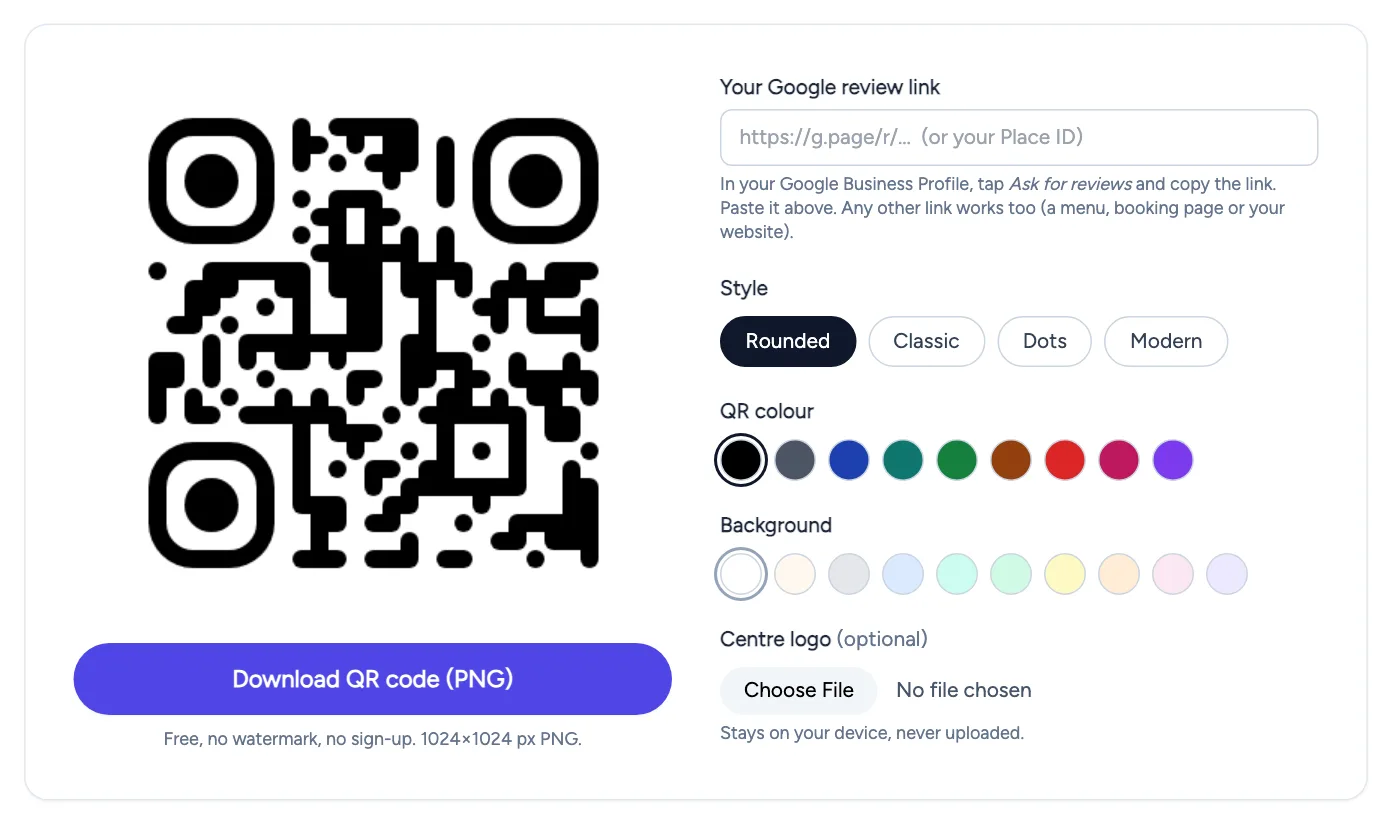
If you don’t have a review QR code yet, FaveCard’s free Google review QR code generator makes one from your review link. It exports a print-ready PNG, with no sign-up and no watermark.
How FaveCard handles review requests
FaveCard is a digital loyalty card that lives on the customer’s phone, and it keeps stamps and review requests separate by design:
- Stamps are for visits. Customers collect stamps when they come in. The review request never adds a stamp, and there’s no setting to reward a review.
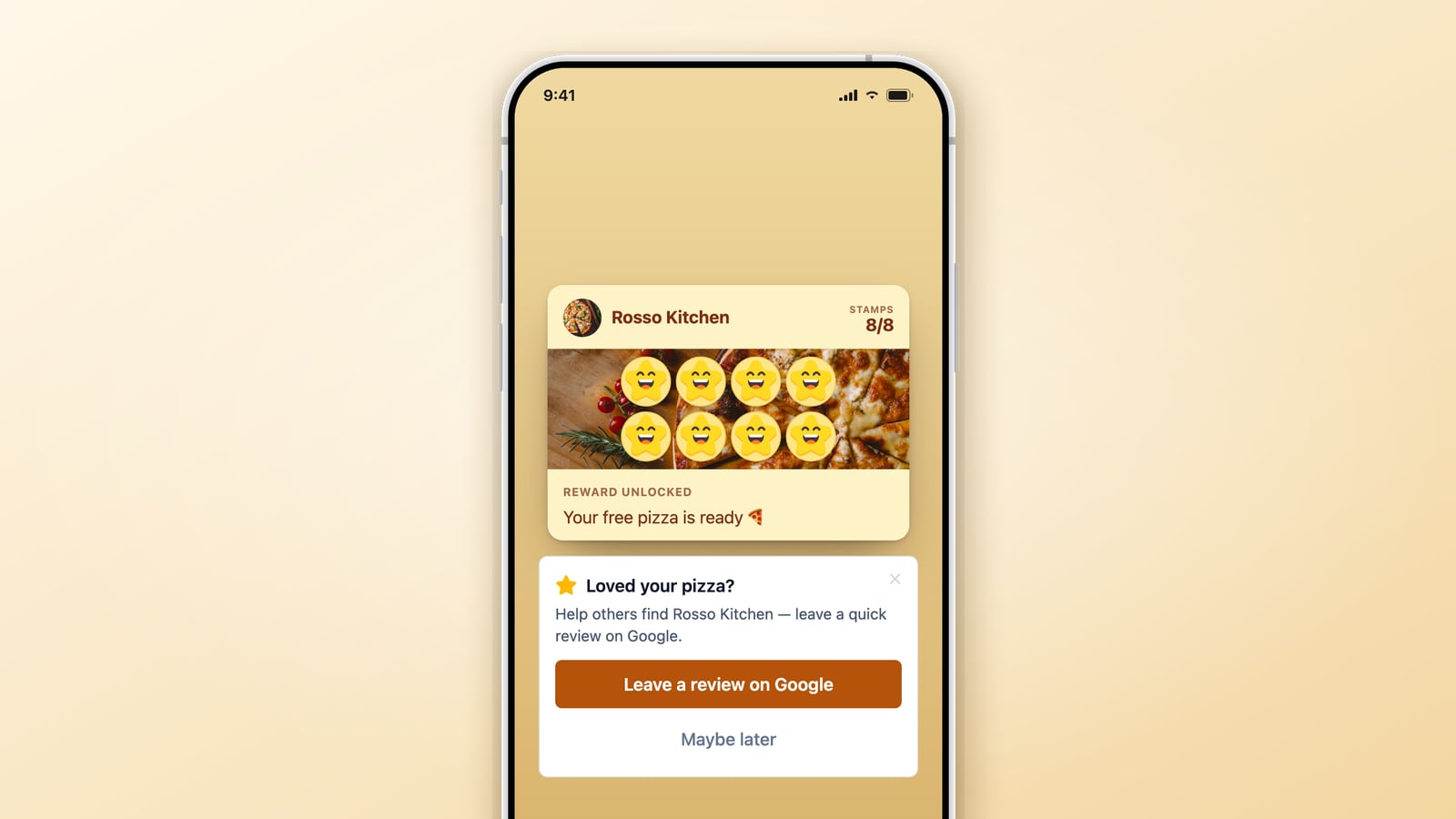
- The review request comes after a reward. When a customer redeems a reward, a “Leave a review on Google” prompt appears on their card, with a follow-up email about two hours later when their email preferences allow it. The reward has already been redeemed at that point, so nothing depends on whether they review.
- Everyone who redeems gets the same request. There’s no rating question first and no satisfaction check that decides who sees it. Everyone who’s asked goes to the same public Google review page.
- It doesn’t nag. A customer is asked at most once every 180 days, and not again for 365 days once they’ve tapped through to Google.
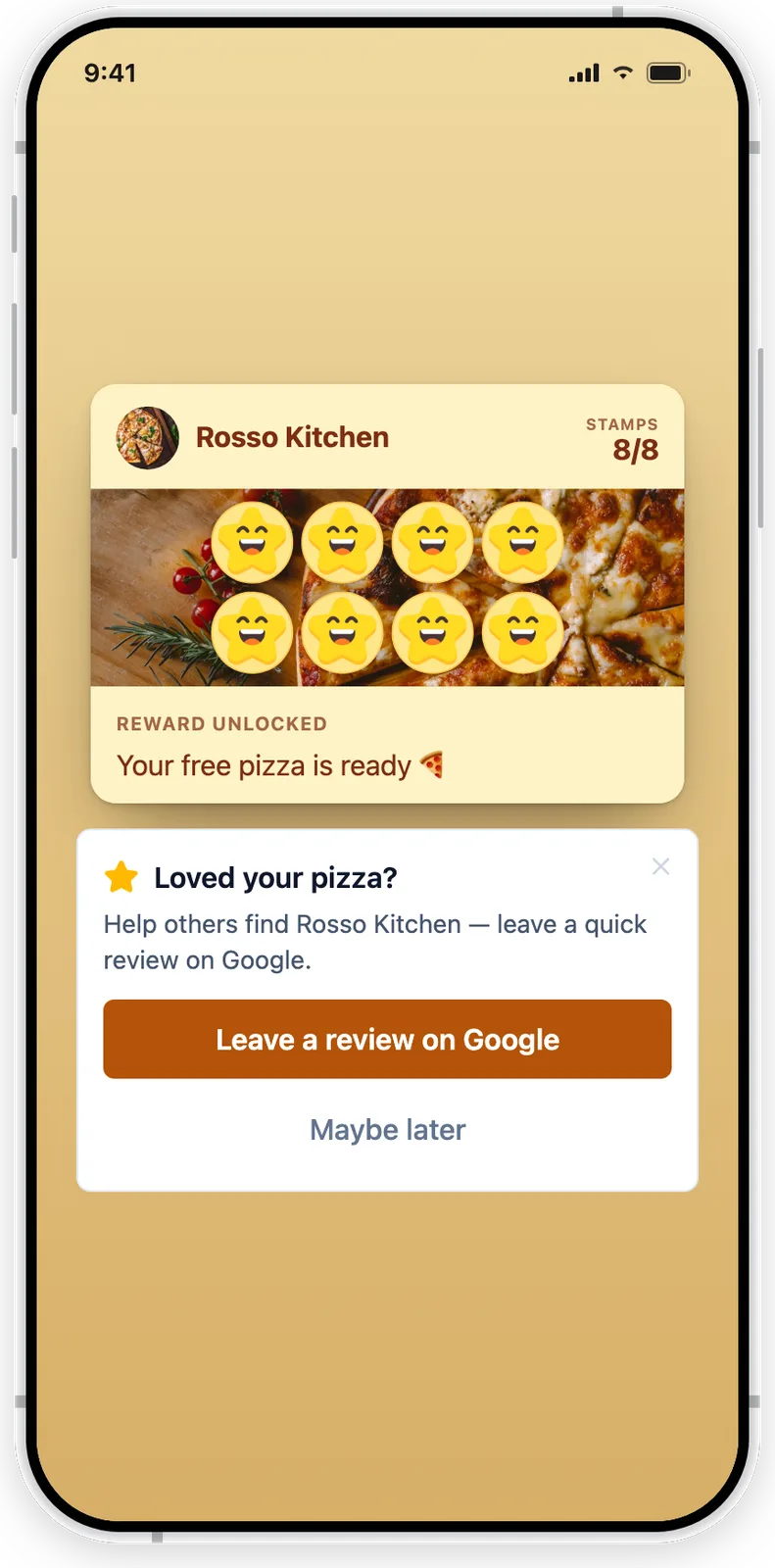
The review request appears below the card after a reward, with “Maybe later” if the customer doesn’t want to. The reward doesn’t depend on the review.
Google Reviews is part of the FaveCard Business plan and is included in the free trial, which lasts until your first 30 customers are on the card. See pricing for details.
Related guides
Frequently Asked Questions
Can I give a loyalty stamp for a Google review?
No. Google's policy says merchants may not offer incentives, such as payment, discounts, free goods or services, in exchange for posting a review, and it counts reviews paid for directly or in kind as fake engagement. A loyalty stamp has real value, so it is an incentive. Give stamps for visits and purchases, and ask for reviews separately.
Can I offer a discount if the customer leaves any review, good or bad?
Not on Google. Google's ban covers incentives for posting any review, not only positive ones. In the US, the FTC's rule on reviews targets incentives tied to a particular sentiment, and its guidance says the rule itself does not ban neutral incentives, though failing to disclose them could still break the FTC Act. Being legal under that rule doesn't make it allowed on Google.
Is it illegal to pay for reviews?
It depends on where you are and what the payment is for. In the US, the FTC's rule, in force since October 21, 2024, bans offering compensation or incentives conditioned on a review expressing a particular sentiment, and lets the FTC seek civil penalties for knowing violations. In the EU, commissioning false consumer reviews is on the blacklist of unfair commercial practices. Rules vary by country, so check with a local advisor if you're unsure.
What happens if Google finds incentivized reviews?
Google says incentivized reviews are not allowed and will be removed from Maps. Its Business Profile help adds that businesses breaking the fake engagement policy may face restrictions, such as not being able to receive new reviews for a set period, having existing reviews unpublished for a set period, or a warning shown to customers that fake reviews were removed.
Can I thank customers who leave a review?
Yes, with words. Reply to the review, thank the person, and mention something specific from their visit. Don't send a gift or a discount because someone reviewed you. Once customers learn that reviews get rewarded, it works as an incentive. Google's own tips also say to avoid using review replies to offer deals or promotions.
Can I ask only my happy customers for reviews?
No. Google's policy says merchants may not discourage or prohibit negative reviews, or selectively solicit positive reviews from customers. This is called review gating. Ask every customer the same way and send everyone to the same public review page. If you also want private feedback, offer it as an extra channel, not as a filter in front of Google.