





What Is a Virtual Loyalty Card? Complete Guide
A virtual loyalty card is a stamp card that lives in your customer's phone, with no app to download. See how they work and how to start one free.
Key Takeaway: A virtual loyalty card is a stamp or rewards card that lives in your customer's phone instead of on paper or plastic. Customers add it in seconds by scanning a QR code, with no app to download, and collect a stamp on each visit. Businesses get automatic tracking, reminders and no lost cards.
FaveCard Team
Published July 6, 2026 · Updated July 6, 2026
Last updated: July 2026
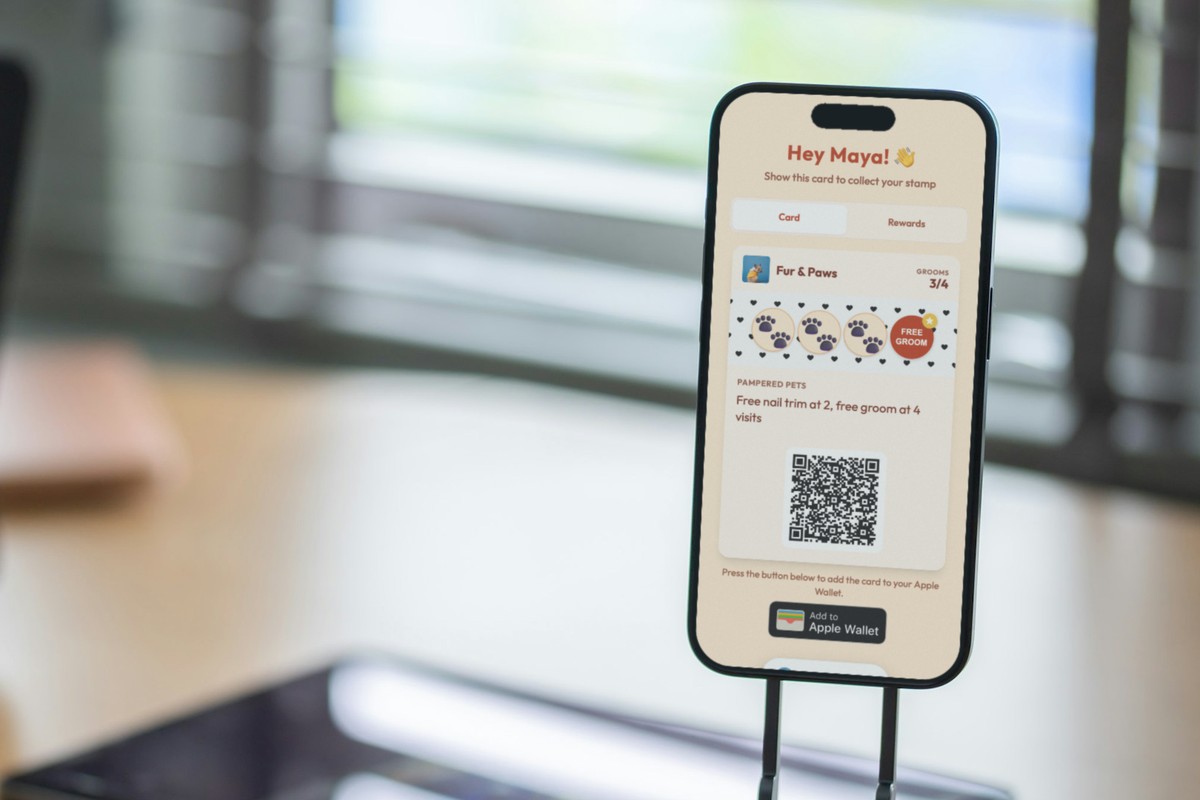
A virtual loyalty card is a stamp or rewards card that lives on your customer’s phone instead of on paper or plastic. Customers add it by scanning a QR code or tapping a link, collect a stamp on each visit, and never carry a physical card again. There is nothing to download.
Key takeaway: A virtual loyalty card is just a paper punch card that moved onto the phone. Customers add it in seconds, with no app to install and no account to create. Businesses get automatic tracking, reminders, and no more “I forgot my card”.
What is a virtual loyalty card?
A virtual loyalty card is the digital version of the paper punch card you have seen at coffee shops for decades. Buy nine coffees, get the tenth free, except the card sits on the customer’s phone and the stamps are added digitally.
You will see it called a few different things, and they all mean the same idea:
- Virtual loyalty card or digital loyalty card: the general term
- Virtual punch card or virtual stamp card: when the reward is stamp-based
- Electronic loyalty card or loyalty card app: older or app-store phrasing
Every one of them describes a rewards card that lives on a phone, not in a purse or a kitchen drawer.
There are two ways a virtual card can live on a phone:
- In the browser. The card opens from a link or QR code. It works on any phone and needs no app.
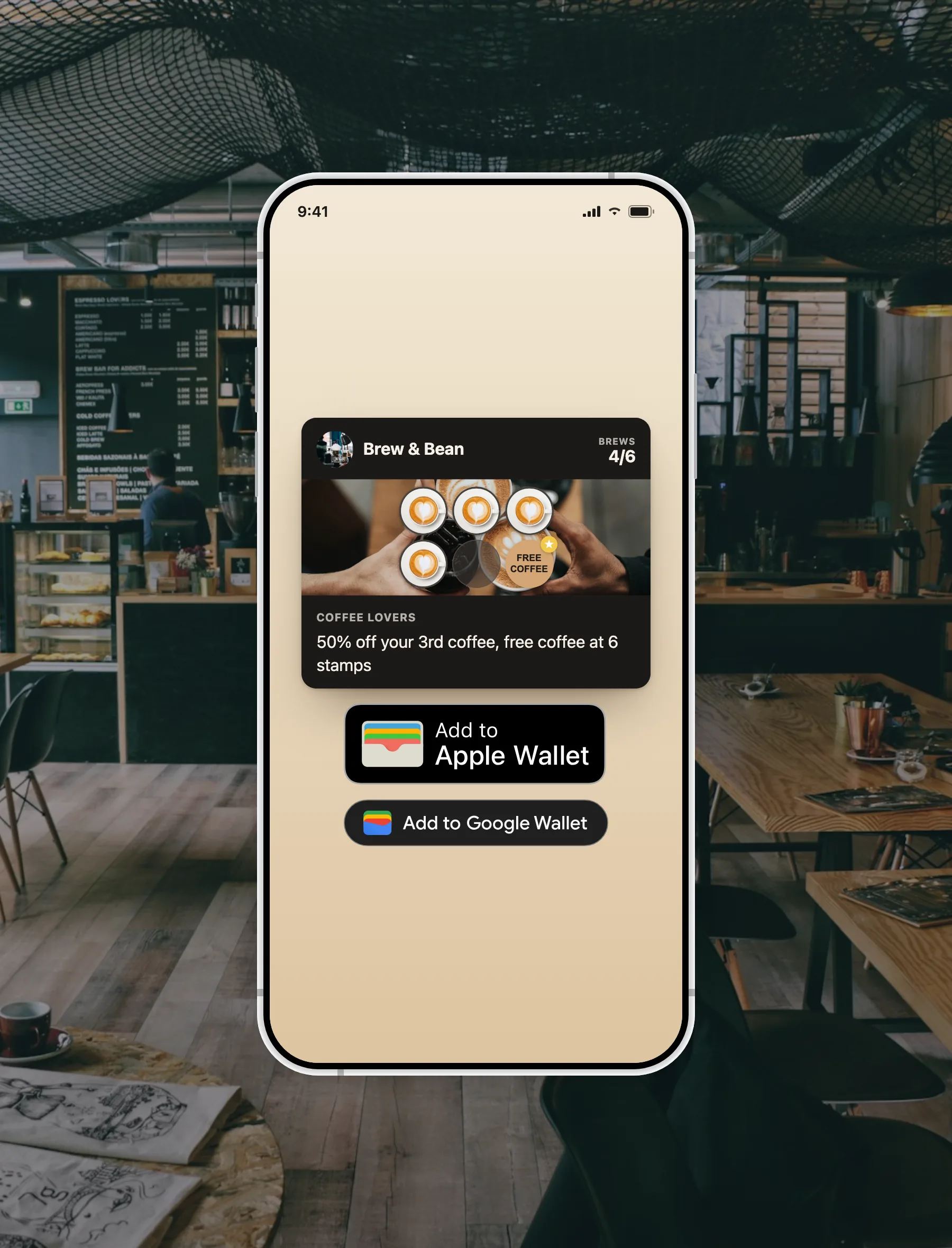
- In Apple Wallet or Google Wallet. The card is saved as a pass, sitting alongside boarding passes and payment cards.
Either way, the customer installs nothing new. If you want the mechanics end to end, here is how a loyalty card without an app works.
Not to be confused with a “virtual rewards card.” A virtual loyalty card rewards repeat customers at a local business. A virtual rewards card usually means a prepaid Visa or Amex card sent as a rebate or promotion. Same word, different world. This guide is about the loyalty kind.
Virtual loyalty card vs loyalty app: what’s the difference?
This is the question that trips people up. A virtual loyalty card and a loyalty app are not the same, and the difference decides how many customers actually use it.
| Virtual loyalty card | Loyalty app | |
|---|---|---|
| Lives in | Phone browser or Apple/Google Wallet | Separate download |
| Customer setup | Scan a QR code, a few seconds | Find app, download, create account |
| Account required | No | Usually yes |
| Storage used | Almost none | Tens of megabytes |
| Who it suits | Local and small businesses | Large chains with complex rewards |
For most local businesses, a virtual card wins because it removes the one thing that kills adoption: the download. Nobody wants a separate app for every cafe they visit. We go deeper on this in our Apple Wallet vs loyalty apps comparison, and if you are weighing platforms, our guide to the best loyalty apps for small business covers the trade-offs.
How a virtual loyalty card works (step by step)
For your customer
- They scan your QR code or tap your link.
- A card preview appears on their phone.
- They tap “Add” (to the browser card, or to Apple / Google Wallet).
- Done. The card is saved. It takes about five seconds.
On each visit, you scan their card and a stamp is added instantly. When they hit the reward, their phone lets them know.
For you
- A customer joins, and you see them appear in your dashboard.
- Each visit, you scan their card and the stamp is added automatically.
- A reward is earned, the customer is notified, and you see the redemption.
- Repeat.
No cards to print. No cards to replace. No stamps to smudge. The whole digital stamp card runs itself.
Virtual punch cards and virtual stamp cards
When people search for a virtual punch card or virtual stamp card, they usually mean the classic buy-X-get-one-free mechanic, moved onto the phone. It is the most popular format for cafes, bakeries, nail studios and barbers, because it is simple and customers already understand it. See our punch card ideas and the fuller loyalty stamp card guide for reward structures that work.
One thing a virtual stamp card can do that paper never could: remote stamping. The founder of Pretty Puress, a handmade press-on nail business, uses exactly this because her customers are not always in the room:
“This product is absolutely seamless. Super intuitive and easy to use. I’ve already referred it to a few others that own businesses looking for a virtual punch card.” — Pretty Puress, handmade gel nails
Because each customer’s QR code stays the same across cycles, she can stamp a card from a screenshot when a customer buys online. A paper card cannot do that.
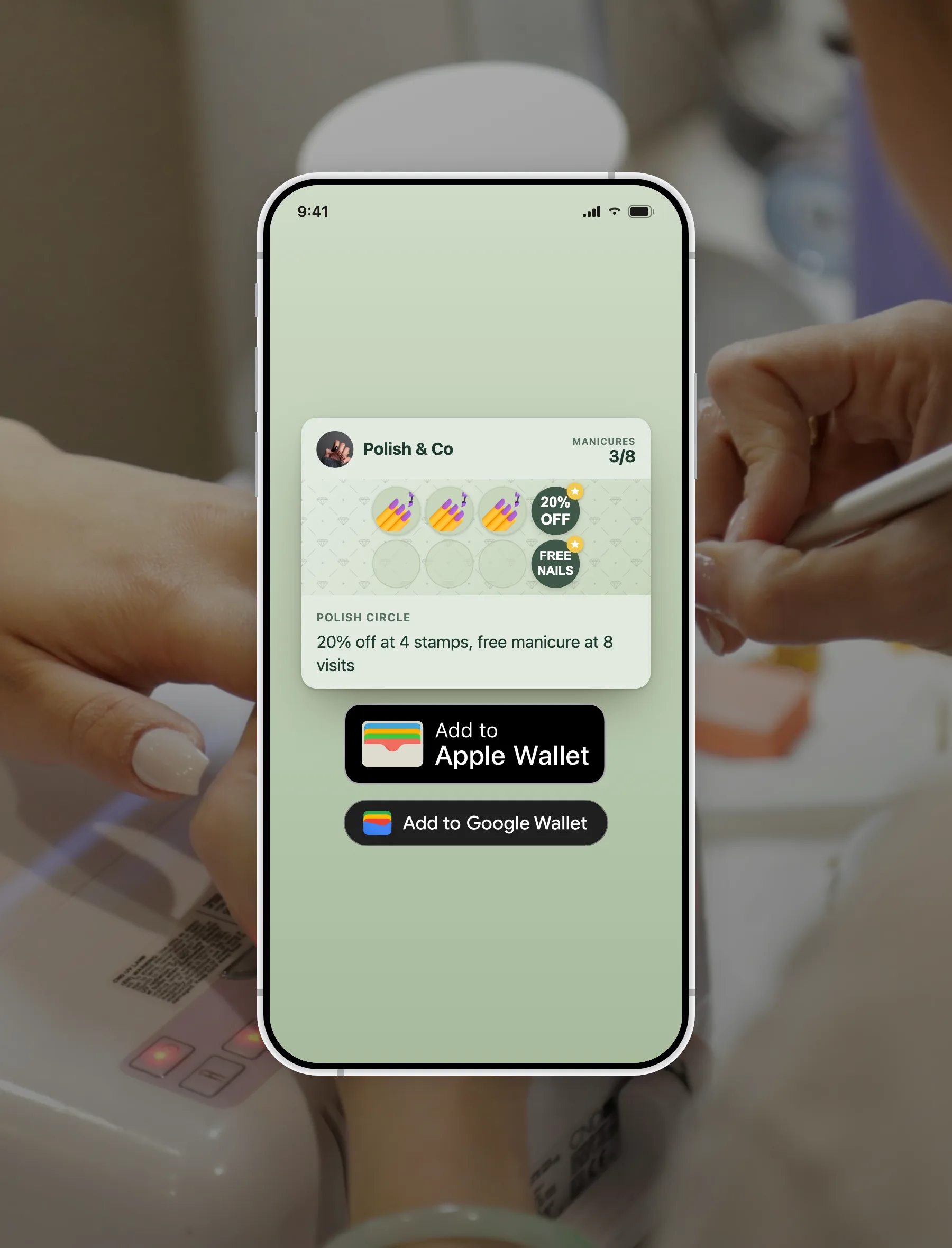
Because the card is software rather than cardboard, you control the details: how many stamps, the stamp icon, the colours, and the reward text. You can even place more than one reward on the same card, say a small perk partway through and the main reward at the end, instead of making customers wait for a single prize at the very last stamp. That flexibility matters more than it sounds: our completion data shows cards that reward customers along the way get finished far more often than cards with one distant prize.
You can also give new customers a head start by adding a stamp or two the moment they join. People who feel they have already begun are far more likely to keep going, which is one of the most reliable findings in loyalty psychology, and it turns a cold card into one that is already in motion.
Why customers prefer virtual cards to apps
The honest reason is friction. A separate app asks a lot: find it in the store, wait for the download, create an account, allow notifications, remember another password. A virtual card asks for one thing: scan and tap.
There is a second reason: the phone is already set up for it. Almost every adult now carries a smartphone (91% of US adults, Pew Research Center, 2025), and mobile wallets have gone mainstream. In the UK, 57% of adults used a mobile wallet in 2024, up from 42% the year before (UK Finance, UK Payment Markets 2025). Most people already keep boarding passes and payment cards in Apple Wallet or Google Wallet, so a loyalty card just slots in next to things they already carry. It is not a new habit, it is an existing one.
And it is always there. A wallet card cannot be left at home, lost in a coat pocket, or run through the wash. Lucky Beans, a specialty coffee shop in Bucharest, put it simply after switching:
“The experience is wonderful. Our clients are satisfied and delighted. It’s wonderful that it doesn’t require a separate app, super handy!” — Lucky Beans, specialty coffee
The preference shows up in the data. In a 2026 survey, three in four consumers said they are more likely to engage with a brand that offers a mobile-wallet option for loyalty or offers, and around 60% had already used a loyalty card stored in their phone’s wallet to make a purchase (Vibes 2026 Mobile Consumer Report).
What your business gets that paper cannot offer
A virtual loyalty card is more convenient for customers, but the bigger win is what it gives you.
- Real tracking. See how many active members you have, who is one stamp from a reward, and which rewards get redeemed. Paper tells you nothing.
- Reminders that reach the phone. With push notifications you can nudge a customer who is one stamp away, or bring back someone who has not visited in a while.
- No lost cards, no counterfeits. Every scan is tied to one card, so stamps cannot be forged or double-counted. Our paper vs digital comparison covers why this matters.
- Instant updates. Change the reward or the card design, and it updates on every customer’s phone. No reprinting.
Repeat customers are where the profit is: the classic Bain finding, popularised by Frederick Reichheld, is that a 5% lift in customer retention can increase profits by 25% to 95% (as cited in Harvard Business Review). A loyalty card is one of the simplest ways to earn that repeat visit, and the tracking helps you design a card people actually finish. In our own study of 1,013 small businesses, the single biggest driver of completion was not the reward, it was how long customers had to wait for it: five-stamp cards were completed at 27.9%, versus 5.6% for ten-stamp cards. The full numbers are in our loyalty card completion rate study.
How to create a virtual loyalty card
You have two routes.
Build it yourself (technical)
Apple and Google both provide developer tools: Apple PassKit and the Google Wallet API. This route means developer accounts, some code, and a server to host and update the passes. It only makes sense if you are building for many businesses or have unusual custom needs.
Use a platform (recommended)
A loyalty platform handles the technical side. You design your card, choose your reward, and get a QR code to share. Setup takes a few minutes and needs no coding.
With FaveCard, the Free plan includes a fully working browser-based virtual loyalty card with animated stamps and unlimited customers, so customers install nothing. Upgrade to Pro and the card is also saved as a pass in Apple Wallet and Google Wallet, and Business adds push notifications and Google review requests. You can see what each plan includes on the pricing page, or start free and have a card live today. If you would rather compare options first, our roundup of the best free digital loyalty card apps is a good place to start.
Are virtual loyalty cards free?
For your customers, always. They never pay to add or use a virtual loyalty card.
For businesses, it depends on the platform. Most charge a monthly fee, and a few offer a genuine free plan. FaveCard’s free plan includes a working virtual loyalty card at no cost and with no time limit, which is the fastest way to try the format before you decide. See the pricing page for what the paid plan adds.
The bottom line
A virtual loyalty card is a paper punch card that moved onto the phone. No app to download, no account to create, no card to lose.
For customers, it is convenient: always there, never forgotten. For businesses, it is powerful: real tracking, reminders that reach the phone, and rewards you can change any time. Whether your customers use a browser-based card or an Apple or Google Wallet pass, the experience is the same, and it beats paper on every measure that matters.
If you are running a loyalty programme this year, a virtual loyalty card is the simplest way to do it well. For more, see our guides on coffee shop loyalty programmes and how to get repeat customers.
Want a virtual loyalty card for your business? FaveCard lets you set one up in minutes, works on every phone, and needs no coding. The Free plan includes a full virtual loyalty card. Pro adds Apple and Google Wallet passes.
Frequently Asked Questions
What is a virtual loyalty card?
A virtual loyalty card is a rewards or stamp card that lives on your customer's phone instead of on paper or plastic. Customers add it by scanning a QR code or tapping a link, then collect a stamp on each visit. It can live in the phone's browser (no app needed) or in Apple Wallet or Google Wallet. Nothing is downloaded from an app store.
Is a virtual loyalty card the same as a digital loyalty card?
Yes. 'Virtual loyalty card', 'digital loyalty card', 'virtual punch card' and 'electronic loyalty card' all describe the same thing: a loyalty card that lives on a phone rather than in a wallet. The stamp-based version is often called a virtual punch card or virtual stamp card.
Do customers need to download an app for a virtual loyalty card?
No. A virtual loyalty card opens in the phone's browser from a link or QR code, and can be saved into Apple Wallet or Google Wallet, both of which come pre-installed. There is no separate app to find, download or log in to.
How do I add a virtual loyalty card to Apple Wallet or Google Wallet?
The customer scans your QR code or taps your link, a card preview appears, and they tap 'Add to Apple Wallet' or 'Add to Google Wallet'. The card is saved in seconds and updates automatically each time they earn a stamp or reward.
What is the difference between a virtual loyalty card and a virtual rewards card?
They are different things. A virtual loyalty card rewards repeat customers at a business (for example, a stamp card at a cafe). A 'virtual rewards card' usually means a prepaid Visa or Amex card sent as a rebate or promotion. This guide is about the loyalty kind.
Are virtual loyalty cards free?
For your customers, always. They never pay to add or use a virtual loyalty card. For businesses, most platforms have a paid plan, and some (including FaveCard) offer a free plan that includes a fully working browser-based virtual loyalty card.
How do I create a virtual loyalty card for my business?
The simplest way is to use a loyalty platform: design your card, choose your reward, and share the QR code with customers. Setup takes a few minutes and needs no coding. Building one yourself with Apple PassKit or the Google Wallet API is possible but requires developer accounts and ongoing maintenance.