




Paper vs Digital Loyalty Cards: When to Switch and How
Paper punch cards cost about a cent each and still suit some shops. When a digital card is worth it, and how to move paper stamps over without losing any.
Key Takeaway:
Paper punch cards are cheap to print (one bubble tea shop paid about $600 for 50,000 cards in 2020) and still suit a short card, a one-person team and customers who don't carry smartphones. A digital card earns its place when customers keep losing cards, when you need a record of who gave each stamp, or when you want to know and reach your regulars. To switch, honor paper cards for a set period and carry the stamps over at the counter: in FaveCard's staff app, staff scan the customer's new card and add up to five stamps in one tap, on every plan.
Last updated: September 2026
Paper punch cards cost very little to print, and for a short card with a small team they work fine. Moving to a phone card pays off once replacing lost cards, guessing who gave a stamp and not knowing your regulars start to cost you more than the printing. If you switch, most of the work happens in one moment at the counter: the customer scans your QR code, the card opens on their phone, and staff add the stamps from their paper card right there.
Below: what each option really costs, using numbers owners have posted themselves; when paper is the better call; and a switching plan that doesn’t cost anyone their stamps. Where we describe how a digital card works in practice, we use FaveCard as the example, as it works today.
| Paper punch card | Digital card on the phone | |
|---|---|---|
| Cost | Printing: $150 a year for one owner, about a cent a card for another | A monthly plan, or a free plan with fewer features |
| Customer carries | The card | Their phone; no app to download |
| Card is lost | The stamps go with it | Card is tied to their email |
| Who gave a stamp | Initials, if staff remember | Recorded with the time, and who gave it with separate staff logins |
| Customers without a smartphone | Fine | Left out, unless you keep some paper |
| Who your regulars are | You remember faces | A list, with each person’s last visit |
What’s the difference between a punch card and a digital loyalty card?
For the customer, the deal is the same: buy something, get a stamp, get the reward. The difference is where the count lives. On paper it lives on the card in the customer’s wallet, and only the card knows it. On a digital card it’s stored on the business’s account and the phone just shows it. Staff scan the QR code on the phone instead of reaching for the stamp. How the digital kind works, from sign-up to Wallet passes, is in what a digital loyalty card is.
A digital card doesn’t have to be an app, either. An app has to be found and downloaded; a card like FaveCard’s opens in the phone’s browser after the customer scans a code at the counter and types an email and a first name (a birthday is optional). On the Pro plan it can also be saved to Apple Wallet or Google Wallet. So when people ask which digital loyalty systems don’t need a physical card, the answer is any card that lives in the phone’s browser or wallet. We compare the options in loyalty cards without an app and Wallet cards vs loyalty apps.
Switching doesn’t take paper off your counter. It changes the job the paper does: instead of a drawer of punch cards, you print one sign with a QR code.
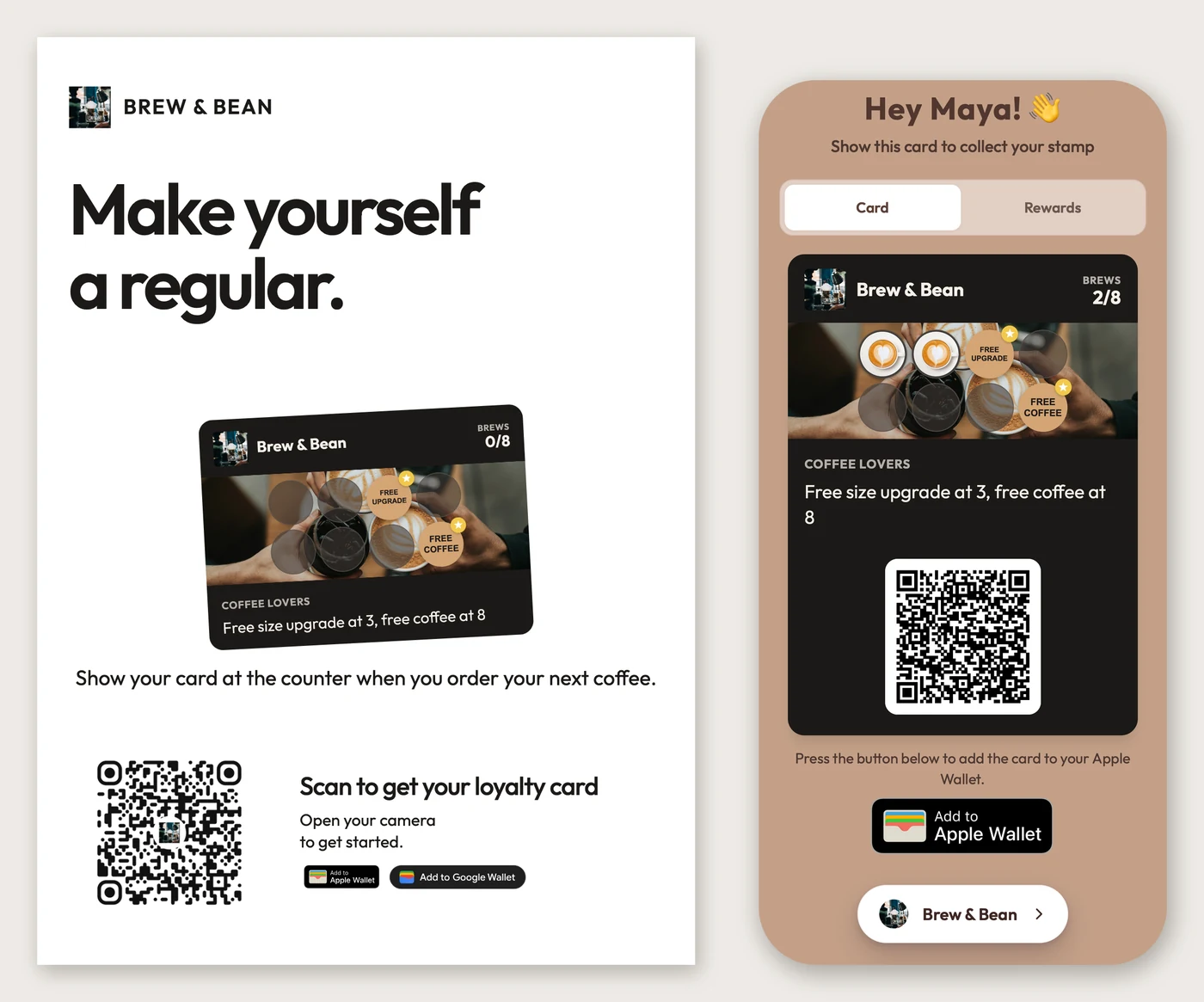
The same card two ways, at true relative size: the A6 counter card FaveCard prints from it (left) and what a customer sees on their phone after scanning it, here with 2 of 8 stamps (right).
What does a paper punch card really cost?
Very little, going by what owners have posted on the Square Seller Community:
- A bubble tea shop that ran paper cards from 2013 until it switched in 2021 ordered “more than 50,000 stamp cards (double-sided, 1 color, 1 black & white) for around $600 after tax and shipping” in 2020. That’s about 1.2 cents a card (thread).
- Another owner wrote in 2021: “I was spending $150 per year for punch cards,” for the previous 13 years (thread).
- An ice cream shop in Queens, in the first thread, printed “at least 20,000 cards every single year” because customers forgot or lost theirs and staff handed out new ones. The custom hole punchers they bought to stop counterfeits “still did break every couple of years.”
So the print bill is small. What costs more is harder to see. The same customers get a new card again and again, every stamp that staff give away is untraceable, and you can’t tell a regular from a one-off. A new offer also means a new print run.
What does a digital loyalty card cost?
Mostly a monthly fee, plus the hours it takes to move customers over. The owner who spent $150 a year on paper looked at Square Loyalty in 2021 and called its “$50 per month” “a big price hike.” That’s a fair point: on printing costs alone, digital rarely wins.
So compare what the cheapest plan lets staff do at the counter, not only the price. As an example, FaveCard’s free plan covers what a basic switch needs: the card in the customer’s browser, stamping by scanning with the staff app, and the counter signs. Apple and Google Wallet passes and your logo on the card come with Pro. Campaigns sent to customers, a self-service kiosk and separate staff logins come with Business. Pricing shows the current prices for your country. To see which apps have a free plan at all, compare the best free digital loyalty card apps.
When is paper the better choice?
When a digital card’s extras would sit unused. Paper is the better call if:
- Many of your regulars don’t carry a smartphone or won’t scan a code. Pushing them to one loses them.
- You sell from a market stall or a pop-up with no reliable signal.
- You’re the only one stamping, the card is short, and you don’t plan to contact customers. You’d pay for records you never look at.
- You work by appointment and see the same faces. Some salons keep each client’s card at the desk and mark it while the client watches, which ends the lost-card problem (SalonGeek thread).
Before switching, that bubble tea owner made two points owners rarely say out loud. “A stamp card also acts like an unobtrusive advert that reminds customers to revisit my business soon every time they open their wallet/purse.” And when a card goes through the wash, “my business benefits as if a small ‘debt’ disappears.” The verdict: “If I didn’t have an online store, I would still keep the paper stamp card system because it has more benefits than problems for me.”
If that’s you, our free card templates print as paper punch cards, and punch card ideas has card wording that works on paper as well as on a phone.
When is a digital card worth it?
When lost cards, untraceable stamps or regulars you can’t reach start costing you more than printing does. The signs:
- You keep handing out new cards to the same people. The Queens ice cream shop got to 20,000 a year that way.
- You can’t tell who stamped what. After switching, the bubble tea owner was glad not to worry “about having my stamper stolen/duplicated or that my employees can give out extra stamps to their friends/family when they think I’m not looking.”
- You’ve seen fake stamps. Size doesn’t protect you: Subway phased out its Sub Club stamp promotion in 2005 after “thousands of stamps” turned up for sale on online auction sites, the AP reported.
- You want to see who is close to a reward, or who stopped coming. A digital card gives you a customer list with each person’s last visit.
- You take online orders. A paper card has no way to collect stamps for them.
Do digital loyalty cards work better than stamp cards for salons?
Not by themselves. What decides whether a card gets finished is how long the reward takes, and switching format doesn’t change that. In our study of 23,296 stamps at 1,013 small businesses, cards that paid out within 2 to 4 weeks were completed 11.4% of the time, and cards that took 32 weeks or more, 0.8%. Where regulars came about once a month, as at most salons and barbers, it was 1.1%. The study covers digital cards only. There are no published completion numbers for paper cards, so a direct comparison isn’t possible.
What digital does fix for a salon is the gap between visits. A paper card has four to six weeks to get lost before the next appointment; a card on the phone doesn’t. But a 10-stamp card at one visit a month still asks for ten months. For monthly visits, 4 stamps with a small reward at stamp 2 is a better start. Our guide to how many stamps a loyalty card needs works it out for every visit rhythm.
How do you switch without losing customers’ stamps?
Honor every paper card, and convert it at the counter the first time the customer joins. Staff scan the new card and add the paper stamps on the spot, so nothing is left to type in later.
This is the step most switching guides skip, and it’s where owners get stuck. A coffee shop owner on the Shopify forum wrote that they “have physical stamp cards but want to move to an electronic way of keeping track” (thread); every reply was a vendor pitch, and none explained what to do with the stamps people already had. Owners who put it off end up typing paper stamps in at the end of the night from phone numbers the cashier wrote down. Doing it while the customer stands at the till is quicker, and they see the count go up.
Whichever system you choose, check two things first: can staff add several stamps in one go, and can they do it at the till rather than only from a back-office screen? Here is the plan, with how each step works in FaveCard:
- Copy your paper card exactly. Same number of stamps, same reward, so four paper stamps mean four digital ones. The card editor takes 1 to 10 stamps. If you want a new offer, change it after the switch period, not during it.
- Decide about a starter stamp. You can give every new card 0, 1 or 2 stamps the moment it’s saved, on any plan. It helps people who never had a paper card, but it applies to everyone who joins, so decide whether switchers get it on top of their paper stamps.
- Print one sign for the counter. An A6 card or a 90 × 50 mm label with your QR code (QR code signs, and how big the code should be).
- Carry the stamps over at the till. The customer scans the sign and joins. Staff open the FaveCard staff app, scan the customer’s new card, set the counter to the number of stamps on the paper card and tap “Add 4 stamps”. The app adds up to five per tap, never more than the card holds, on any plan. Then keep the paper card, or write across it, so it can’t be used twice.
- Or do it later from the dashboard. On Pro and above, the owner can open a customer and use “Add stamps”: 1 to 5 at a time, with an optional reason such as “paper card carried over”. The dashboard warns that “Stamps cannot be removed once added”, so count twice.
- Pick an end date for paper. Stop handing out new paper cards on day one, keep accepting old ones until a date you say at the till and on your sign, say the end of next month, then stop.
A regular who forgets their phone isn’t stuck: staff can find them in the app by first name or email and stamp the card from there. For getting the word out during the switch, see how to promote a loyalty program.
What happens if a customer loses or changes their phone?
Their stamps stay. The count is stored on the business’s FaveCard account, and the card belongs to the customer’s email address, not to the phone. On a new phone they can open the card from the email they got when they joined, or sign in with that email to see all their cards. If they scan your code and join again with the same address, FaveCard doesn’t create a second card; it tells them which inbox the original went to.
With paper, a lost card is lost stamps.
Can customers cheat a digital loyalty card?
The risks are different. A paper card can be filled at home with a lookalike stamp or a hole punch. On SalonGeek, a salon owner asked others how they were “stopping clients from stamping/hole punching their own cards”; the answers were dated logo stickers, a signature next to each stamp, and a star in the appointment diary to check against. A digital card has nothing to copy: the count sits on the business’s account and the phone only displays it. Every stamp is recorded with the time, and with separate staff logins (a Business feature) each staff stamp carries the name of the person who gave it.
Our guide to stopping stamp card cheating covers the rules for paper and the checks to ask any digital vendor about.
Moving from paper? You can set up a FaveCard card, print the counter sign and start carrying stamps over on the free plan. Create your card or compare plans first.
Frequently Asked Questions
Which digital loyalty systems don't need a physical card?
Any loyalty card that lives on the customer's phone, either in the phone's browser or saved to Apple Wallet or Google Wallet. The customer scans a QR code at the counter, types an email and a first name, and the card opens. There is no plastic card to carry and no app to download. Browser cards work on any smartphone; Wallet passes are often a paid-plan feature.
What's the difference between a punch card and a digital rewards app?
The deal is the same: buy, get a stamp, get the reward. On a punch card the count lives on the paper in the customer's wallet. On a digital card it is stored on the business's account and the phone only shows it, so a lost card doesn't mean lost stamps. A rewards app is a separate download from an app store; a digital stamp card usually opens from a QR code without one.
How do I move customers' paper stamps to a digital card?
Do it at the counter the first time the customer joins. Set up the digital card with the same number of stamps and the same reward, let the customer scan your QR code, then add the stamps from their paper card to the new card straight away and keep or mark the paper card so it can't be used twice. Check that your system lets staff add several stamps at once; FaveCard's staff app adds up to five per tap on every plan.
Are paper punch cards cheaper than digital loyalty cards?
On printing alone, yes. One owner on the Square Seller Community paid $150 a year for 13 years; a bubble tea shop paid around $600 for 50,000 cards in 2020, roughly a cent each. The costs that make owners switch are elsewhere: cards reprinted for customers who lost theirs, stamps nobody can trace to a staff member, and not knowing who your regulars are.
Do digital loyalty cards work better than stamp cards for salons?
Not on their own. What decides whether a card gets finished is how long the reward takes. In FaveCard's study of 1,013 small businesses, customers who visit about once a month, as at salons and barbers, finished 1.1% of card cycles, against 10.2% for near-daily visitors. A digital card can't be left at home between appointments, but a salon card still needs few stamps, around 4, to be finished.
What happens to a customer's stamps if they lose their phone?
Usually nothing: digital stamp cards store the stamps on the business's account, not on the phone. In FaveCard, for example, the card belongs to the customer's email address, so on a new phone they open it from the email they got when they joined, or sign in with that email. Joining again with the same email does not create a second card.