




Clover Loyalty Program: Cost, Setup & Alternatives
How Clover Rewards works, which Clover plans include it, how to set it up, the loyalty apps in the Clover App Market, and a free option that runs next to it.
Key Takeaway:
Clover's built-in loyalty program, Rewards, gives customers 1 point per dollar and runs on your Clover devices at no extra charge on the plans that include it. Clover's own pages disagree on which plans those are, so confirm yours before you sign. App Market apps add stamp cards, wallet passes and tiers for a monthly fee. A standalone card like FaveCard runs next to any Clover setup, free to start, but it doesn't post points from your sales automatically.
Last updated: October 2026
The Clover loyalty program is called Rewards. It is built into Clover’s point of sale: customers join with a phone number or email at checkout, earn 1 point for every dollar they spend, and redeem points for the discounts or free items you set up. There is no separate fee on the plans that include it. The catch is working out which plans those are, because Clover’s own pages don’t agree.
This guide covers how Clover Rewards works, how to set it up, what it costs, where it falls short, the loyalty apps in the Clover App Market, and when a standalone loyalty card makes more sense. Everything about Clover comes from Clover’s own help center, pricing pages and App Market listings, checked in September 2026.
The short answer:
- What it is: Rewards, Clover’s built-in points program. 1 point per $1 spent, before tax. You set the rewards.
- How customers join: a phone number or email at checkout. No app needed, though Clover has one.
- What it costs: included in some Clover software plans with no extra fee. Clover’s pages disagree on which, so check yours.
- Setup: Clover dashboard, then Customers, then Rewards, then Activate rewards. Clover says it takes minutes.
- Alternatives: loyalty apps in the Clover App Market (Loyalzoo, Trezoro, TapMango and others) or a standalone card like FaveCard that runs next to Clover.
What is the Clover loyalty program?
Clover calls it Rewards, and its App Market listing is “Rewards by Clover”. It is a points program that lives on your Clover devices and in your Clover dashboard. According to Clover’s Rewards FAQ:
- Points are fixed at 1 per dollar. Every dollar a customer spends earns 1 point, based on the pre-tax total.
- You decide what points buy. Any discount, free item or service, or add-on, at whatever point cost you choose.
- Sign-up bonus. You can offer new members a bonus to get them to join.
- Works across devices and locations. Points sync across your connected Clover devices and eligible locations.
Clover’s own example is worth borrowing. On its customer engagement page, an ice cream shop describes customers redeeming $5 off after earning 50 points. At 1 point per dollar, that is $5 back on every $50 spent, or 10%.
How Clover Rewards works at the counter
Joining. When the customer pays, the Register app shows a pop-up where the cashier can enter their phone number or email. New customers are enrolled on the spot; existing members earn points or see their rewards. On a Station Duo, customers can check in on the customer-facing screen, and you can switch on sign-up and check-in on a customer-facing Mini as well.
Earning. Clover’s award and redeem guide lists three ways for customers to earn:
- Printed codes for customers with eligible purchases
- The Clover consumer app for iOS and Android
- Checking in before or after payment on the Register app
Redeeming. When a customer has enough points, the reward shows up on their profile. They check in on their phone or bring a redeemable QR code they received by text or email, and the cashier applies it at checkout. Clover discounts the item before sales tax, so the customer doesn’t pay tax on a free item.
Messaging. The App Market listing says Rewards works “through email, text, and the Clover app” and lets you announce the program to your contact list and on social media.
Bonuses. Clover’s help center describes a Bonus Plus rewards subscription, an “enhanced plan” with Welcome, Regulars, VIP and Birthday bonuses. A Regulars bonus kicks in after a number of visits you choose, and a birthday bonus can be redeemed for 30 days. A separate help article shows sign-up and birthday bonuses in the regular Rewards settings, so it isn’t clear which bonuses need Bonus Plus. Clover doesn’t publish its price.
How to set up Clover Rewards
These are the steps from Clover’s help center:
- Log in to your Clover dashboard.
- Open Customers, then Rewards, from the menu on the left.
- Select Activate rewards.
- Follow the on-screen steps to create and save your first reward.
- Add more rewards if you want several options at different point levels.
- Select Save.
You can also start from a Clover device or the Clover Go app. Clover describes it as a two-step setup that takes minutes. Afterwards, the Rewards app on each device has settings for the customer-facing screens and the post-payment rewards screen, so you can decide where customers see the program.
One setup tip. Because points are fixed at 1 per dollar, the only lever you control is how many points a reward costs, and that sets how long customers wait. A coffee shop customer who spends $5 a visit needs 10 visits to reach 50 points. In our study of 23,296 loyalty card stamps from 1,013 small businesses, cards designed to be completed in 2 to 4 weeks had an 11.4% completion rate. Cards that took more than 16 weeks had under 2%. Price your first reward so a regular can reach it within a few weeks.
How much does the Clover loyalty program cost?
Clover doesn’t price Rewards on its own. It comes with certain Clover software plans, and Clover’s help center says reward features are “included in select service plans with no additional fee.” Which plans count is where it gets confusing.
The App Market listing says Rewards is “included in Essentials, Restaurant Growth, Services Growth, and Retail Growth plans.” The same listing shows “Pay-per-action fees: $0.01/Loyalty pricing” and doesn’t say what counts as an action.
Clover’s pricing pages list a “Loyalty program” row for each hardware bundle. Here is what they showed in September 2026:
| Clover system (pricing page) | Software plan | Loyalty program shown? | Price shown |
|---|---|---|---|
| Retail, Basic (Compact) | Starter | Not included | $16/mo for 36 months, or $349 |
| Retail, Standard (Station Duo) | Retail Growth | Included | $180/mo for 36 months, or $1,899 + $84.95/mo |
| Quick-service restaurant, Starter (Mini) | Restaurant Growth | Not included | $135/mo for 36 months, or $849 + $89.95/mo |
| Quick-service restaurant, Standard (Station Duo) | Restaurant Growth | Included | $185/mo for 36 months, or $1,899 + $89.95/mo |
| Personal services, all three bundles | Starter or Services Growth | Not included | From $16/mo for 36 months |
Card payments on these bundles are listed at 2.3% + 10¢ when the card is tapped, swiped or inserted.
Two things don’t line up. The quick-service Starter bundle runs on Restaurant Growth but shows no loyalty program, and the personal services bundles show none even on Services Growth, which the App Market listing says includes Rewards. We can’t tell you which page is right. If loyalty matters to you, ask Clover or your reseller to confirm in writing that Rewards is included in your plan, and ask what the $0.01 pay-per-action fee applies to and what Bonus Plus costs.
Where Clover Rewards falls short
Clover Rewards is a sensible default if it comes with your plan. It does have limits worth knowing before you build a program on it:
- Points only, 1 per dollar. You can’t give a stamp per visit or weight points differently. For a business where every visit matters more than the ticket size, such as a barber or a coffee shop, a visit-based stamp card can be easier for customers to follow.
- Turning it off freezes the points. Clover’s FAQ says that if you deactivate Rewards, customers can’t redeem the points and bonuses they earned. Reactivate it and the points come back.
- No import. Clover doesn’t transfer customers or points from another loyalty platform, so moving to Clover Rewards means starting from zero.
- It lives inside Clover. The program runs on Clover devices and the Clover consumer app. If you ever change your point of sale, the program doesn’t come with you.
- No wallet card mentioned. Clover’s help pages describe phone or email check-in, printed codes, QR codes by text or email and the Clover app. We couldn’t find any mention of a pass for Apple Wallet or Google Wallet.
- Bonus Plus has no published price. Regulars and VIP bonuses sit under the Bonus Plus subscription, and Clover doesn’t say what it costs.
Loyalty apps in the Clover App Market
If Rewards doesn’t fit, Clover’s App Market has a Loyalty & Rewards collection of apps that connect to your Clover register. These are the ones with the most detail on their listings, with their App Market ratings, as shown in September 2026:
| App | What the listing says | Price on the listing | Rating |
|---|---|---|---|
| Loyalzoo Digital Loyalty | Points or stamps, tiers, email, SMS and push campaigns, Apple and Google Wallet pass | $77/mo (Grow) after a 7-day trial; SMS credits extra | 4.71 |
| Trezoro Loyalty + Rewards | Nine reward types, including points, punch cards and VIP tiers; no customer app needed | $39.99/mo (Starter, one reward type) | 4.5 |
| TapMango | Branded customer app and tablet check-in, campaigns and deals | Integration free; program price not listed | 4.46 |
| LoyLap Loyalty | Stamps, credit back or discounts; Apple or Google Wallet pass, app QR code or phone lookup | 30-day trial, then a Facilipay plan (from $25, per the listing) | 3.44 |
| Fivestars Loyalty | Adds points from a Fivestars (by SumUp) program at Clover checkout | Integration free; Fivestars program billed separately | 2.65 |
The main reason to pick one of these over Clover Rewards is flexibility: stamp cards, tiers and wallet passes. The main cost is another monthly bill on top of your Clover plan. Several listings show an integration as “free” while the loyalty program itself is billed separately by the app’s maker, so check the full price on the vendor’s site. For a closer look at one of them, see our Loyalzoo vs FaveCard comparison.
Clover Rewards vs App Market apps vs FaveCard
| Clover Rewards | Clover App Market apps | FaveCard | |
|---|---|---|---|
| Monthly cost | Included in some Clover plans; Bonus Plus price not published | Usually a monthly subscription (e.g. $39.99 Trezoro, $77 Loyalzoo) | Free plan; paid plans on the pricing page |
| Works with Clover | Built in | Integrates with the Clover register | Runs next to Clover, no integration |
| Points from each sale added automatically | Yes, once the customer checks in | Yes, for integrated apps | No: staff scan the card, or the customer uses the kiosk |
| Reward style | Points, 1 per $1 | Points, stamps, tiers (varies by app) | Stamps, with rewards at any stamp |
| How customers join | Phone or email at checkout | Varies: at the register, QR code, app | Scan a QR code at the counter |
| Apple or Google Wallet card | Not mentioned in Clover’s help pages | Some (Loyalzoo, LoyLap) | Paid plans; free plan uses a browser card |
| Customer app | Optional (Clover consumer app) | Varies; some use a branded app | None |
| If you leave Clover | The program stays behind | Depends on the app | Nothing changes |
Using FaveCard alongside Clover
We make FaveCard, so read this section with that in mind. Here is how it fits a Clover counter, including what it doesn’t do.
FaveCard doesn’t integrate with Clover. It doesn’t read your Clover sales and it doesn’t add points automatically when a customer pays. You ring up the sale on Clover as usual, and the loyalty card is a separate step:
- You scan the customer’s card. Open the free FaveCard app on your phone and scan the QR code on the customer’s card to add a stamp. Team accounts for your staff are part of the Business plan.
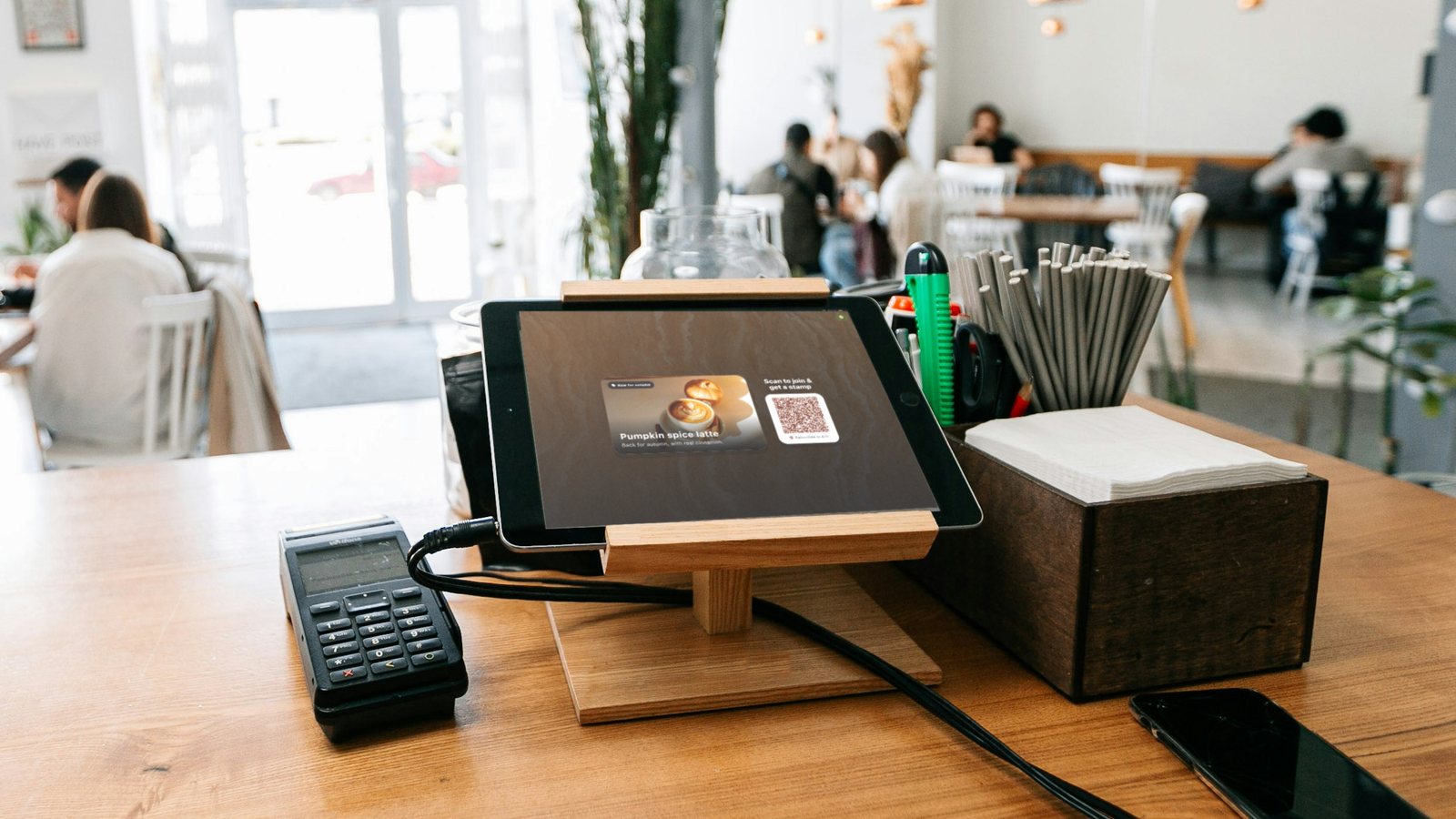
- Or the customer stamps it themselves. Put a tablet next to your Clover terminal in kiosk mode. Customers scan the code on the screen with their phone camera to join and collect a stamp, while your staff keep serving.
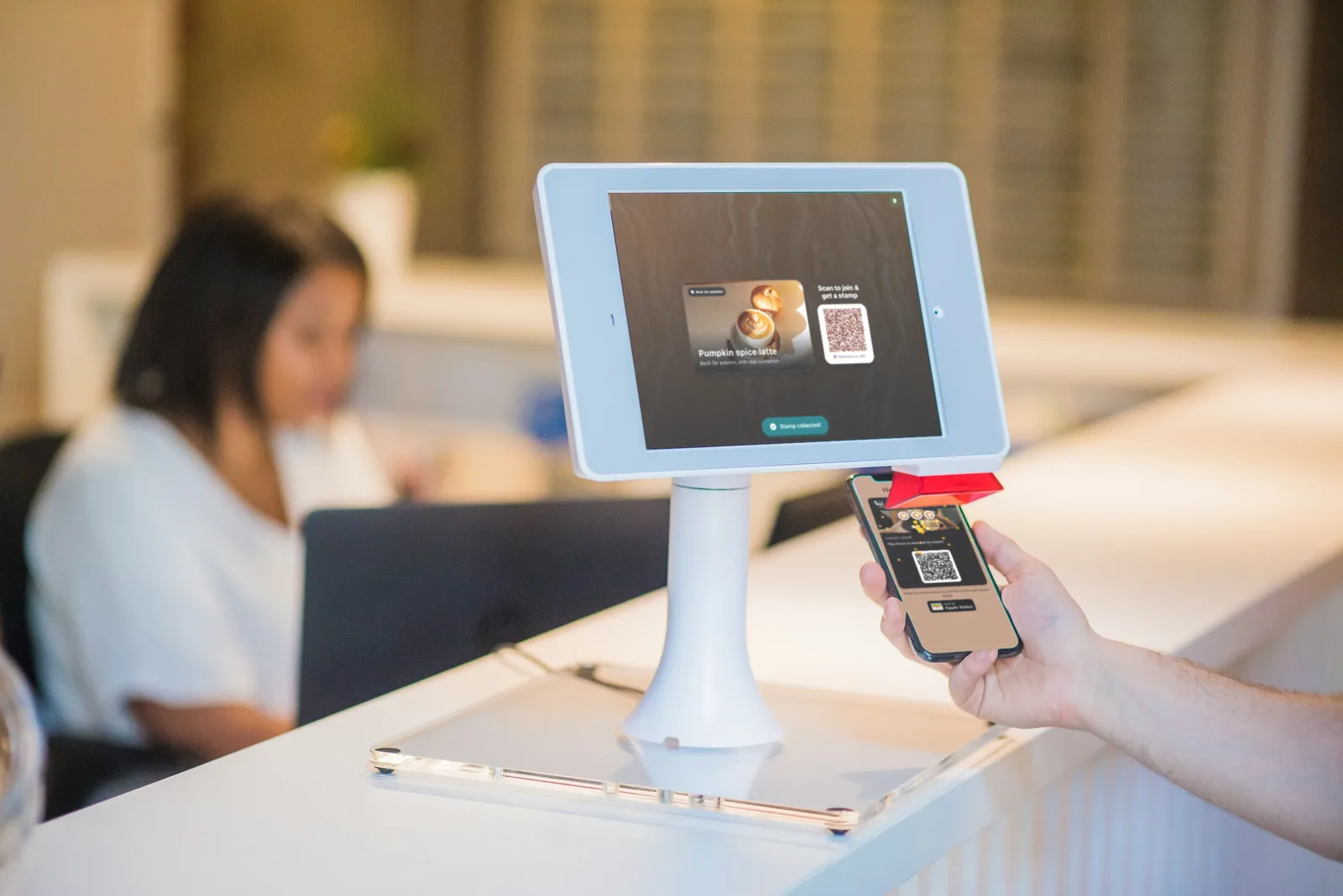
Illustration: real FaveCard kiosk and customer screens placed in a stock photo. The kiosk sits beside your register; it doesn’t connect to it.
Customers join by scanning a QR code. Print a sign for the counter (the dashboard’s print editor makes a ready-to-print sign with your card’s QR code) and customers get the card on their phone with one tap. There is no app to download.
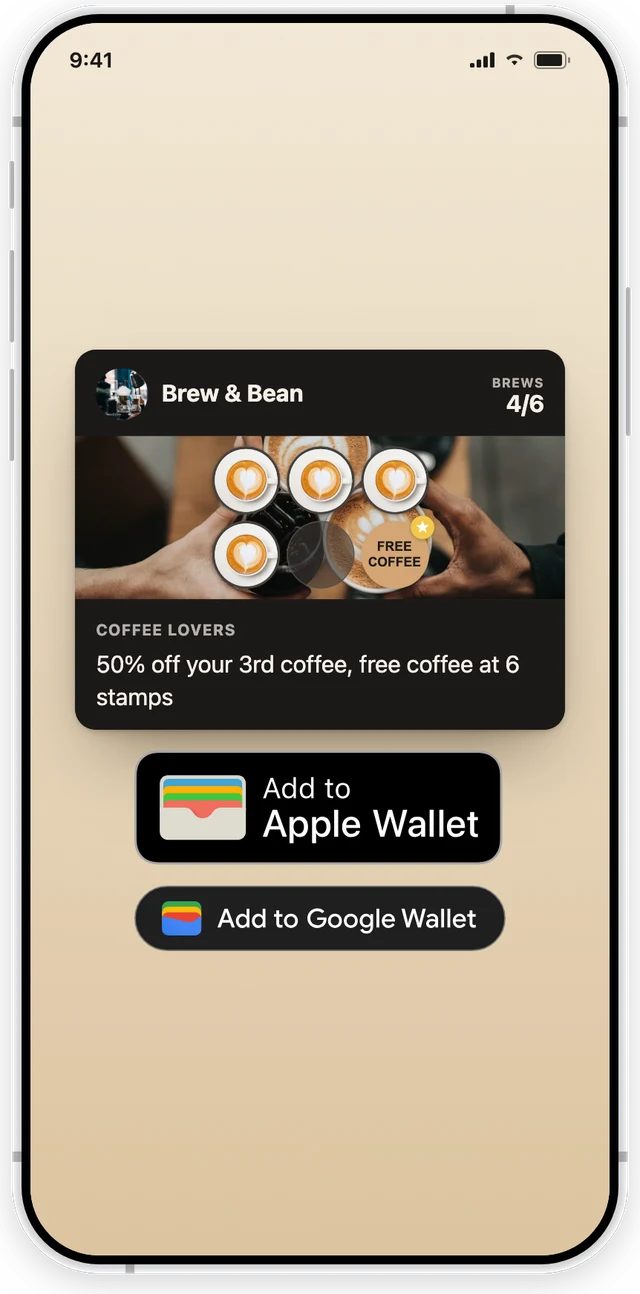
A real FaveCard card, rendered from the product. On the Free plan it opens in the phone’s browser; a paid plan adds the Apple Wallet and Google Wallet passes.
What each plan adds:
- Free: a browser-based card, unlimited customers, no time limit.
- Pro: native Apple Wallet and Google Wallet passes and your own branding (logo and banner).
- Business: campaigns and customer messages, birthday automation, Google review requests, the kiosk and team accounts.
- Free trial: every new account gets the wallet passes, branding and Business tools such as campaigns and the kiosk until the first 30 customers are on the card. Team accounts need a paid Business plan.
Prices vary by region, so they live on the pricing page rather than here.
When FaveCard makes sense for a Clover business:
- Your Clover plan doesn’t include Rewards, or you don’t want to pay for Bonus Plus or an App Market subscription.
- You want a stamp card that lives in your customers’ Apple or Google Wallet.
- You want the loyalty program to stay put if you ever change your point of sale.
When it doesn’t: if you want points to post automatically from every sale with no extra step at the counter, stay with Clover Rewards or an integrated App Market app. That is the honest trade-off.
Which Clover loyalty option should you pick?
- Rewards is included in your plan and points per dollar suit you: turn it on. It costs nothing extra and your staff already know the register.
- You need stamps, tiers or wallet passes and don’t mind a monthly fee: try an App Market app. Check the full price with the vendor, not only the integration price.
- You want to start free, or keep loyalty separate from your POS: use a standalone card like FaveCard and accept a scan at the counter.
Whichever you choose, the program only works if people know it exists. Our guide on how to promote a loyalty program covers the counter sign, what staff say at checkout, and the first few weeks. If you’re comparing POS loyalty programs, we’ve also reviewed Square Loyalty (with a Square vs FaveCard comparison) and Toast Loyalty.
Clover plans, prices and features were checked on clover.com, Clover’s help center and the Clover App Market on September 29, 2026. Clover changes its bundles often, so confirm the details for your plan with Clover before you sign.
Frequently Asked Questions
Does Clover have a loyalty program?
Yes. Clover's built-in loyalty program is called Rewards. Customers earn 1 point for every dollar they spend (before tax), and you decide how many points each reward costs: a discount, a free item or service, or an add-on. It runs on your Clover devices, so staff enroll customers and redeem rewards at checkout.
How much does the Clover loyalty program cost?
Clover doesn't sell Rewards as a separately priced add-on. Its App Market listing says Rewards is included in the Essentials, Restaurant Growth, Services Growth and Retail Growth plans, and also shows a $0.01 pay-per-action fee without saying what counts as an action. Clover's pricing pages don't fully agree: the retail and quick-service restaurant systems show a loyalty program on the Growth bundles, while the personal services bundles show it as not included. Some bonuses, such as regulars and VIP bonuses, are part of a Bonus Plus subscription whose price Clover doesn't publish. Confirm with Clover for your plan before you sign.
How do customers join Clover Rewards?
They give their phone number or email address at checkout. The cashier can enter it in the Register app when the customer pays. Customers can also check in on a customer-facing screen, such as the customer display on a Station Duo, and you can let them sign up on a customer-facing Mini. Their phone number or email then identifies them on every later visit.
Do customers need an app for Clover Rewards?
No, but there is one. Customers can check in with their phone number or email at your counter, or use printed codes. They can also download the Clover consumer app for iOS and Android to track points, pay and order ahead. To redeem, they check in on their phone or show a QR code they received by text or email.
What happens to Clover Rewards points if I turn the program off?
Customers can't redeem them. Clover's FAQ says that if you deactivate Rewards, customers lose access to the points and bonuses they had earned; if you reactivate it, the points come back. Clover also doesn't import customers or points from another loyalty platform, so switching into Clover Rewards means starting from zero.
What are the best loyalty apps for Clover?
Clover's App Market has a Loyalty & Rewards collection. Among the higher-rated listings: Loyalzoo's Digital Loyalty (points or stamps and Apple and Google Wallet passes, from $77 a month after a 7-day trial), Trezoro Loyalty + Rewards (from $39.99 a month) and TapMango (a branded app and tablet check-in). If you'd rather not add another monthly bill, a standalone card such as FaveCard runs next to Clover without an integration and has a free plan.