




Printable coupon designs
Free coupon templates for your business
Pick an offer worded for your trade and print coupons or table tents today, with an optional QR code.
- Pick a coupon Choose your business and your goal, then tap the coupon you like.
- Change the words Add your name, the offer, one rule and the last day. Add your logo and, if you like, a QR code to your website.
- Print it Pick coupons, table cards or a folded table tent on US Letter or A4, then print it or download a PDF.
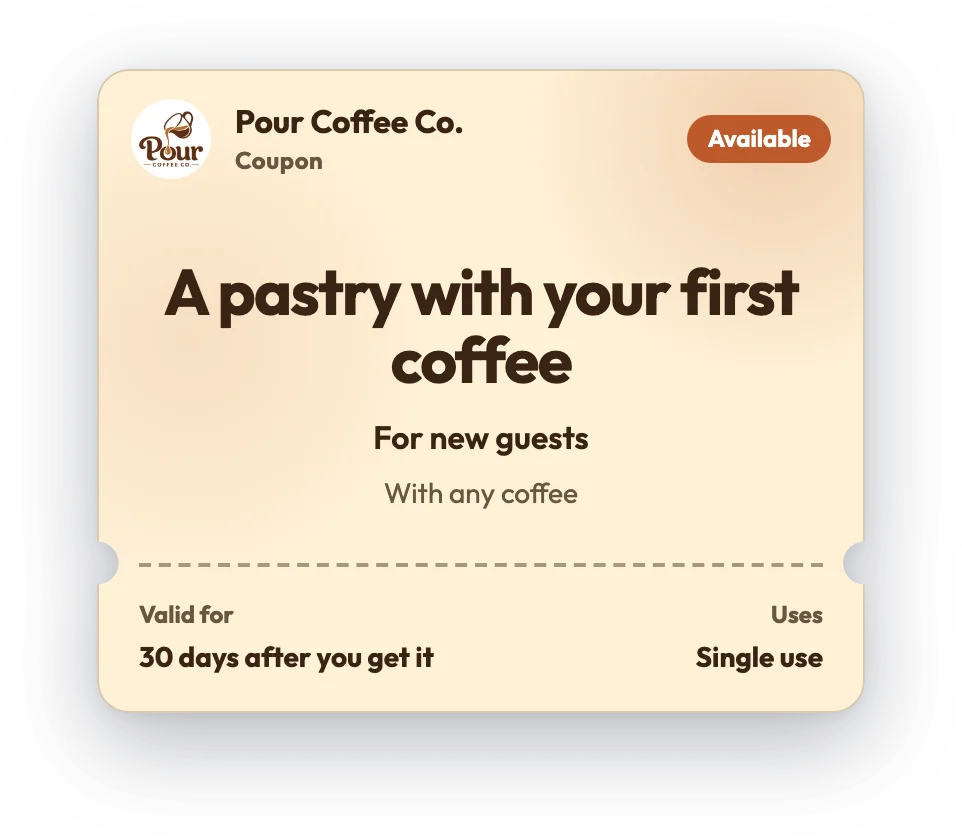
- Corner CaféCouponA pastry with your first coffeeFor new guestsOne per customer
- Cut & Co.CouponA free hair washWith a haircutTuesday to Thursday, 10 am to 1 pm
- Shine Car WashCouponA free wash on usThank you for the recommendationOne per customer
- Golden Crust BakeryCouponA free coffee with your next pastryFor past customersOne per customer
- Olive KitchenCouponA dessert with your first mealFor new guestsOne per customer
- Gloss Nail StudioCouponFree nail art with your manicureWith a manicureTuesday to Thursday, 10 am to 1 pm
- Move StudioCouponAn entry on usSorry we cancelled your classOne per customer
- Willow Gift ShopCouponA gift with your next purchaseFor past customersOne per customer
- Bloom Brows & LashesCouponFree brow shaping with a first lash liftFor new customersOne per customer
- Corner CaféCouponA large coffee for the price of a smallOrder a large, pay for a smallMonday to Friday, 2 to 5 pm
- Cut & Co.CouponA free conditioning treatment with your haircutThank you for the recommendationOne per customer
- Shine Car WashCouponFree waxing with your next car washFor past customersOne per customer
In short
Print a free coupon or table tent here when you want an offer on the counter today, and lead with something free and a short end date. If a sign stays up for weeks and you want one coupon per person, use a QR coupon link.
What should a business coupon say?
A business coupon needs five clear lines: the offer in a few words, who can use it, the last day it is valid, one plain rule such as one per customer, and your business name. Leading with something free reads like a welcome gift instead of a clearance markdown.
Percentage discounts make customers do math at the counter and can make a haircut or a fresh loaf feel marked down. A concrete gift, such as an add-on service or a second item, feels generous to the customer and costs you the item itself or a few quiet minutes of chair time.
The templates on this page are worded from FaveCard’s ready coupon ideas for ten kinds of business, and each idea leads with something free rather than a percentage off. Keep the wording short enough to read in two seconds on a counter or in a takeout bag.
| Line on the coupon | Café example | Hair salon example | Car wash example |
|---|---|---|---|
| The offer | Free pastry with your morning coffee | A scalp massage with your first haircut | Free car waxing with any full wash |
| Who it is for | First-time guests | New clients | Returning drivers |
| Last day | Valid through November 30 | Use within 30 days | Good until the end of this month |
| One clear rule | One coupon per visit | One per new client | One per car, weekdays |
| Your business name | Maple Street Café | Studio Nine Hair | BrightBay Car Wash |
Which coupon fits which goal?
The right business coupon starts with one goal: bringing in new customers, filling quiet hours, thanking regulars, or winning back past customers. Each goal calls for a different offer and a different place to hand it out, because a window sign reaches passers-by while a slip with the receipt reaches people who already buy from you.
Picking the goal first protects your busy hours. A bakery with slow weekday afternoons between 1 pm and 3 pm does not need an all-day giveaway during the morning rush; a timed afternoon treat fills those hours without cutting into peak sales.
| Business goal | Business type | Offer wording | Best time and place |
|---|---|---|---|
| Bring in new customers | Barber or hair salon | “A scalp massage with your first haircut” | Front window sign, or a flyer at a shop nearby |
| Bring in new customers | Gym or fitness studio | “Your first class on us” | Card at a partner business, such as a juice bar nearby |
| Fill quiet hours | Bakery | “A second pastry on us” | Counter card, Monday to Friday, 1 pm to 3 pm |
| Fill quiet hours | Café | “A large coffee for the price of a small” | Table tent, Monday to Friday, 2 pm to 5 pm |
| Say thank you | Car wash | “A free wash on us” | Handed to a customer who recommended you |
| Win back past customers | Hair salon | “Free conditioning with your next haircut” | Your own social post or mailing list |
For more offer ideas, see our guides to coffee shop promotion ideas and restaurant promotion ideas. For salons, shops and other trades thanking their regulars, see customer appreciation ideas.
What size should a coupon or table tent be?
Handout coupons work at business-card size (about 3.5 by 2 in) or four to a US Letter or A4 sheet, while tables take a flat A6 card (4.1 by 5.8 in) in a holder or a folded tent. Make a QR code at least 0.8 in (2 cm) wide, QR Code Generator’s minimum, and about 2 in (5 cm) on a table card.
There is no single standard coupon size, so pick the format that matches how you hand it out and the paper in your printer. The editor on this page prints on US Letter and A4, with cut lines on the four-coupon sheet and the top panel of the folded tent printed upside down, so both sides read the right way up once folded.
| Print format | Size | Where it works | What you need |
|---|---|---|---|
| Four-coupon sheet | 4 coupons per US Letter or A4 sheet | Takeout bags, salon front desk, shop checkout | Plain paper or light card, and scissors or a trimmer |
| Flat A6 table card | 4.1 by 5.8 in, 2 per sheet | Bakery register, barber station, gym front desk | An acrylic holder: an A6 card does not stand on its own |
| Folded table tent, printed at home | 1 tent per US Letter or A4 sheet | Restaurant tables, café pickup counter, car wash waiting area | Card your printer takes, and one fold; no holder |
| Table tent from a print shop | 4 by 6 in from a 4 by 16.25 in flat sheet (4over4), or 4.25 by 6 in and 4 by 8 in (UPrinting) | Every table, or a counter display that stays for months | The shop’s template, with bleed lines, safe zones and trim lines (UPrinting) |
When you add a QR code, size it for the scanning distance rather than squeezing it into a corner. QR Code Generator recommends at least 2 by 2 cm (about 0.8 by 0.8 in) on printed marketing, and our QR code size guide, checked with a scan simulation, puts a table card read from half a meter at 5 cm (2 in).
Use the templates on this page for clean handouts or a folded tent in a few minutes. Word or Google Docs fit better for a custom table layout, Canva or a template gallery such as MyCreativeShop when you want full control of the artwork, and a print shop when you want thick coated tents in bulk.
Should you use a paper coupon or a QR coupon?
Plain paper coupons are free, quick to print and easy for any customer to hand back at the counter, but anyone can photocopy them, and you only know they worked if staff keep the slips. A QR code that leads to a coupon service can give each person their own coupon on their phone.
Plain paper is plenty when the crowd is small or the offer is short. If a bakery hands out 100 slips at a Saturday market, a barber leaves welcome cards at the shop next door, or a car wash hands cards to regulars it knows, paper works with no extra step.
The editor on this page puts a QR code to any link on your coupon, and static QR codes are free, as QR Code Generator notes. A QR code to your menu, booking page or website is handy, but it opens the same page for everyone and can’t limit a coupon to one per person.
A QR coupon link is worth it when the sign stays up in public, such as a window poster or tents left on tables all month: each person who scans gets their own coupon on their phone.
How do you stop people copying a printed coupon?
Stopping extra copies of a printed coupon takes simple checks on paper or a one-per-person check behind a QR code. For handouts, set a short end date, print “one per customer”, number or stamp the cards and collect each slip; for public signs, use a QR coupon link that checks each person once.
On paper, four habits make repeat use harder at a busy counter:
- Print on colored card or stamp the back, so black-and-white photocopies stand out at once.
- Number higher-value gifts by hand, such as a free conditioning treatment at a salon or free waxing at a car wash.
- Keep the end date short, such as 14 days, so leftover stacks don’t circulate for months.
- Print “Hand in this coupon to use it” and drop every used slip into the register drawer, so the same coupon never comes back tomorrow.
Paper checks stop working when the offer is on a window poster, or someone shares a photo of your flyer in a local chat group, because there is no card to take back.
FaveCard example: When a customer scans a FaveCard coupon poster at a café, hair salon, ice cream shop or car wash, they enter their email, the 4-digit code sent to it and a first name, in the browser with no app. The same email typed another way, with a “+” tag or, on Gmail, extra dots, still counts as one person, and a screenshot of a coupon is the same coupon, not a new one, so each person gets the offer once even when your poster is photographed. You also choose who can get it: everyone, new customers only or your existing customers. A quiet-hours coupon can’t be used outside its hours.
Where should a coupon card or poster go, and how do you know it worked?
Coupon placement depends on who you want to reach, and you can tell what worked when every spot gets its own code, paper color or QR link. Put new-customer offers on your front door or at a neighbor’s shop, put repeat-visit cards at your counter or tables, and count each spot separately.
Match the spot to the customer’s routine. A front window poster or sidewalk sign catches people walking past a café, bakery or barber shop with a first-visit gift, while an A6 card at a car wash register or a tent on a restaurant table reaches people who are already buying and brings them back on a slower afternoon.
Swapping counter cards with a business down the street works best when you share neighbors without competing, like a gym and a smoothie bar, or a nail salon and a boutique. On paper, tell spots apart by printing each batch on a different paper color or adding a tiny corner code such as DOOR or GYM, then count the slips at the end of the month.
FaveCard example: In FaveCard you make a separate link for each place a coupon goes, from ten kinds of place such as “Poster or flyer”, “Partner business” and “In the customer area” for your own counter or tables. Each link has its own QR code and its own number of coupons (50 unless you change it), and the links table shows how many were given and how many are left for each place, so a salon or café owner sees whether the window poster beat the partner’s counter.
How do you turn a template into a QR coupon with FaveCard?
Turning a coupon template into a QR coupon with FaveCard takes a few minutes: pick an offer for your business, publish it, open “Give to customers”, choose “Print it” (it starts at “Poster or flyer”) and then “Create and print” to get a PDF with that link’s QR code.
In FaveCard you can browse 80 ready ideas across ten kinds of business, from cafés and hair salons to bakeries and car washes, and each idea says where it works best, such as a QR code at the door or counter. Choose who can get it, set when it’s valid or its quiet hours, and publish.
“Print it” gives a 300 dpi PDF: 1 poster, 2 flat table cards or 10 small flyers on one sheet, with cutting marks, on A4 paper or, in the USA, Canada and a few other countries, on US Letter. It shows your business name, logo, colors, the offer, the last day or how long it’s valid, “Scan to get your coupon” and that link’s QR code. For a folded tent, paste your FaveCard link into the editor on this page.
Coupons are on the Business plan, and new accounts try it free for their first 30 days. See pricing for plans, and how coupons work in FaveCard.
If you want regulars to come back again and again rather than use one offer, a stamp card fits better: try the loyalty card templates. FaveCard’s printable QR code signs for a stamp card come on every plan, Free included.
Paper from this page fits a quick one-off batch. FaveCard fits when a sign stays up for weeks: each customer gets their own coupon on their phone, and you see which spot brought them in.
FaveCard example: A bakery prints two A6 counter cards from “Print it”, then changes the offer’s words or moves the last day. Publishing the change updates what every printed QR code shows, and customers keep the coupons they already got. “Add coupons” puts more on the same link without a new QR code, and if an old flyer stays up too long, “Replace link and QR code” stops every old print at once.
Frequently asked questions
Are these coupon templates free for business use?
Yes. The coupon and table tent templates on this page are free for any business to edit and print on US Letter or A4. QR coupons in FaveCard, which give each person one coupon, are on the Business plan, and new accounts try it free for their first 30 days.
Can I edit these coupon templates in Word or Google Docs?
The templates edit and print in your browser, not as Word files, which keeps the cut lines, the tent's upside-down panel and the QR code in place. Word or Google Docs fit better when you want your own table layout or coupon numbers merged from a list.
Can I put my own QR code on a printable coupon?
Yes. Paste any link into the editor on this page and it adds a QR code to your coupon sheet, A6 card or folded tent. A QR code to a regular website can't limit a coupon to one per person; a FaveCard coupon link gives each person one coupon.
Do business coupons need an expiration date?
An end date is optional in the editor on this page. A short one, two to four weeks out, gives customers a reason to come soon and keeps old flyers from coming back next year. Leave it blank for a standing welcome offer. Rules on coupon terms vary by place, so check yours.
Can a QR code coupon be used twice by the same person?
It depends on the link. A QR code to a website opens the same page every time and can't stop repeat use. With a FaveCard QR coupon, each person confirms their email with a 4-digit code, an email with a "+" tag or extra Gmail dots counts as one person, and a screenshot is the same coupon.
Do customers need an app to get a QR coupon?
No. Any phone camera scans the printed QR code and opens the link in the browser. On a FaveCard coupon link, the customer enters their email, the 4-digit code sent to it and a first name on that page, with nothing to install.
What is the difference between an A6 table card and a table tent?
An A6 table card (4.1 by 5.8 in) is a flat card, printed two to a sheet, that needs an acrylic holder because it doesn't stand on its own. A folded table tent bends in the middle and stands by itself, with the offer on both sides.
Bring in new customers, and see which sign brought them
With FaveCard, customers scan the QR code on your poster or table card and get a coupon of their own, one per person, with no app.
Coupons are on the Business plan, and new accounts try it free for their first 30 days.
- No app for your customers
- One per person, even if the poster is copied
- See which poster or table brought them in