
How Big Should a QR Code Be? We Tested 8 Sizes
A QR code size chart in cm and inches from our scan simulation of 8 sizes: how far each one reads, what a logo costs, and where the 10:1 rule goes wrong.
Key Takeaway: Make the black pattern of a printed QR code at least one tenth as wide as the distance it will be scanned from, and at least 2 cm (0.8 in) wide. In FaveCard's September 2026 simulation of 8 sizes from 1.5 to 12 cm, plain codes without a logo read reliably out to about 16 times the width of the pattern (11 times the width of the whole printed square, white border included). A logo in the middle cut the range by a median 12 to 18%, and a rounded code with a logo reached only about 8 times its full printed width, so the 10:1 rule overpromises in that case. Depending on style, logo and decoder, a 4 cm (1.6 in) code read to 47–70 cm and a 12 cm (4.7 in) code to 1.3–2.4 m. This was a simulation, not a phone test, and glare and lighting were not modeled.
FaveCard Team
Published September 29, 2026 · Updated September 29, 2026
Last updated: September 2026
Make the black pattern of a printed QR code at least one tenth as wide as the distance people will scan it from, and never narrower than 2 cm (0.8 in). A code on a card reader, scanned from 30 cm (1 ft), needs 3 cm (1.2 in). A table card read from half a meter needs 5 cm (2 in). A sign read from 2 m (6.5 ft) needs 20 cm (8 in). If the code has a logo in the middle, add about 20%.
That is the familiar “10:1 rule”, with two details most guides leave out: what you measure, and what a logo costs. We checked both with a scan simulation. We printed nothing; instead we rendered the QR codes FaveCard’s print editor produces at 8 sizes from 1.5 to 12 cm, generated thousands of synthetic phone-camera frames at different distances, and asked four open-source decoders to read them. Below are the size chart, the distances, and the cases where 10:1 isn’t enough.
The quick answer:
| Where people scan it from | Black pattern at least | FaveCard format that fits |
|---|---|---|
| In their hand: business card, flyer (15–25 cm, 6–10 in) | 2–2.5 cm (0.8–1 in) | 90 × 50 mm label |
| At the register or card reader (30 cm, 1 ft) | 3 cm (1.2 in) | 90 × 50 mm label, up close |
| On the table or counter (50 cm, 20 in) | 5 cm (2 in) | A6 counter card |
| On a wall or door, one step back (1 m, 3.3 ft) | 10 cm (4 in) | QR image in your own poster; the A4 sign reads to 65–86 cm |
| Through the window, from the sidewalk (2 m, 6.5 ft) | 20 cm (8 in) | QR image in your own poster |
| Across the room (3 m, 10 ft) | 30 cm (12 in) | QR image in your own poster |
Add the white border on top of these widths: at least four squares’ width of white on every side.
How big should a QR code be?
Divide the scanning distance by 10 and print the black pattern at least that wide. For a code people scan from 50 cm, that’s 5 cm of pattern, edge to edge, not counting the white margin. The table above covers the usual spots in a shop.
“Size” is the word that causes most mistakes here. A QR image has two widths: the black pattern and the whole square including its white border. Generators and print editors export the whole square. In FaveCard’s exports the pattern is about 72% of the square, so a code that measures 4 cm from white edge to white edge has less than 3 cm of pattern. Measure the pattern with a ruler; that’s the width the camera has to resolve.
The rule behind the table is simple: phones read a QR code by resolving its small squares (modules). Double the distance and the squares look half as big to the camera, so the code needs to be twice as wide. Our results follow that straight line almost exactly.
QR code size chart: 8 sizes and how far each scans
Here is what each size reached in the simulation. “Reliable” means a decoder read the code in at least 90% of 20 camera frames at that distance and at every closer step. The middle two columns use zxing-cpp, a common open-source decoder; the last column is the best of the four decoders we ran. Sizes are the black pattern; with the white border FaveCard adds, the printed square is about 40% wider (a 2 cm pattern sits in a 2.8 cm square).
| Black pattern | Square modules, no logo | Rounded + logo | Best decoder, square, no logo |
|---|---|---|---|
| 1.5 cm (0.6 in) | 24 cm (10 in) | 18 cm (7 in) | 30 cm (12 in) |
| 2 cm (0.8 in) | 32 cm (13 in) | 23 cm (9 in) | 37 cm (15 in) |
| 2.5 cm (1.0 in) | 41 cm (16 in) | 30 cm (12 in) | 47 cm (19 in) |
| 3 cm (1.2 in) | 47 cm (19 in) | 35 cm (14 in) | 55 cm (22 in) |
| 4 cm (1.6 in) | 60 cm (24 in) | 47 cm (19 in) | 70 cm (28 in) |
| 5 cm (2.0 in) | 72 cm (28 in) | 55 cm (22 in) | 84 cm (33 in) |
| 8 cm (3.1 in) | 1.25 m (4.1 ft) | 91 cm (3.0 ft) | 1.40 m (4.6 ft) |
| 12 cm (4.7 in) | 1.87 m (6.1 ft) | 1.31 m (4.3 ft) | 2.37 m (7.8 ft) |
“Rounded modules + logo” is what FaveCard’s print editor produces by default when your business has a logo, so we show it next to the plain code. It is the most cautious column. Even that column stays above the 10:1 line at every size.
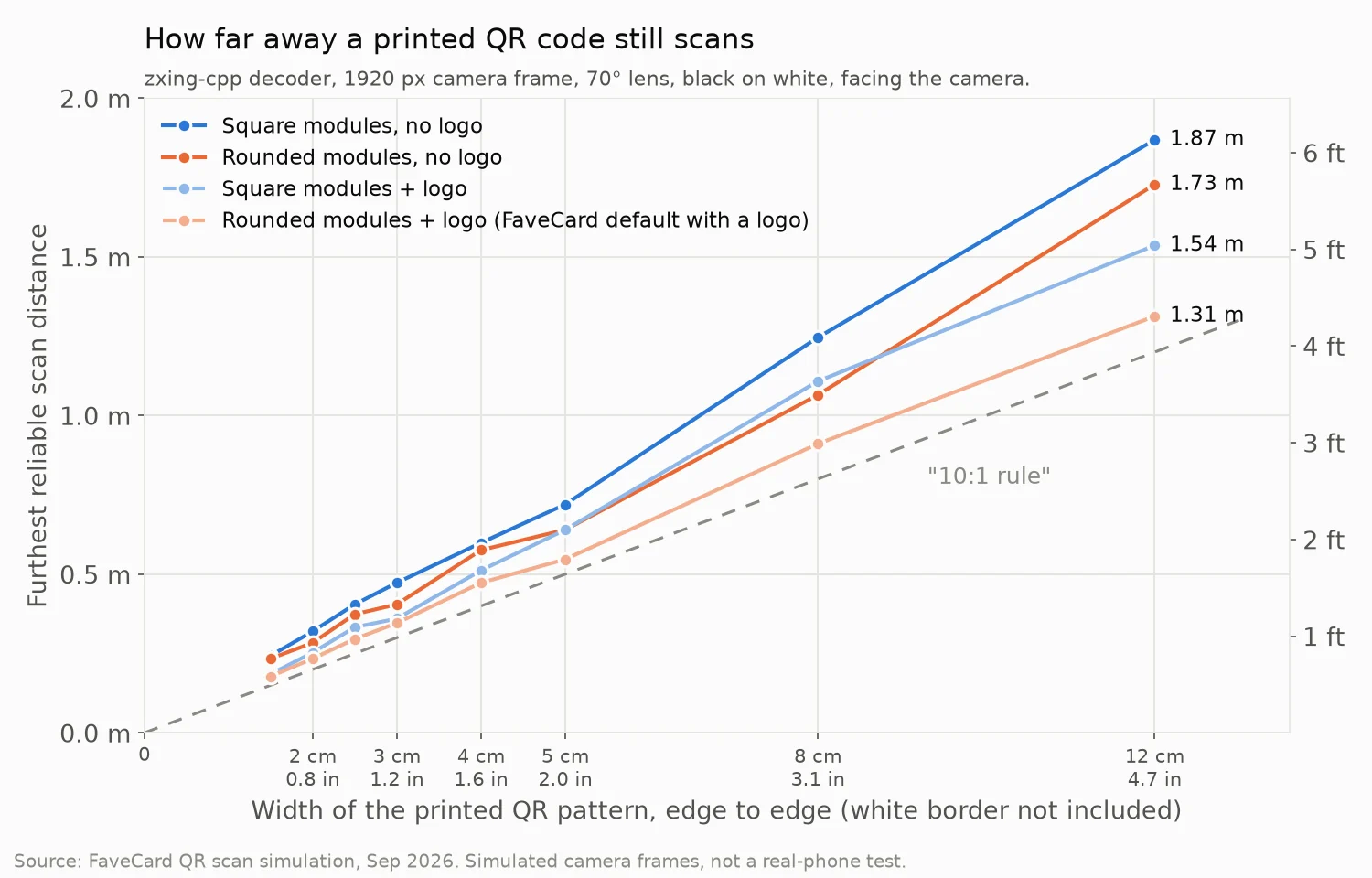
We stopped at 12 cm. For a window or a poster read from 2 or 3 meters, the table at the top extends the same straight line; we did not simulate those sizes.
How small can a QR code be?
About 2 × 2 cm (0.8 × 0.8 in) for anything held in the hand. That is the minimum QR code generators quote too: QR Code Generator says “at least 2 x 2 cm (0.8 x 0.8 in)” and Uniqode gives the same floor. Our data agrees.
At 2 cm, a plain code read reliably up to 32–37 cm (13–15 in). That covers a business card, a flyer or a receipt in someone’s hand. The smallest size we ran, 1.5 cm (0.6 in), still read up to 24–30 cm (10–12 in) without a logo, but only 18 cm (7 in) with one. At that point the phone has to come uncomfortably close, and the simulation did not model whether a phone can focus that close. We tested nothing smaller than 1.5 cm.
On a business card, use 2 to 2.5 cm of pattern and leave the logo out of the code. A 2.5 cm code read to 41–47 cm (16–19 in); with a logo, 30 cm (12 in).
Developer forums show the same thing. One developer reported that 20 × 20 mm codes “with high error correction” took more than 10 seconds of moving the phone around to read in a browser-based scanner, while the phone’s own camera app read them instantly. That fits our data: a 2 cm code at level H is both small and dense, which leaves little margin for a weaker scanner.
Does the 10:1 rule work?
Mostly, and partly by luck. QR Code Generator puts it as “the scanning distance is about 10x the QR Code size”; Uniqode as “QR Code size = scanning distance ÷ 10”. Neither line says what “size” means, and that changes the answer.
What the rule gets right:
- The straight line. Range grows in proportion to size, in every variant we ran.
- Plain codes measured with their white border. Measured edge to edge, border included, black-and-white codes without a logo read to a median of 11.3 times their width with zxing-cpp and 13.4 times with the best decoder. Ten is a safe round number there.
- Measured on the black pattern alone, the same codes reached about 16 to 19 times their width, depending on the decoder. A 10:1 plan has a comfortable margin.
What it gets wrong:
- Logos and rounded squares. A rounded code with a logo, measured border included, read to only 8.3 times its width with zxing-cpp. If you size that code with 10:1 on the full square, you overshoot by about a fifth. Measure the pattern instead (11.6 times) and you’re fine.
- The camera. The rule assumes one kind of phone. In our runs the same code went from about 8 times its pattern width with a low-resolution camera frame to about 19 times with a 4K frame. More on that below.
- Everything around the code. The rule is silent on tilt and glare. Tilt alone cost up to 23% of the range in our runs.
Our practical version: measure the black pattern and divide the distance by 10. With the base-case camera, that sizing held for every style we tested, logo included, with zxing-cpp and with the best decoder. Two weaker decoders fell short on codes with a logo.
Does a logo make a QR code harder to scan?
Yes: in our runs a logo in the middle cut the reliable range by 12 to 18% with zxing-cpp and with the strongest decoder, OpenCV’s WeChat detector. That is the median over the 2, 4 and 8 cm codes; at some sizes it was more (the 12 cm rounded code lost 24% with zxing-cpp). One decoder, zbar, lost half its range on rounded codes with a logo.
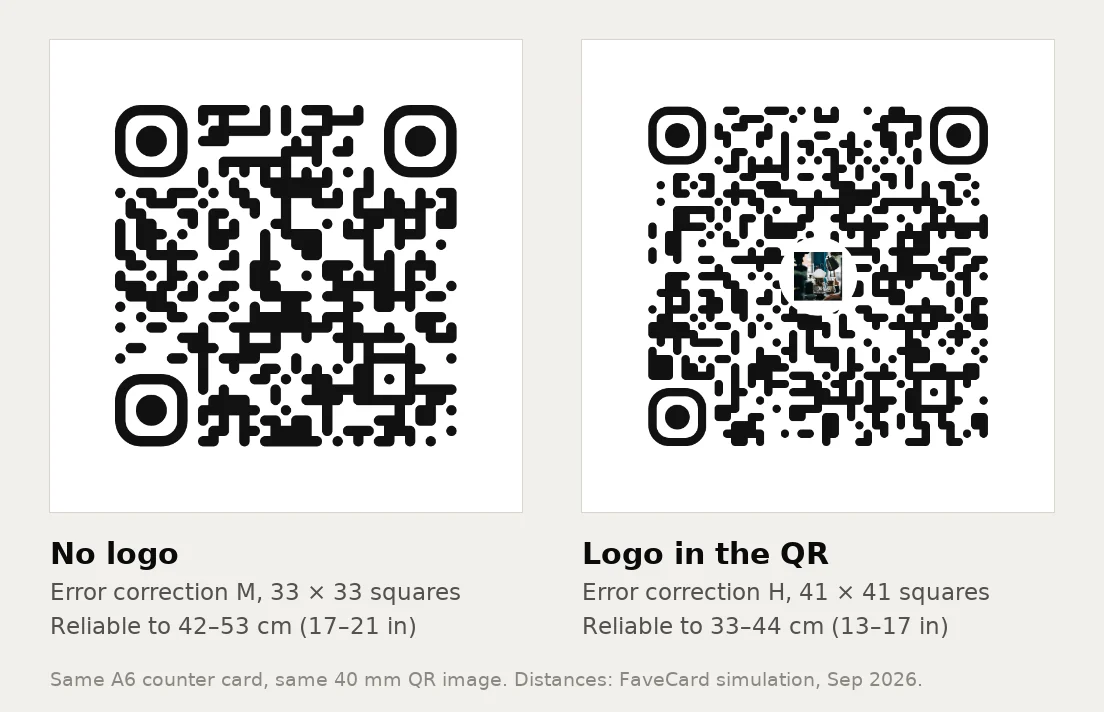
The logo itself isn’t the main problem. QR codes carry spare data so they can survive damage, and a logo covering the middle uses up that spare. So a code with a logo has to use the highest error correction level, H, and more error correction means more squares. Denso Wave, the company that invented the QR code, notes that a higher error correction level also makes the code bigger. For the same link, FaveCard’s codes go from 33 × 33 squares at level M to 41 × 41 at level H. Printed at the same width, each square is about 20% smaller, and smaller squares are harder for a camera to resolve from a distance.
What to do about it:
- Keep the logo where there’s room. On an A4 sign read from arm’s length it costs you nothing you’ll notice.
- Drop it on small labels and business cards. Or size the code up by a fifth to make up for it.
- Keep the link short. Longer links need more squares too. Uniqode: “A code with a long tracking URL needs more physical space than one pointing to a short link.”
Rounded or square modules?
Square is the safe choice for any scanner. Rounded worked with three of the four decoders and cost 3 to 16% of the range, depending on the decoder. Here is the reliable distance as a multiple of the pattern width, by style (no logo, base camera, median over all 8 sizes):
| QR code style (FaveCard editor name) | zxing-cpp | Best of 4 decoders | Decoders that never read it |
|---|---|---|---|
| Classic (square) | 15.7× | 18.6× | none |
| Rounded (the editor’s default) | 14.3× | 18.1× | basic OpenCV detector |
| Dots | 17.5× | 18.7× | basic OpenCV detector, zbar |
| Modern | 12.4× | 16.6× | basic OpenCV detector |
The column to worry about is the last one. OpenCV’s basic QR detector never read a single rounded, dotted or “Modern” code at any distance, and zbar never read the dotted one. Phone camera apps use their own detectors, which we did not test, so this doesn’t mean your customers’ phones will fail. It does show that some decoders struggle with anything other than plain squares. If the code has to work with anything, including a third-party scanner app or a web scanner, print Classic.
How far away can a QR code be scanned?
From about 10 to 19 times the width of its black pattern, and the camera decides where in that range you land. What a decoder needs is enough camera pixels on each small square. In our runs, the better decoders stopped reading when each square covered about 2 to 3 camera pixels. Google’s barcode scanning library, ML Kit, sets a similar floor: “The smallest meaningful unit of the barcode should be at least 2 pixels wide” (Google ML Kit).
Here is what that looks like in the simulated camera frames themselves, zoomed in:
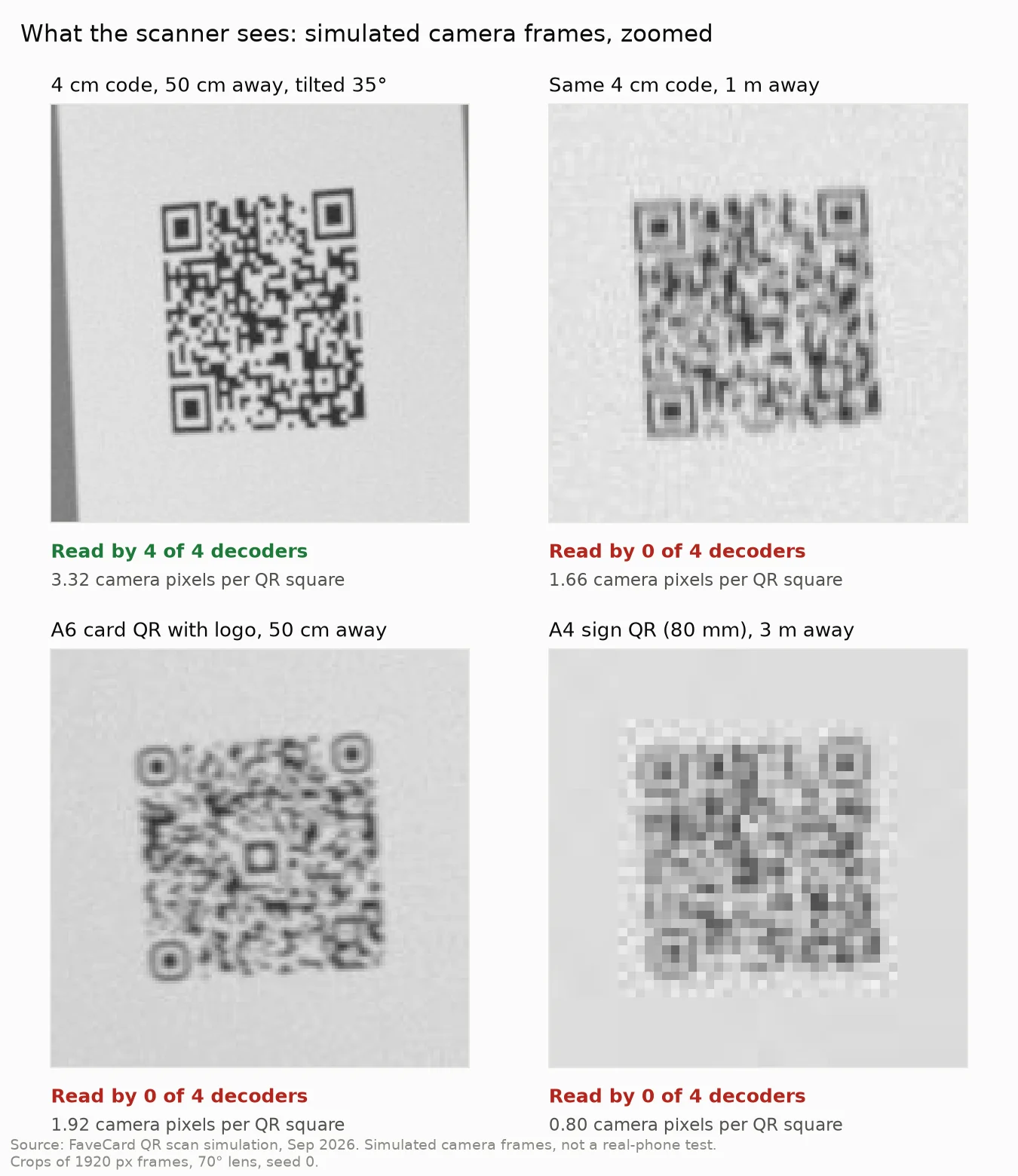
The A6 frame is the telling one. To a person it still looks like a QR code. At 1.92 pixels per square, none of the four decoders could read it.
How many pixels land on each square depends on the camera: how many pixels wide the frame is that the scanner analyzes, how wide the lens is, how sharp the image is. Google’s ML Kit guidance recommends “a higher resolution image, such as 1280x720 or 1920x1080, which makes barcodes scannable from a larger distance.” We used a 1920-pixel frame and a 70° lens as the base case, then changed one thing at a time. The chart uses the median of the 2, 4 and 8 cm codes, so the base case reads 15.6 here rather than the 15.7 median over all sizes:
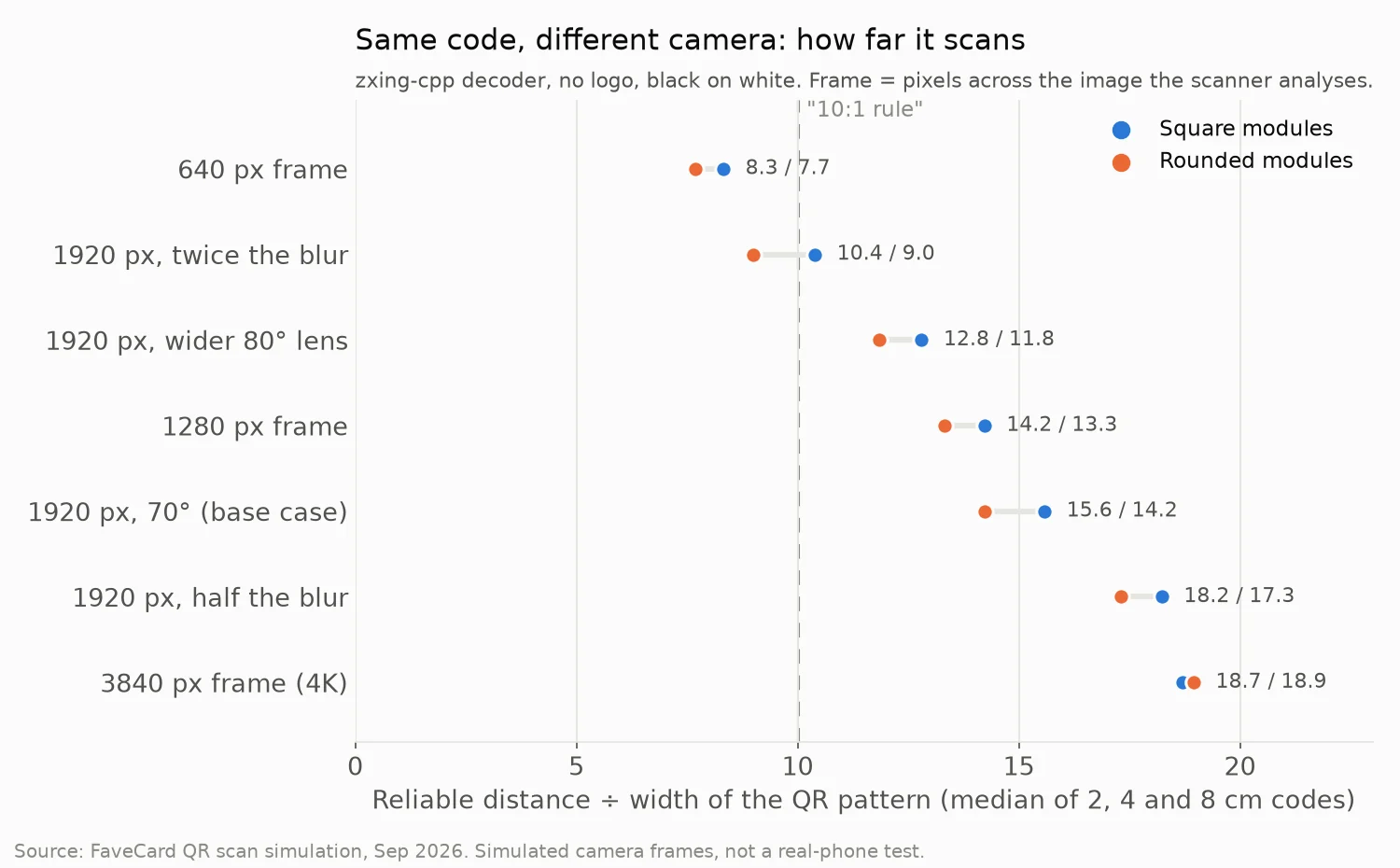
The two cases that fall below 10:1 are a low-resolution 640-pixel frame and a blurrier image. We didn’t measure real phones, but an older camera, a basic scanner app or a shaky hand in dim light pushes in the same direction. That is why we size by the black pattern: at 10:1 on the pattern, our base-case camera still had 40 to 55% of range to spare. That absorbs a fair amount of camera weakness, though not all of it, as the 640-pixel row shows.
Does the angle matter?
Less than size, but it adds up. Tilting the code 20° away from the camera cost up to 13% of the range; at 35° it cost 5 to 23%, depending on the decoder and the style. Rounded codes lost the most (23% with zxing-cpp at 35°).
A card lying flat on a table, seen by someone standing, is at a much steeper angle than 35°. Stand counter cards up, and put wall signs at chest to eye height so people scan them straight on.
What else stops a printed QR code from scanning?
Size is the part you can plan ahead. A few things our simulation didn’t cover also matter:
- The white border. Denso Wave’s standard asks for “a four-module wide margin at all sides of a symbol” (Denso Wave). Don’t crop it to fit a layout, and don’t print the code on a busy photo.
- Contrast. Keep the squares dark on a light background. Our simulation showed no clear penalty for colored codes, but it modeled no lighting, ink or paper, so we don’t count that as evidence. Dark on white is the safe bet.
- Glare and lamination. A glossy card under a spotlight can blank out part of the code. We didn’t simulate glare. If the sign is laminated or behind glass, test it with your own phone where it will hang.
- Long links. More characters mean more squares. A short link lets the same printed size read from farther away.
QR code sizes in FaveCard’s print editor
FaveCard’s print editor sizes the QR code for each format, so you don’t have to measure. These are the formats it offers and how far each code read in our simulation (zxing-cpp to best of four decoders, rounded modules):
| Format | QR image (with white border) | With your logo in the QR | Without a logo |
|---|---|---|---|
| 90 × 50 mm label | 26 mm (1.0 in) | 22–28 cm (9–11 in) | 24–31 cm (10–12 in) |
| A6 counter card, Bold design (the default) | 40 mm (1.6 in) | 33–44 cm (13–17 in) | 42–53 cm (17–21 in) |
| A6 counter card, other designs | 32 mm (1.3 in) | 24–33 cm (10–13 in) | 35–44 cm (14–17 in) |
| A4 sign, Bold design | 80 mm (3.1 in) | 65–86 cm (26–34 in) | 83 cm–1.01 m (33–40 in) |
| A4 sign, other designs | 64 mm (2.5 in) | 54–71 cm (21–28 in) | 64–81 cm (25–32 in) |
| QR for your own design | PNG, 1600 × 1600 px | depends on the size you print |
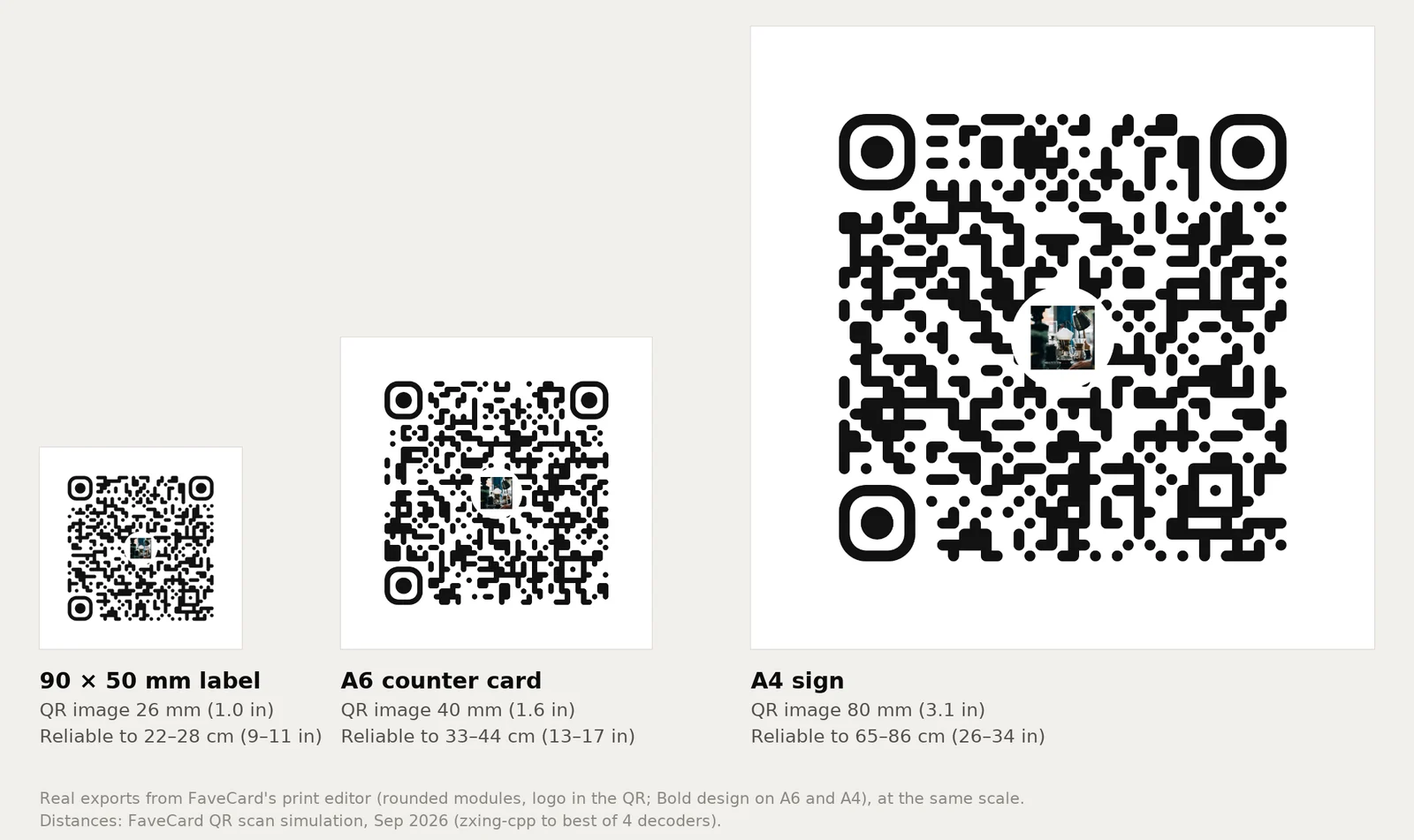
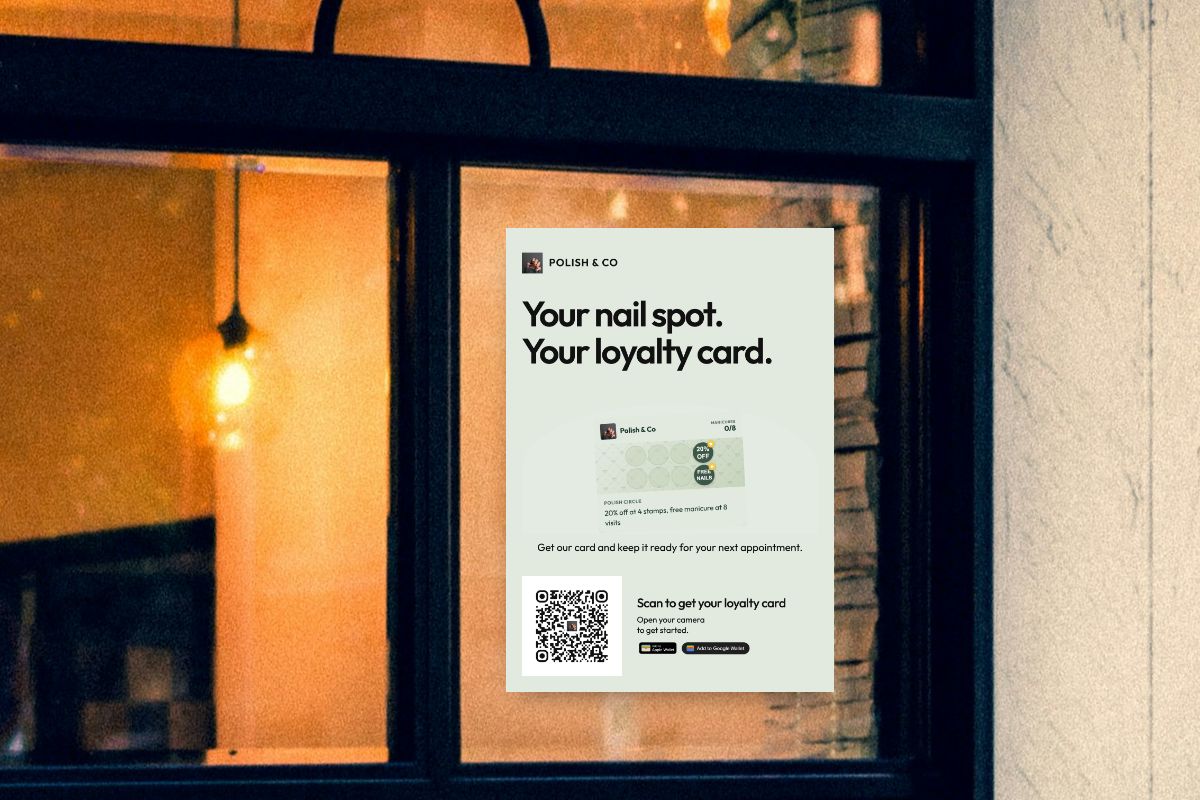
Look at the distances again: every format is built for someone standing close. The label works on a card reader or a mirror; the A6 on a table or the counter right where people pay; the A4 on a door or wall people walk up to. The A4 sign in the cover photo only works for people who walk up to the glass. For anything read from 1 m or more, download the 1600 × 1600 px QR image and place it in your own poster at 10 cm (4 in) or more of pattern per meter. At 20 cm (8 in) wide, that file still has 200 pixels per inch.
Two settings in the editor change the range. The QR code style (Classic, Rounded, Dots, Modern) defaults to Rounded; pick Classic if you want the widest scanner support. “Logo inside QR” is on by default when your business has a logo; turn it off on labels and small cards to win back the range the logo costs.
The print editor is on every FaveCard plan, including Free. A logo inside a loyalty card’s QR code needs Pro or a higher plan, or the free trial; QR codes for your Business Page can carry your logo on every plan. The pricing page lists what each plan includes. For where to put the signs and what they should say, read how to promote a loyalty program. The same sizing applies to codes from our Google review QR code generator.
How we ran the simulation
- Codes: the links and settings FaveCard’s print editor produces: 33 × 33 squares at error correction M without a logo, 41 × 41 at H with a center logo, in four styles (Classic, Rounded, Dots, Modern), dark (#111111) on white.
- Sizes: black patterns of 1.5, 2, 2.5, 3, 4, 5, 8 and 12 cm, plus the editor’s own label, A6 and A4 layouts.
- Camera: a 1920-pixel-wide analyzed frame with a 70° horizontal field of view. Sensitivity runs used 640 to 3840 pixels, 65° to 80° and half to double the blur.
- Each frame was degraded with defocus blur, sensor noise, JPEG compression and motion smear, at a tilt of 0°, 20° or 35°. 20 frames per distance, with fixed random seeds.
- Decoders: zxing-cpp, zbar, OpenCV’s QR detector and OpenCV’s WeChat detector.
- “Reliable” means read in at least 90% of frames at that distance and at every closer step, walking away in 4% steps.
What it doesn’t tell you. It’s a simulation, not a phone test. A phone’s own camera app uses autofocus, several frames at once, zoom and its own detector (Apple’s or Google’s), none of which we modeled, so real phones may do better than these numbers. Lighting, glare, lamination, paper and print quality weren’t modeled either. Each case used one link length. Treat the distances as planning numbers, not guarantees, and scan your printed code once where it will hang before you print a hundred.
Source: FaveCard QR scan simulation, September 2026. Codes generated with the same settings as FaveCard’s print editor; decoding by four open-source libraries.
Frequently Asked Questions
How big should a QR code be?
Measure the black pattern, not the white border, and make it at least one tenth of the scanning distance: 3 cm (1.2 in) for a code scanned from 30 cm (1 ft), 5 cm (2 in) from half a meter, 10 cm (4 in) from 1 m, 20 cm (8 in) from 2 m. Never go below 2 cm (0.8 in). In our simulation that sizing still worked with a logo in the middle, which typically cuts the range by 12 to 18%.
How small can a QR code be and still work?
About 2 × 2 cm (0.8 × 0.8 in) for something people hold in their hand. In our simulation a 2 cm code without a logo read reliably from up to 32–37 cm (13–15 in) and a 1.5 cm (0.6 in) code from up to 24–30 cm (10–12 in). With a logo, the 1.5 cm code dropped to 18 cm (7 in), which is closer than many people hold a phone. We did not test anything smaller than 1.5 cm.
What size should a QR code be on a business card?
2 to 2.5 cm (0.8 to 1 in) of black pattern, plus the white border around it. A business card is read from 15 to 30 cm, and in our simulation a 2.5 cm code without a logo read reliably out to 41–47 cm (16–19 in). Skip the logo in the middle on a card this small, or use the full 2.5 cm if you keep it.
How far away can a QR code be scanned?
About 10 to 19 times the width of its black pattern, depending mostly on the camera. In our simulation, with a 1920-pixel camera frame, a plain code read out to about 16 times its width with one open-source decoder and about 19 times with the best of four. A low-resolution 640-pixel frame or a blurry image cut that to 8 to 10 times. A plain 12 cm (4.7 in) code read to 1.9–2.4 m (6–8 ft); a rounded 12 cm code with a logo, to 1.3 m (4.3 ft).
Does a logo in the middle make a QR code harder to scan?
Yes, a little. A logo forces the highest error correction level, which adds squares to the code: 41 × 41 instead of 33 × 33 for the same link in our tests. At the same printed size each square is about 20% smaller, and the range dropped by a median 12 to 18% with the two strongest decoders we ran, more at some sizes. Print the code one size up, or turn the logo off for small labels.
Is the 10:1 rule for QR codes accurate?
Roughly, for a plain black-and-white code measured including its white border: in our simulation those read to about 11 times their width. It is too optimistic for a rounded code with a logo measured the same way (about 8 times) and for scanners with low-resolution or blurry camera frames (about 8 to 10 times the pattern width). Applied to the black pattern alone, the rule has a safety margin.


