




5 Free Linktree Alternatives for Small Business
Link-in-bio tools for cafés, salons and shops, not influencers. Compare free Linktree alternatives for booking, reviews and loyalty, and which show a menu.
Key Takeaway:
Most link-in-bio tools were built for influencers and content creators. If you run a local business — a cafe, salon, barbershop, or restaurant — you need a tool that supports booking links, your menu or price list, Google reviews, QR codes, and ideally a loyalty programme. FaveCard is the only link-in-bio tool we found that includes a built-in digital loyalty card on the free plan, and its Business plan puts your menu, services and events on the same page.
Last updated: October 2026
A Linktree alternative for small business is a link-in-bio tool designed for shops, salons, cafes, and service businesses — not influencers or content creators. The best ones include features like booking links, Google review buttons, QR code sharing, and loyalty programmes.
Key Takeaway: Most link-in-bio tools were built for influencers and content creators. If you run a local business, you need a tool that supports booking links, your menu or price list, Google reviews, QR codes, and ideally a loyalty programme. FaveCard is the only link-in-bio tool we found that includes a built-in digital loyalty card on the free plan, and its Business plan puts your menu, services and events on the same page.
You’ve probably heard the advice: “Put a link in your bio.”
Good advice. But when you go to set it up, every tool assumes you’re an influencer selling courses, merch, or brand deals. You get features like “tip jar,” “creator store,” and “media kit” — and nothing for the things your customers actually need.
Where’s the menu with prices? The loyalty card? The QR code for the counter?
If you run a coffee shop, a hair salon, a barbershop, or a restaurant, Linktree wasn’t built for you. This guide covers the alternatives that were.
Why Linktree Doesn’t Work for Local Businesses
Linktree is the most popular link-in-bio tool — over 70 million users worldwide. But popularity doesn’t mean it’s the right fit.
Here’s what Linktree does well:
- Simple setup (under 2 minutes)
- Clean, recognisable design
- Works on every platform
- Built-in bookings on every plan, plus apps for your Google Maps location and Google reviews
Here’s what it’s missing for local businesses:
- No loyalty programme. You can’t reward repeat customers or track visits.
- No menu or price list. There’s no block for a menu with prices; you link to one hosted somewhere else, usually a PDF.
- Reviews are for showing, not asking. Linktree’s Reviews app displays the Google reviews you already have. It isn’t built to ask a happy customer for a new one.
- Creator-first. Tip jars, music links, and NFT galleries sit next to the business features. You can add a bio, a map location and contact details, but the templates and dashboard are built around creators.
Linktree works well for links and bookings. But a local business also needs a page that brings customers back.
What Local Businesses Actually Need in a Link-in-Bio
Before comparing tools, here’s what matters when you serve customers in person:
- Booking or ordering link — Let customers book an appointment or place an order directly.
- Your menu or price list — People want to see prices before they visit. A page that shows them beats a link to a PDF they have to pinch and zoom.
- Google review button — Make it easy for happy customers to leave a review (see how to ask for Google reviews). Reviews drive more local search traffic than almost anything else.
- Loyalty programme — Reward repeat visits. A link-in-bio page that includes a digital loyalty card turns one-time visitors into regulars.
- Business branding — Your logo, colours, and description. Not a generic template with someone else’s branding.
- QR code — Print it for your counter, receipt, or window. Customers scan it and get your page instantly.
- Social media links — Instagram, Facebook, TikTok, YouTube — wherever you’re active.
- Free plan — You’re a small business, not a venture-funded startup. The tool should work at $0.
Linktree and 5 Free Alternatives for Small Business
First, the tool everyone compares against. Then five free alternatives, starting with the one built for local businesses.
The baseline: Linktree — Best Known, But Creator-Focused
Price: Free | Starter $8/month | Pro $15/month | Premium $35/month (billed monthly; $6–$30/month billed annually)
Linktree is the original link-in-bio tool. It’s simple, reliable, and works everywhere. If you just need a clean list of links, it does the job.
What you get (free):
- Unlimited links
- Free themes
- Bookings
- Email and phone number collection
- A QR code for your page
- Basic analytics (lifetime totals and 28 days of history)
What you get (paid):
- Link scheduling, animated and spotlighted links, per-link insights (Starter and up)
- Remove Linktree branding (Pro and up)
- A Calendly calendar embedded on the page (Pro and up)
Best for: Businesses that need a clean list of links and simple bookings, with no loyalty programme.
Limitation for local business: No loyalty features, and no menu or price list on the page. The free plan shows Linktree branding and takes 12% on digital products and courses. Removing the logo and embedding a Calendly calendar both need Pro ($15/month).
1. FaveCard — Best for a Built-in Loyalty Card (Menu on the Business Plan)
Price: Free (no time limit) | Pro and Business plans (see pricing)
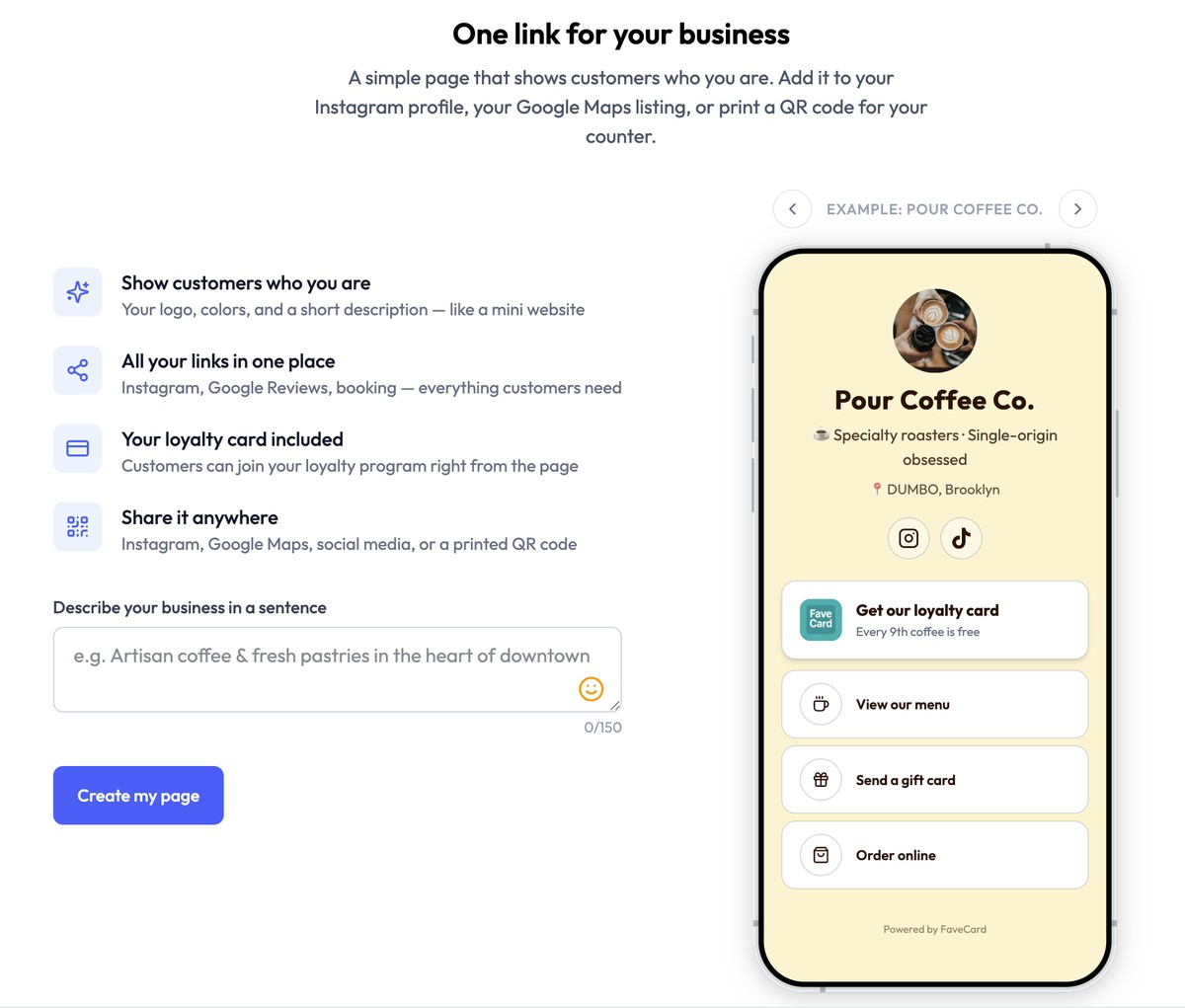
FaveCard is a digital loyalty card platform, and every account comes with a business page: one link for your Instagram bio and one QR code for your counter or tables.
What makes it different: the first button on the page is your loyalty card. Customers open your page, see what you offer, and join your stamp card right there, with no app to download. On the Business plan, the same page also holds your menu, products, services, portfolio, news and events, so it can stand in for a small website if you don’t have one. To see how the card compares with dedicated loyalty tools, check our roundup of free digital loyalty card apps.
What you get (free):
- Your loyalty card as the first button (customers join in one tap)
- Your business name, a short description, your location and social links
- Call, WhatsApp and Telegram buttons
- Up to three link buttons (to your booking site, ordering page or current menu), plus a table-reservation link. The menu shown on the page itself comes with Business
- A “Leave a review on Google” link once your Google Maps listing is connected
- A QR code, print-ready signs and Instagram graphics for the page
What you get (paid):
- Pro: your logo and a cover photo on the page, and cards that go straight into Apple Wallet and Google Wallet
- Business: a menu with prices, sizes, extras and dietary tags; products; services with prices and durations; a portfolio; news posts; and events with dates. Customers can tap “Ask” next to any item to message you on WhatsApp or by text.
Every new account can use these premium tools free for its first 30 days.
Best for: Coffee shops, restaurants, salons, barbershops, spas — any local business that wants a link-in-bio page AND a loyalty programme for their small business without paying for two separate tools.
Limitation: You get up to three custom links (plus the review and reservation links), not an unlimited list like Linktree or Lnk.Bio. FaveCard doesn’t take orders, bookings or payments: the buttons link to the tools you already use. There’s no online store, tip jar or checkout, so if you’re an online-only brand or a content creator, the other tools on this list fit better.
Why it stands out: Every other tool on this list gives you links. FaveCard’s free plan gives you links and a loyalty card on the same page, and the Business plan adds your menu or price list to it. For a local business, that’s the difference between a page customers visit once and a page that brings them back. Create your business page. You’ll start with the premium tools free for the first 30 days, then keep your free page for as long as you like.
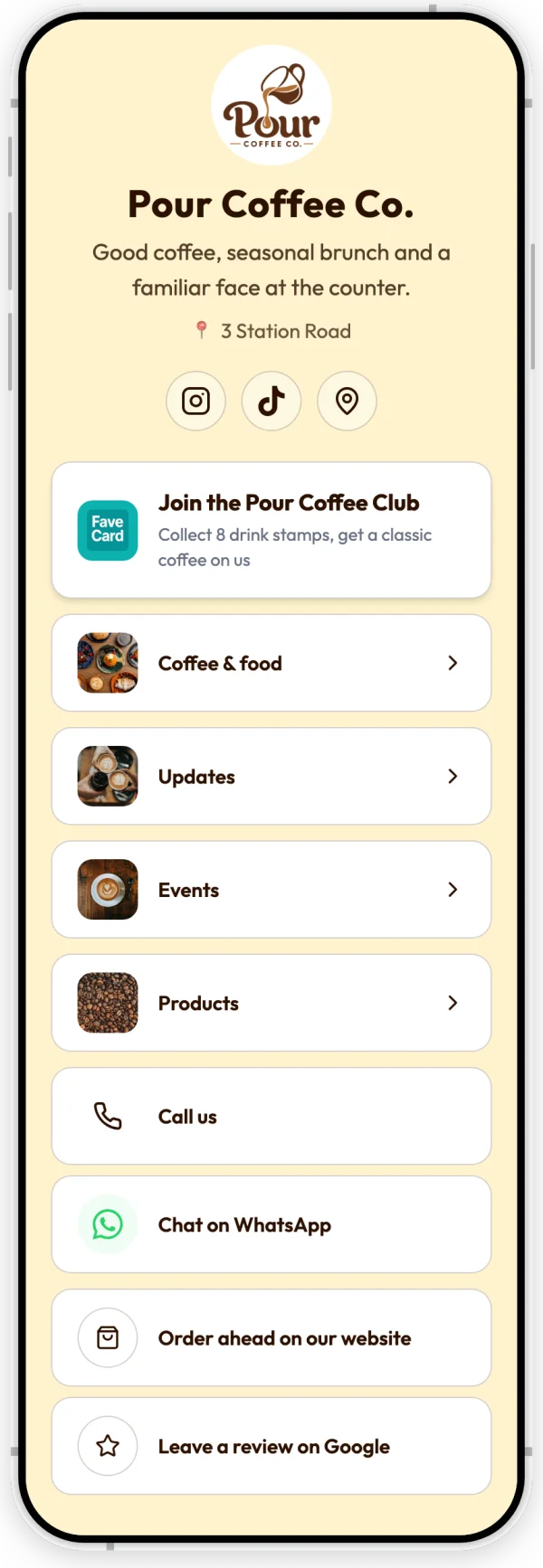
The whole page of an example coffee shop: the loyalty card first, then the menu, news, events and products, contact buttons and a Google review link. See how the business page works, or how to put it behind one QR code on your tables.
2. Lnk.Bio — Best Simple Free Option
Price: Free | Mini $0.99/month (or $9.99 one-time) | Unique $24.99 one-time (lifetime)
Lnk.Bio keeps things minimal. No frills, no bloat — just links on a page. The one-time lifetime pricing is genuinely impressive.
What you get (free):
- Unlimited links
- Basic analytics (views and per-link clicks)
- QR code generation
- 38 page layouts and hundreds of templates
- Blocks for opening hours, customer reviews and a Google Map of your business
What you get (paid):
- Link scheduling and grouping (Mini and up)
- Instagram/TikTok grid sync (Mini and up)
- Custom colours (Unique)
- A custom domain ($29.99/year add-on on any paid plan)
- A booking calendar ($4/month add-on)
Best for: Budget-conscious businesses that want the simplest possible link page. The $24.99 lifetime price is unbeatable.
Limitation for local business: No loyalty features and no menu or price list. Booking is a $4/month add-on and the shop comes with Unique, so it’s more than a list of links, but nothing is built around repeat customers. The lifetime pricing still makes it excellent value.
3. Beacons — Best for Businesses That Also Sell Online
Price: Free (9% seller fee) | Creator $10/month | Creator Plus $30/month | Creator Max $100/month (billed monthly; about 17% less billed annually)
Beacons started as a creator tool but has grown into a bigger platform with an online store, email marketing and a media kit.
What you get (free):
- Link-in-bio page
- Online store (unlimited digital products, 9% fee)
- Email marketing (50 emails/month)
- Media kit
- Analytics
- A QR code for your page
What you get (paid):
- A custom domain (Creator, free for the first year)
- Removed Beacons branding (Creator Plus+)
- 0% seller fee (Creator Plus+)
Best for: Businesses that sell products online (merch, gift cards, retail) alongside in-person services.
Limitation for local business: Powerful but complex. The 9% seller fee on the free plan eats into revenue. The dashboard is designed for creators managing multiple revenue streams — overkill if you just need a booking link and a loyalty card. No loyalty programme feature. Removing Beacons branding requires the $30/month plan.
4. Milkshake — Best Mobile-First Mini Website
Price: Free | Lite $2.99/month | Pro from $5/month (yearly) | Pro+ from $8.33/month (yearly)
Milkshake is a mobile app that lets you build a mini website (they call it a “shake”) in swipeable card format. It’s designed entirely for phone use — you create and edit everything from the app.
What you get (free):
- Swipeable card-style pages
- All templates and cards
- QR code sharing
- 30 days of analytics
What you get (paid):
- Remove Milkshake branding (Lite, $2.99/month)
- 365-day analytics and contact forms (Pro, $5/month)
- Custom domain (Pro+, $8.33/month)
Best for: Solo business owners who want a visually creative mini website built entirely from their phone.
Limitation for local business: Mobile-only — no desktop editor. The card format is creative but can feel unusual for customers expecting a standard page. No loyalty integration. Selling digital files works on every plan, but Milkshake takes 12% on Free and Lite. The free plan is limited to 30 days of analytics and shows Milkshake branding.
5. Carrd — Best DIY Simple Website
Price: Free (3 sites) | Pro Lite $9/year | Pro Standard $19/year | Pro Plus $49/year
Carrd isn’t a link-in-bio tool — it’s a simple one-page website builder. But many small businesses use it as their link-in-bio because it offers far more customisation than any dedicated tool.
What you get (free):
- 3 one-page websites
- Responsive design
- Basic templates
What you get (paid):
- A QR code for your site (Pro Lite and up)
- Custom domains, forms and Google Analytics (Pro Standard, $19/year and up)
- More sites (10 on Standard, 25 on Plus)
Best for: Businesses that want full control over their page design and don’t mind spending 30 minutes on setup instead of 2.
Limitation for local business: It’s a website builder, not a link-in-bio tool. No loyalty features, and QR codes need Pro Lite ($9/year). Setup takes longer and requires more design decisions.
Later isn’t free, so it isn’t in the five above, but it comes up often, so here is how it compares.
What About Paid-Only Tools Like Later?
Later (Linkin.bio) — For Instagram-Heavy Businesses
Price: No free plan (14-day free trial) | Starter $25/month | Growth $50/month | Scale $110/month (billed monthly)
Later is primarily a social media scheduling tool. Its Linkin.bio feature turns your Instagram grid into a clickable page — each post links to a URL. You cannot buy the link-in-bio feature separately.
What you get:
- Clickable Instagram grid (each post → a link)
- Link page with custom buttons
- Full social media scheduling suite
- Analytics
Best for: Businesses that already use Later for Instagram scheduling and want an integrated link-in-bio.
Limitation for local business: No free plan, only a 14-day trial, and the cheapest option is $25/month for the full social media suite. You’re paying for scheduling, analytics, and team tools when you might just need a link page. No loyalty features. Overpriced if you only want link-in-bio functionality.
Quick Comparison Table
| Tool | Free Plan | Loyalty Card | Menu / Price List on the Page | QR Code on Free Plan | Price (paid) | Best For |
|---|---|---|---|---|---|---|
| FaveCard | Yes (up to 3 custom links) | Yes (built-in) | Yes (Business plan) | Yes | Pro and Business plans | Loyalty, menu and links in one |
| Linktree | Yes (branded, unlimited links) | No | No (link to one) | Yes | $8–35/mo | Links and simple bookings |
| Lnk.Bio | Yes (unlimited links) | No | No | Yes | $0.99/mo, or $9.99–24.99 one-time | Budget minimalists |
| Beacons | Yes (9% fee) | No | No | Yes | $10–100/mo | Online sellers |
| Later | No (14-day trial) | No | No | No free plan | $25–110/mo | Instagram scheduling |
| Milkshake | Yes (branded) | No | No | Yes | $3–10/mo | Mobile-only owners |
| Carrd | Yes (3 sites) | No | Build your own | No (Pro Lite, $9/yr) | $9–49/yr | DIY website builders |
Prices are what a US visitor sees on each vendor’s pricing page, billed monthly unless noted; checked in September 2026.
Other tools now add booking, map or review widgets. Only FaveCard builds a loyalty card into the page. And unless you build the page yourself in a site builder like Carrd, it’s the only tool here that shows a structured menu or price list on the page.
Free Linktree Alternatives at a Glance
If budget is your main concern, here are the genuinely free options:
- FaveCard — Free with no time limit. Includes the loyalty card, links, contact buttons, a Google review link and a QR code. The menu and services come with Business.
- Lnk.Bio — Free with unlimited links. Paid plans start at $0.99/month or $9.99 one-time.
- Milkshake — Free with branding. Mobile-only builder.
- Linktree — Free but limited (branded, 12% fee on digital products and courses, 28 days of analytics history).
- Beacons — Free but charges 9% on any sales.
- Carrd — Free for 3 sites, but very basic without paid features (no QR code, no custom domain).
How to Choose the Right Tool
Choose FaveCard if you run a business with repeat customers — a cafe, salon, barbershop, restaurant, spa, or studio. You get a link-in-bio page AND a loyalty card in one tool, and on Business your menu or price list on the same page. Create your business page and have it ready to share in minutes.
Choose Linktree if you need a clean list of links and simple bookings, and don’t need a loyalty card or a menu on the page.
Choose Beacons if you sell products online alongside your in-person services.
Choose Later (paid only) if Instagram is your primary marketing channel, you post multiple times per week, and you have the budget for a full scheduling suite.
Choose Milkshake if you work entirely from your phone and want something creative.
Choose Carrd if you want full design control and don’t mind building something from scratch.
Choose Lnk.Bio if you want the absolute simplest option with zero learning curve.
How to Set Up Your Business Link-in-Bio in 5 Minutes
Once you’ve picked a tool, here’s what to include on your page:
- Your business name and description — One sentence that tells customers what you do and where you are.
- Booking or ordering link — The single most important link for a local business.
- Google review link — Add your Google Maps review URL. More reviews = more local search visibility (how many do you need?).
- Loyalty programme — If your tool supports it, add your digital loyalty card so customers can join on the spot. With FaveCard, the loyalty card is already built into your page — create your business page and it’s there from day one.
- Social media links — Instagram, Facebook, TikTok — wherever your customers follow you.
- Menu or services — Link to your menu, treatment list or price list. On a FaveCard page (Business plan), you can show it on the page itself, with prices.
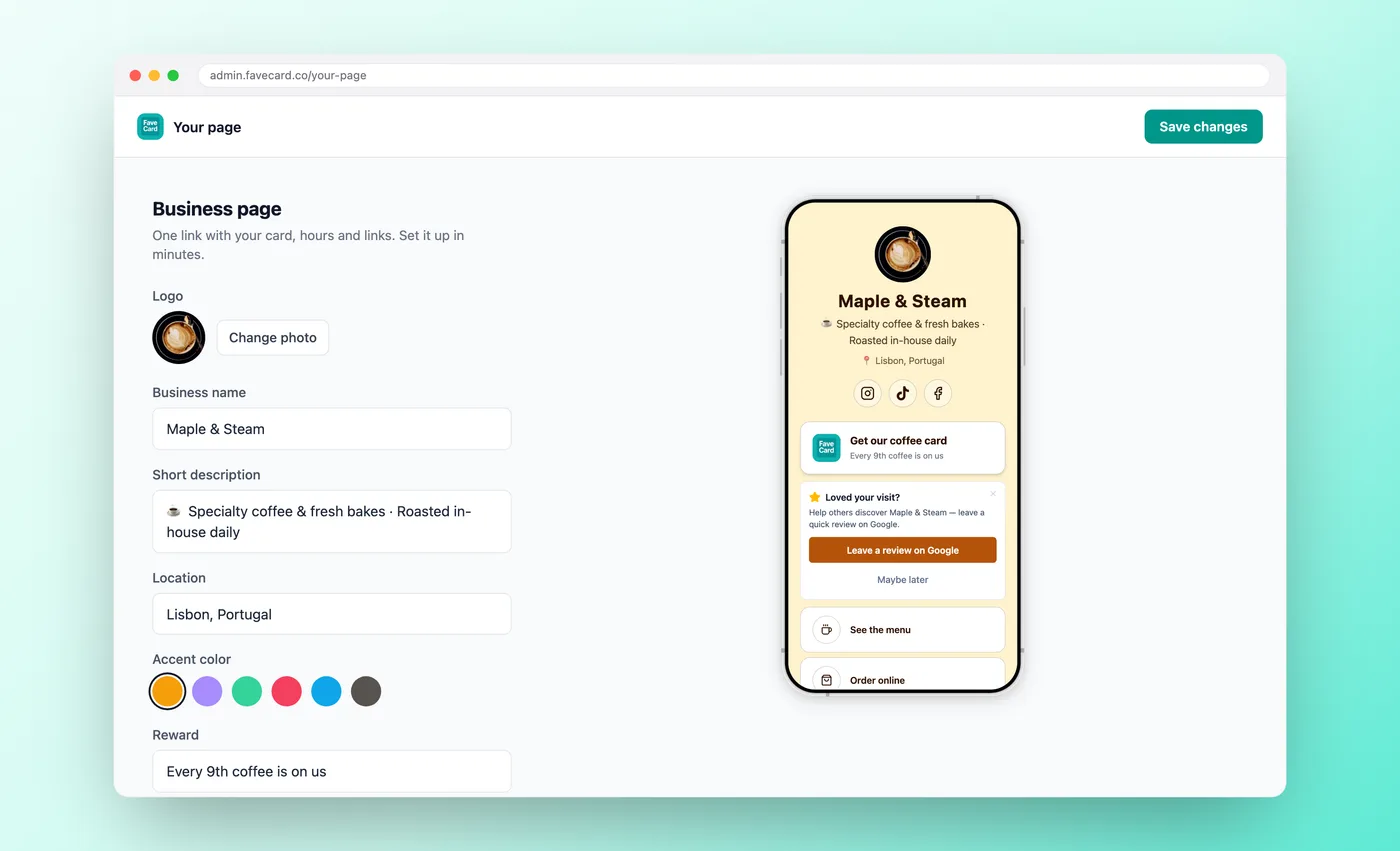
The FaveCard “Your page” dashboard: set your links with a live preview, then copy the shareable URL. Adding a logo takes a paid plan; the Google review card (shown here) is on every plan.
Then share it:
- Instagram bio — Replace your current link.
- Google Maps — Add it to your Google Business Profile website field.
- QR code — Print it and place it on your counter, in your window, or on receipts.
- WhatsApp / text — Send it to existing customers.
Beyond the Bio Link
Linktree works for influencers. It’s simple, it’s popular, and it does what it says.
But if you run a local business, “a list of links” isn’t enough. You need a page that helps customers book, leave reviews, and keep coming back. Most link-in-bio tools don’t do that.
The best Linktree alternative for a small business isn’t just another link tool — it’s one that turns your bio link into a tool for repeat business.
If you want a free page with your links and a loyalty card, with the option to add your menu later on the Business plan, create your FaveCard business page. The basic page takes a few minutes, with your loyalty card already on it.
Frequently Asked Questions
What is a good free alternative to Linktree?
It depends on what the page is for. For a local business that wants repeat visits, FaveCard's free business page has your links, social icons, call and WhatsApp buttons, a Google review link and a loyalty card built in as the first button; its Business plan adds a menu, services, products and events to the same page. For creators or online sellers, Lnk.Bio and Beacons offer strong free plans, and Linktree's free plan now includes bookings.
Is Linktree free?
Linktree has a free plan with unlimited links, free themes, bookings, and basic analytics (lifetime totals and 28 days of history). The free plan shows Linktree branding and takes a 12% fee on digital products and courses. Paid plans run from $8/month (Starter) to $35/month (Premium) billed monthly, or $6–$30/month billed annually. Removing the Linktree logo needs Pro ($15/month).
What is better than Linktree for a small business?
A tool built for in-person customers. Look for booking links, a menu or price list on the page, a Google review link, a QR code for the counter and a way to bring people back, such as a loyalty card, rather than tip jars and media kits built for influencers. Linktree now includes bookings and can show your existing Google reviews, but it has no loyalty card and no menu block.
Do I need a link-in-bio tool for my business?
If you use Instagram, TikTok, or Google Maps, it helps. Profiles give you little room for links, and a single page is easier for customers than a list. A link-in-bio page lets you share your menu, booking link, reviews, and loyalty programme from one URL, and the same URL works on a printed QR code.
Can I use a link-in-bio page as a mini website?
Yes. Many small businesses use their link-in-bio page as a simple landing page — especially if they don't have a website yet. It shows your branding, description, location, social links, and key actions like booking or ordering.
Can I show my menu on a link-in-bio page?
With most link-in-bio tools you can only link to a menu hosted somewhere else, often a PDF. A FaveCard business page can show the menu itself, with sections, prices, sizes, extras and dietary tags, on the Business plan; the basic page with your links and loyalty card is free. See how to put it behind one QR code on your tables in our guide to one QR code for your menu, reviews and loyalty card.