




27 Questions to Ask Customers at Loyalty Signup
The questions worth asking when a customer takes your loyalty card, grouped by trade. Plus the ones not to ask, and why the customer answers, not your staff.
Key Takeaway: The quickest way for a local business to remember what its regulars like is to let the customer say so once, at signup, in two or three optional questions. The answers stay attached to their loyalty card, so nobody has to keep a spreadsheet and nothing walks out of the door when a staff member leaves.
FaveCard Team
Published August 3, 2026 · Updated August 3, 2026
Last updated: August 2026
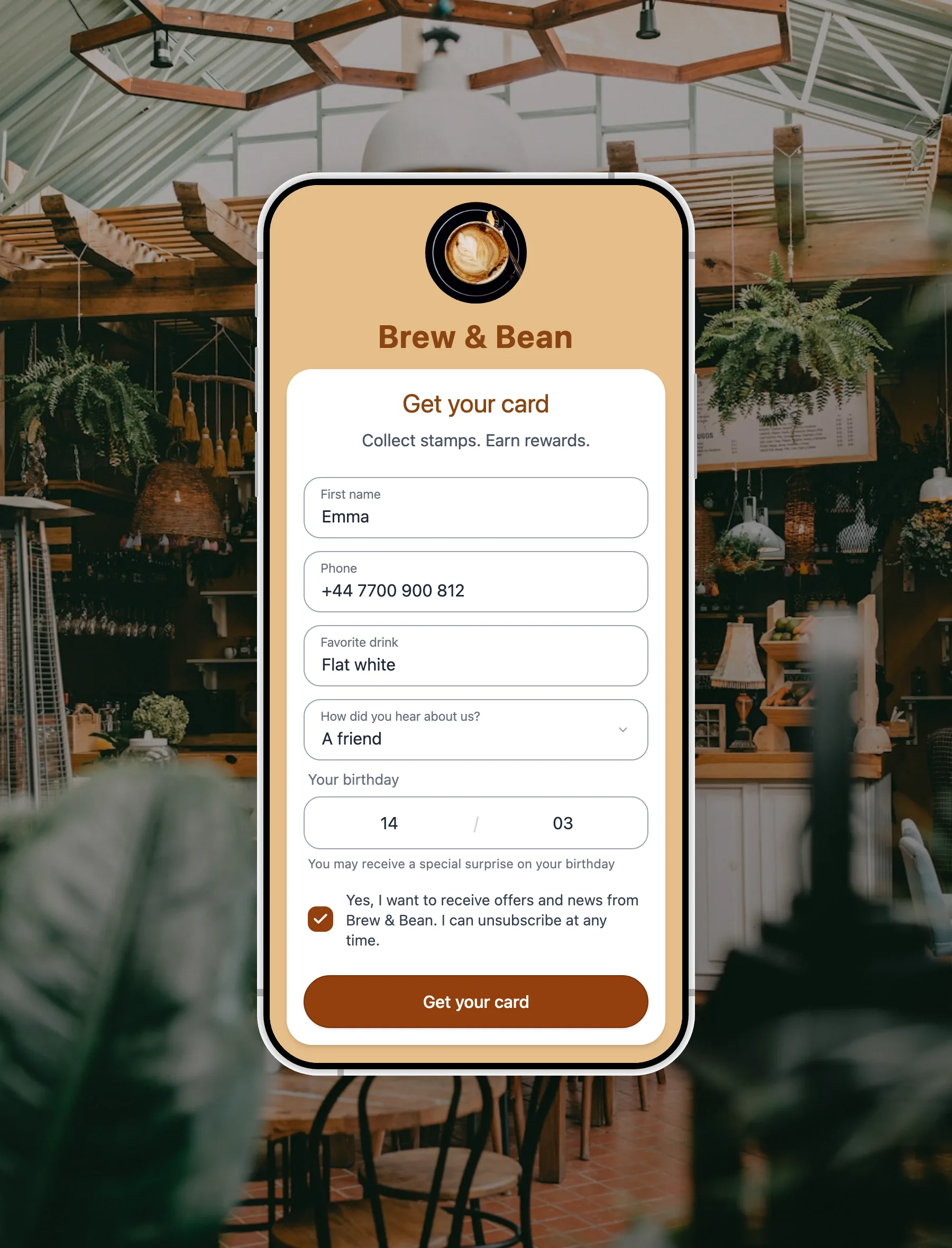
A local business can remember what its regulars like by asking them once, at signup. When someone takes your digital loyalty card, the form can carry two or three optional questions: favourite drink, usual service, the best time of day for them. The customer types the answers on their own phone, in whichever of 30 languages that phone is set to. Those answers stay attached to their card, and your team sees them on the same screen at the next visit.
Key Takeaway: Nobody has to remember anything, and nobody has to write anything down. The customer tells you once, and the answer is still there when the member of staff who served them has moved on.
Below is the full bank of questions worth asking, grouped by the kind of business asking them. There is also a section on when to ask nothing at all, which matters more than the list does.
The rule before the list: two or three, never more than five
Every question you add to a signup form is another reason not to finish it. The customer is standing at your counter with a phone in one hand, and the thing you actually want is for your card to end up in their wallet. The answers are a bonus.
So the rule is:
- Two or three questions is normal. Five is the ceiling.
- Never make one required. A required question blocks the card until it is filled in. If a customer will not share the answer, you have not collected data, you have lost a customer.
- Only ask what changes what you do. If nobody will ever read the answer, the question is a tax on your signup rate.
FaveCard’s form editor makes this visible while you build it. Add questions and an “Ease of signup” reading moves from Easy to Getting harder to Difficult, so you can see the cost of the question you are about to add before a customer pays it.
One honest note on numbers. We do not yet have a published figure for how much each extra question costs in completed signups. These questions went live in July 2026 and we started measuring the week they shipped. When there is enough data to report properly, with the sample size and the date attached, we will publish it, the way we published our study of 23,296 loyalty stamps. Until then, treat the rule above as a design principle rather than a measurement, and be suspicious of anyone in this category quoting a precise drop-off percentage without saying where it came from.
The customer answers, not your staff
Almost every other piece of advice on this subject ends in the same place: train your staff to write notes. Put a profile in your booking system. Keep a shared spreadsheet. The barbering and hairdressing trade press says it, the point-of-sale vendors say it, and the reservation platforms sell it as a paid feature.
It does not hold. Here is an owner in r/smallbusiness explaining why, in a thread about keeping track of regular customers:
“We have tried using spreadsheets and it does work for a couple weeks but it almost always dies because no one is updating the spreadsheet regularly. They are doing a lot of manual work already when we add this step as well they either don’t do it or forget it.”
The same owner describes the other failure in the original post: “Right now it’s spread across WhatsApp, a couple spreadsheets, and whatever the staff happen to remember. Someone leaves and half of it walks out with them.”
Both failures come from the same design mistake. The person expected to record what a customer likes is the person already serving them. A reply in that thread calls the thing being reached for a customer memory system, which is a good name for it, and it is precisely what a busy counter cannot maintain by hand.
Asking the customer inverts it. They answer once, unprompted, at the one moment they are already filling in a form and already motivated, because a reward is on the other side of it. There is no ongoing task for anyone. No one has to remember to write it down, and nothing is lost when someone hands in their notice.
The question bank, by trade
Your card already asks for a first name and an email address, plus an optional birthday, so those are not on this list. Everything below is an optional extra you can switch on.
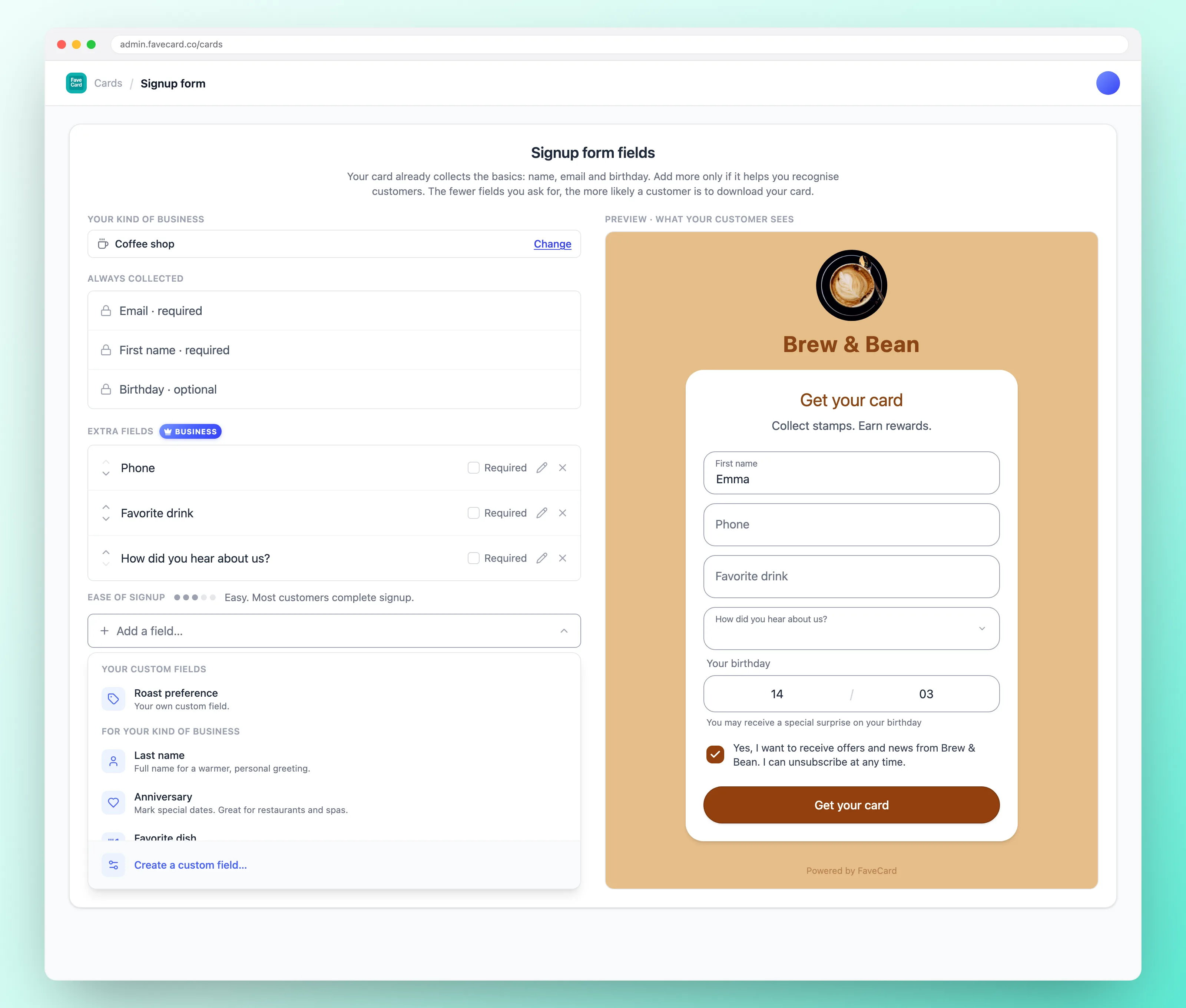
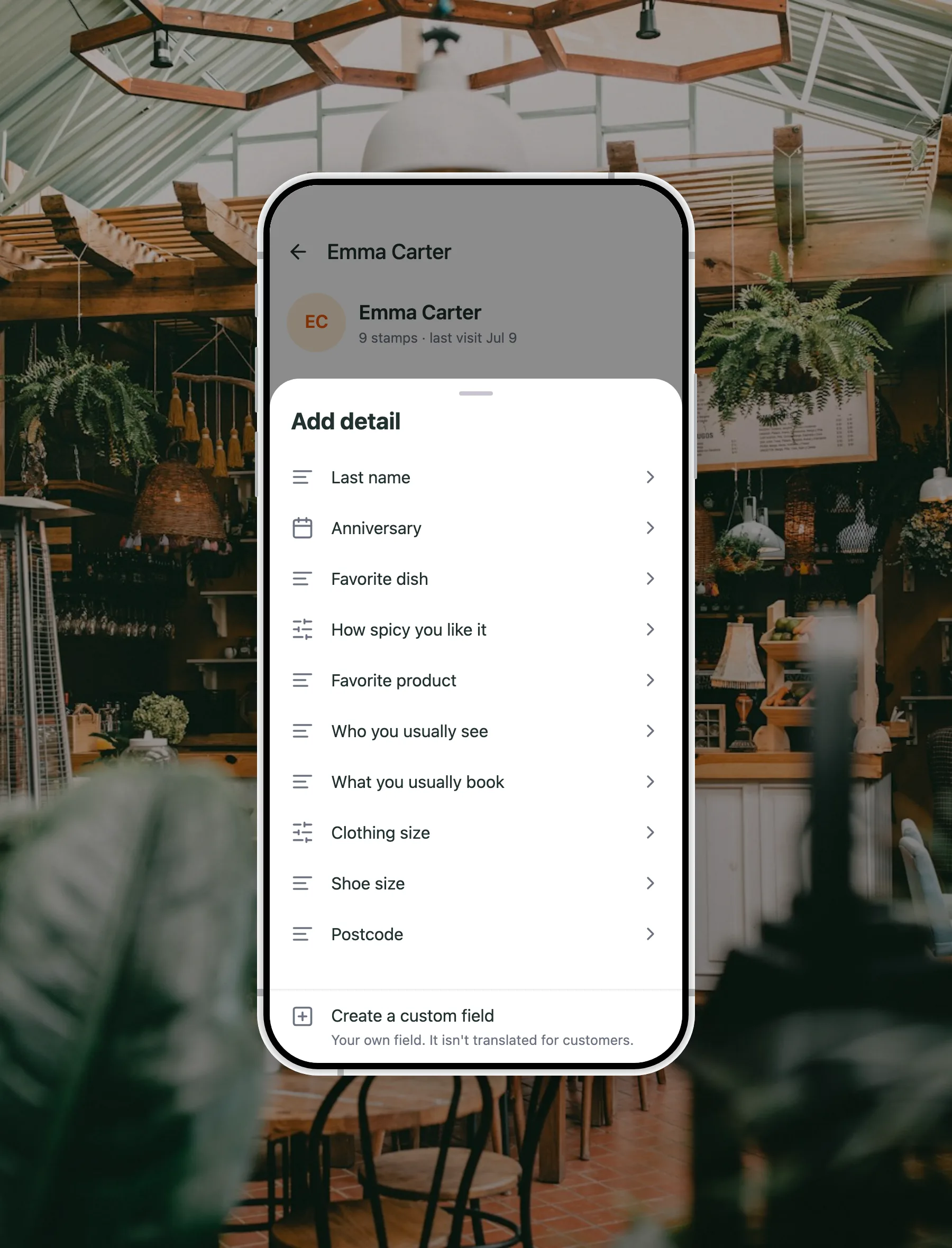
One thing to know before you read it. Every question below, and every dropdown answer inside it, ships translated into 30 languages, and the language is chosen by the customer’s own phone rather than by you. A Portuguese visitor to a Dublin café sees the form in Portuguese without anyone configuring anything. That is the part of this that is genuinely hard to copy, and it is why the ready-made questions are worth more than a box you fill in yourself.
Cafés and coffee shops
A café sees the same faces every two or three days, which is why coffee-trade advice is full of memory tricks: use the name three times, invent a nickname with the order baked into it. They work right up until you hire someone new. Asking once, at signup, survives a rota change. If you are still setting the card itself up, start with how to run a coffee shop loyalty programme.
| The question | Why it earns a slot | Best for |
|---|---|---|
| Favourite drink | Lets whoever is on the machine greet a regular with their usual instead of asking. The single highest-value question in this trade. | Cafés, coffee shops, bakeries, juice bars, bars |
| Favourite product | Tells whoever is serving what to recommend, instead of guessing. Works for beans, pastries and anything you sell off the shelf. | Cafés selling retail, delis, farm shops, boutiques |
Restaurants, bars and takeaways
A takeaway that already knows a regular takes theirs hot does not have to ask, and does not get it wrong once. The gain here is not sentiment, it is order accuracy and speed at the busiest hour of the week. There is more on the mechanics in restaurant loyalty programmes.
| The question | Why it earns a slot | Best for |
|---|---|---|
| Favourite dish | Records what a regular actually comes in for, so whoever takes the order already knows the answer. | Restaurants, takeaways, pubs, food trucks |
| How spicy you like it (mild / medium / hot / extra hot) | A fixed set of answers, no typing, and it makes the food right first time rather than after a complaint. | Curry houses, Thai and Mexican kitchens, wings, ramen |
| Anniversary | A second date in the year, sitting on their profile where you will see it. The birthday is already on your form; this is the one they plan around. | Restaurants, wine bars, spas, hotels, florists |
Hair salons, barbershops and nail bars
This trade has the sharpest version of the problem, because a stylist may see a client once a month and needs to recall a conversation from five weeks ago. A stylist in r/hairstylist put it plainly: “I’m starting to get returning clients - AMAZING! But I can’t for the life of me remember anything about them or what we last spoke about.” Two questions answered at signup do most of that work for you. See also barbershop loyalty programmes and salon loyalty programmes.
| The question | Why it earns a slot | Best for |
|---|---|---|
| Who you usually see | What most often goes wrong when a client books over the phone, and the easiest thing on this list to get right. | Salons, barbershops, nail bars, spas, clinics, garages |
| What you usually book | Tells you the service before they say it, so the slot is the right length and the price is not a surprise. Not available to clinics, for a reason worth reading below. | Salons, barbershops, nail bars, beauty, dog groomers |
| Best time for you (mornings / afternoons / evenings / weekends) | Tells you when a client can actually come, so you offer them a quiet slot instead of guessing at one. | Salons, gyms, clinics, cafés with off-peak offers |
Spas, clinics and beauty
Recognition here has to be discreet, and there is a hard line running through the middle of it.
For a spa or a beauty salon, all three questions above work. For a dental practice, a medical or aesthetic clinic, a physiotherapist or a pharmacy, What you usually book is not offered at all. FaveCard withholds it from those trades on purpose, because a patient answering “what do you usually book?” honestly is describing a diagnosis, and a loyalty card is no place to hold one. Those trades get Who you usually see and Best time for you instead: who and when, never what is wrong.
Add Anniversary if you sell couples’ or gift treatments, and nothing else.
Pet groomers and vets
The easiest questions in the bank to ask, because they are about the one subject customers are usually pleased to be asked about.
| The question | Why it earns a slot | Best for |
|---|---|---|
| Pet’s name | Greeting the dog by name lands better than greeting the owner by name, and it is hard to make it feel intrusive. | Groomers, vets, pet shops, dog walkers, boarding kennels |
| Pet type (dog / cat / other) | A fixed choice rather than free text, so the answer reads the same on every profile and nobody has to interpret it. | Vets, groomers, pet shops, pet food retailers |
Garages, car washes and bike shops
Here the question is not about preference at all, it is an identifier. A number plate turns a queue of cars into a list of names, which is why an identifier is worth more in this trade than any preference question.
| The question | Why it earns a slot | Best for |
|---|---|---|
| Number plate | Scan the card and you know which car is theirs, without asking. The one answer in this bank that is an identifier rather than a preference. | Car washes, valeting, garages, MOT centres |
| Car make and model | Tells you what you are working on as soon as the card is scanned, rather than after somebody walks out to look. | Garages, tyre fitters, detailers, mobile mechanics |
| Bike make and model | Same idea on two wheels. A service booking is a different job on a road bike than on an e-bike. | Bike shops, bike repair, motorbike servicing |
Gyms, studios and coaches
A gym’s retention problem is that the reason somebody joined stops being visible almost immediately. Asking for it at signup keeps it in front of whoever is on the floor.
| The question | Why it earns a slot | Best for |
|---|---|---|
| What you’re training for | The reason they joined, in their own words. It is what a good coach uses to keep somebody coming in month four. | Gyms, PTs, studios, climbing walls, running clubs |
| Level (beginner / intermediate / advanced) | Puts someone in the right class the first time rather than the third. | Gyms, yoga and pilates studios, dance schools, ski schools, martial arts |
Tutors, schools and classes
| The question | Why it earns a slot | Best for |
|---|---|---|
| What you’re learning | The subject, not just the progress. Lets whoever picks up the class know what they are picking up. | Tutors, language schools, music teachers, driving instructors, craft workshops |
Level from the section above belongs here too, and is usually the more useful of the two.
Shops and boutiques
In retail the answer has money attached directly, with one caveat expanded further down: today the size sits on the customer’s profile and in your export, and there is no button that finds everybody who wears a medium.
| The question | Why it earns a slot | Best for |
|---|---|---|
| Clothing size (a fixed list, XS to XXL) | On the profile when they are in front of you, and a column in your export when you want to work through the list yourself. | Clothing, sportswear, uniform suppliers, kit shops |
| Shoe size | Free text on purpose, so a customer can answer in EU, UK or US sizes rather than yours. | Shoe shops, running shops, workwear, dance and sports kit |
Favourite product from the café section works just as well on a shop floor.
Run a clothing shop? The clothing boutiques page shows the whole card set-up for one, sizes included.
Trade counters and anyone who invoices
If some of your customers buy on behalf of a business, two questions save a chasing email later.
| The question | Why it earns a slot | Best for |
|---|---|---|
| Company name | For customers buying on behalf of a business, and for getting an invoice right first time. | Trade counters, wholesalers, print shops, B2B cafés and caterers |
| Tax ID | The detail that otherwise gets chased by email a week after the sale. | Anyone who issues business invoices |
Questions that suit any business
| The question | Why it earns a slot | Best for |
|---|---|---|
| Phone number | The one contact detail that still reaches somebody who ignores email. Visible on an admin login only; counter staff see it masked. | Any business that ever needs to reach a customer |
| Last name | The full name for invoices, bookings and anything you post. Like the phone number, it sits on the admin login rather than the counter screen. | Anyone taking bookings or issuing paperwork |
| City | Where your customers actually travel from, which is rarely where you assume. There is no map or chart for it: you read it in the export. | Tourist-town businesses, anyone deciding where to advertise |
| Postcode | The finer-grained version, with the same caveat. It is a column in your export, not a report. | Shops, gyms, takeaways with delivery |
| Lets you tag the person in the photo they would want to be tagged in. Ask only if you genuinely post. | Salons, cafés, restaurants, anywhere visual | |
| How did you hear about us? (a friend / social media / walked by / search / other) | The only question here about your marketing rather than your customer. Be warned there is no breakdown of it in the dashboard: you read the answers one profile at a time, or you count them in the export. | Any new business, and anyone spending on ads |
| Anything else? | A free-text catch-all for the thing you did not think of. Most customers leave it blank, which is fine. | Any business, as a fifth question at most |
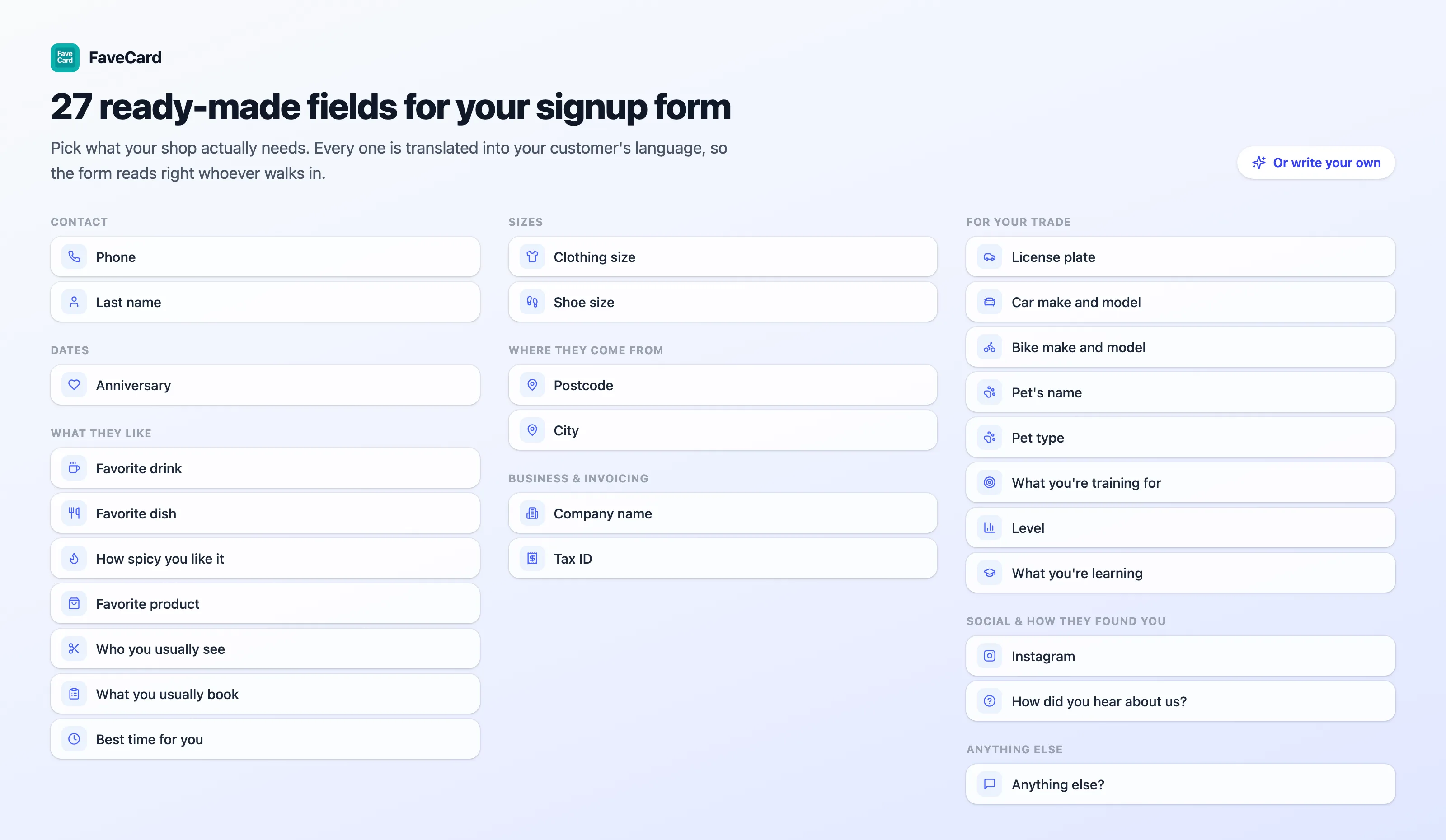
That is more than twenty ready-made questions. You should be using two or three of them.
When not to ask
This is the part most lists leave out, and getting it wrong costs more than any question on the list earns.
The card beats the answer. If a customer will not give you their phone number and the form insists, you do not get a reluctant phone number, you get no customer. Getting the card into their hand is the whole point of the exercise. Everything else is a bonus you can collect later.
Don’t ask what you won’t act on. A question you will never read is pure friction. Before adding one, finish this sentence out loud: “when I see this answer, I will …”. If you cannot, cut the question.
Never ask about health, beliefs or background. Anything touching someone’s health, religion, ethnicity, politics or sex life is special-category data under Article 9 of the GDPR. It needs its own lawful basis, extra safeguards and a seriousness that a loyalty card signup at a counter cannot provide. If your business genuinely needs that kind of information, it belongs in your clinical or booking records under the appropriate process, not attached to a stamp card.
FaveCard enforces this rather than leaving it to you to remember, and the details are worth knowing because they show what the line looks like in practice:
- No question in the ready-made bank is special-category data, and anything classified that way is excluded from collection outright.
- What you usually book is never suggested to dental practices, medical and aesthetic clinics, physiotherapists or pharmacies, because answered honestly by a patient it is a diagnosis. Those trades are left out of that question’s suggestions deliberately, not by oversight. The suggested set for them is who and when, never what is wrong.
- How spicy you like it has fixed options and no free-text box, specifically because a free-text spice answer is where somebody writes “no chilli, I have an ulcer”.
- A pharmacy is offered nothing about what a customer takes, and a childcare business nothing about the child, who is a minor.
Ask later instead of asking now. You do not have to learn everything at signup. Once someone is a customer you can add what you have picked up to their record yourself, and staff can leave a note on any customer on any FaveCard plan, including Free. A quiet Tuesday is a better time to fill in a preference than the queue at half past eight.
If you run a self-service kiosk, there may be no moment to use the answers in. In kiosk mode the customer scans and stamps themselves, and nobody greets anybody. That is a fair trade for speed, but it means a form built around a counter conversation is solving for a moment your shop does not have. Worth deciding which of the two you are running before you design the questions.
”Isn’t this a bit creepy?”
Yes, sometimes, and pretending otherwise is how vendor copy gets ignored. Here is a customer saying so in a thread on cultivating regulars in r/coffeeshopowners:
“Personally all of the ‘I know your name and who you are’ thing, as a customer, puts me off. Friendly yet efficient service is the key for me, without being over the top.”
That is a real preference and it deserves a straight answer rather than a rebuttal.
The distinction that resolves it is who chose. Recognition feels intrusive when a business appears to know something the customer never handed over: tracked, inferred, bought, or written down about them by a stranger. It does not feel intrusive when the customer typed it themselves, into an optional box, knowing exactly what they were sharing and why.
Which is what makes optional load-bearing rather than a nicety. A customer who would rather stay anonymous leaves every box blank, still gets the card, still collects stamps, still gets the reward, and you never learn a thing about them. Nothing is guessed at, and no gap gets filled in from anywhere else.
The marketing opt-in on the same form works the same way. It is unticked by default, and ticking it is never a condition of getting the card. A customer can take your loyalty card and decline to hear from you, which is exactly as it should be.
You can still add things to a customer’s record yourself, of course, and that is where the judgement sits. What a customer typed is theirs and they know you have it. What you noticed about them is yours, and it deserves more care.
And the person quoted above is describing the right use of it anyway. “Friendly yet efficient” is exactly what knowing the usual order buys you: less asking, a shorter queue, no small talk required. Used well, this makes service faster. Used badly, it makes service performative. The information is the same either way, and the difference is entirely in how your counter behaves.
What your team actually sees
Scan a customer’s card and their first name appears at the top of the screen before anybody adds a stamp. That happens on every FaveCard plan and for every team member.
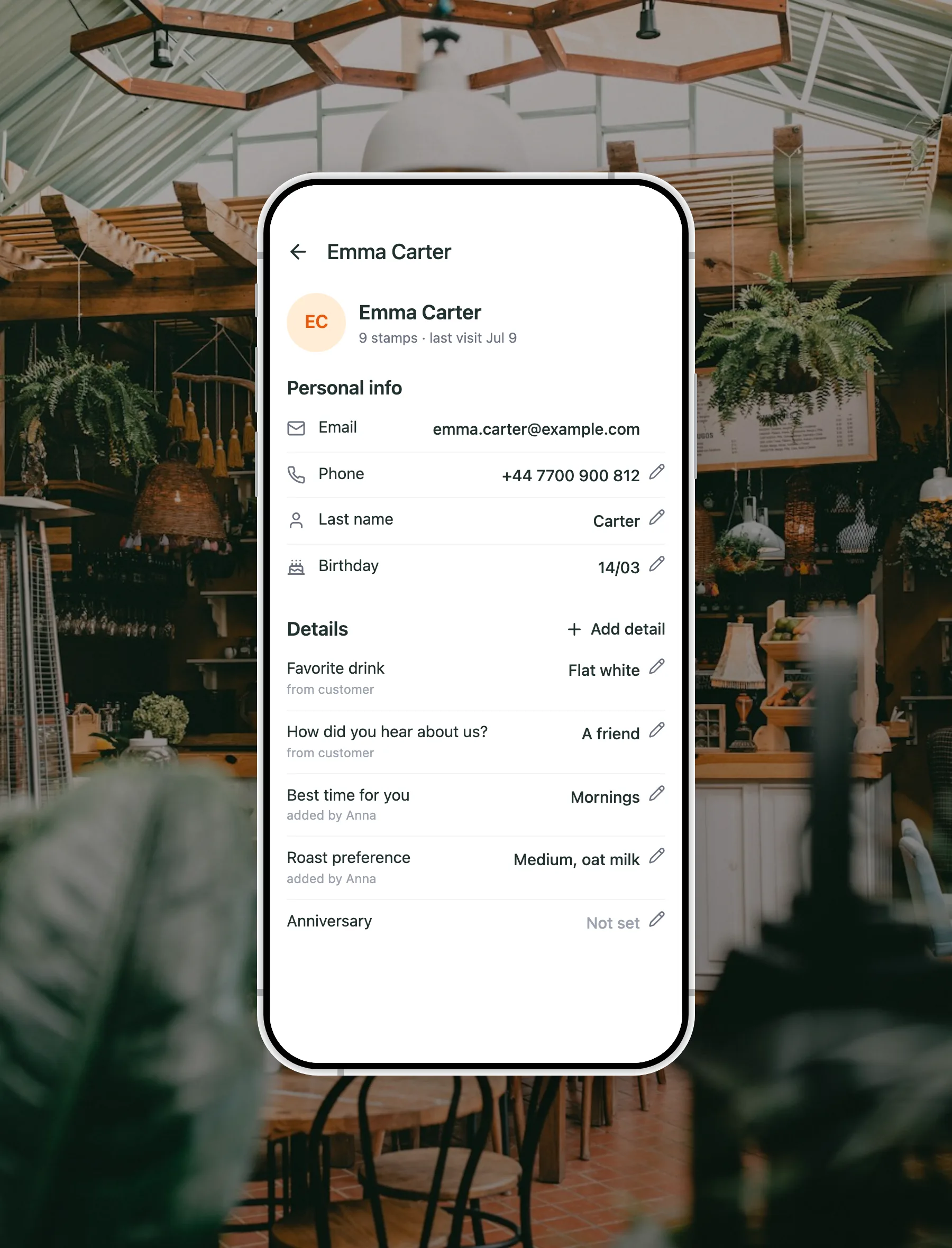
The card open on the owner’s login. Everyone on the team sees the Details and can update them; contact details such as a phone number stay with the account owner.
On the Business plan, the answers from the signup form sit further down that same screen, under a heading called Details: the favourite drink, who they usually see, the pet’s name, the number plate. Being straight about the layout, it is below the stamp button, so it is a scroll rather than a headline. Useful to know before you build a habit around it.
Contact details behave differently on purpose. A phone number or a last name is shown on an admin login and masked for everyone else, so whoever is at the counter sees the usual order but not the phone number. If you want to reach customers between visits, that is a separate job with separate tools.
The signup questions and the answers on a customer’s record are part of the Business plan, and switched on during the free trial. On Free and Pro the form collects a first name and an email address, plus an optional birthday. There is a fuller walkthrough of the whole loop on the know your regulars page, and the pricing page sets out what each plan includes.
It works the other way round too
The signup form gets the first answer. Everything after that comes from your team, and this is the half most people miss.
Your staff carry the same app they stamp with, and every customer’s Details are open to them. Someone mentions on the way out that they are training for a half marathon, or that they always come in before a shift, or that the dog is called Bella. Whoever heard it can add it there and then, in a few taps, while it is still fresh. No shared spreadsheet, no note passed to the owner, nothing to remember at the end of a shift.
That is what makes the record grow rather than go stale. A customer answers one question when they take the card, and then the relationship fills the rest in on its own, one visit at a time. Six months later the person on the counter knows things about a regular that nobody ever formally collected, because the team wrote them down as they learned them.
And because every answer is labelled with where it came from, you can always tell the difference between what a customer told you and what your team observed. That distinction matters: what someone typed themselves is theirs and they know you have it, and what you noticed about them deserves more care.
Where the answers show up
What this is built for is the counter. The answers are there so that the person standing in front of a customer knows who they are, and everything it does well follows from that:
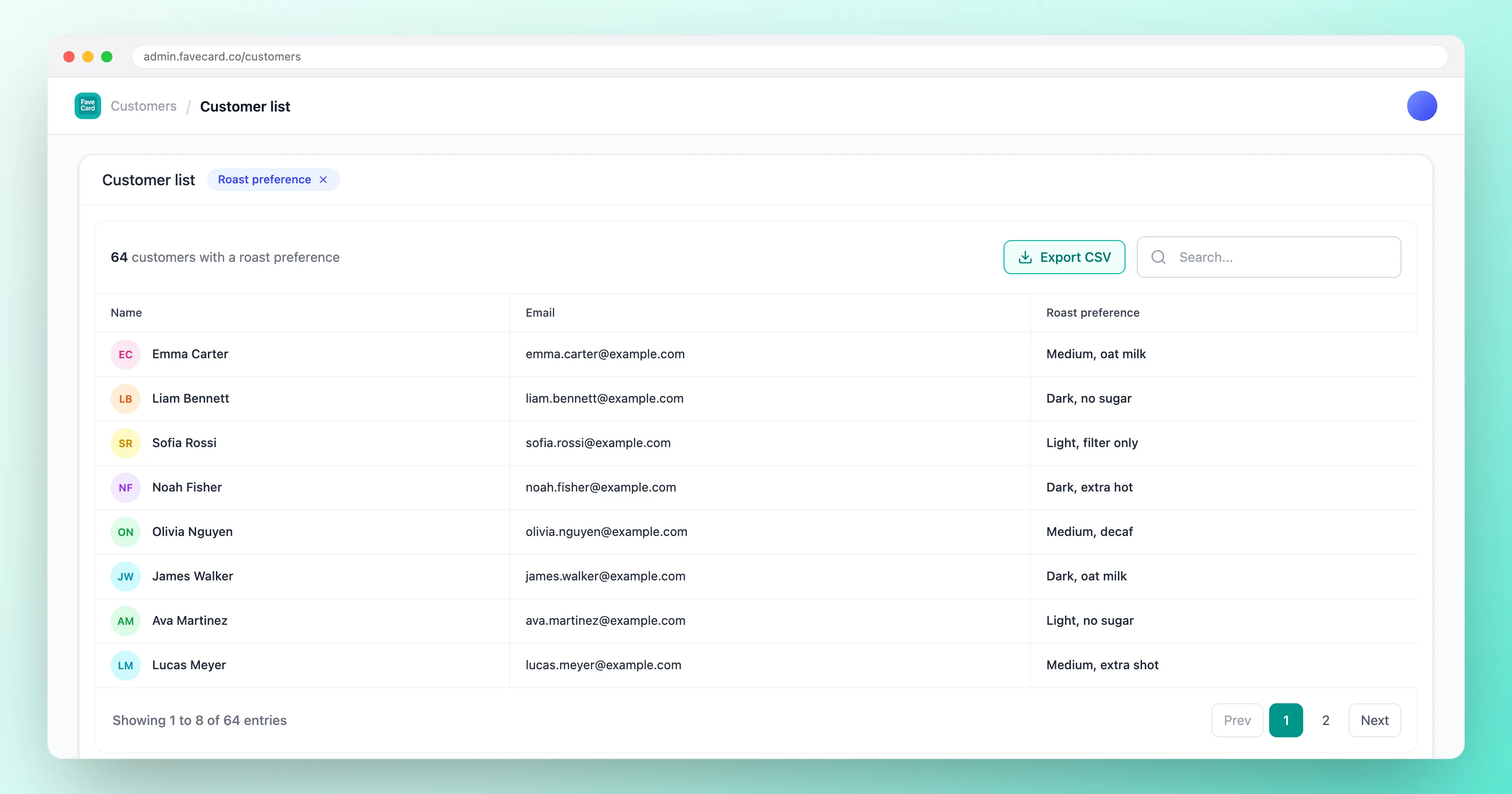
- Every answer sits on the customer’s profile, labelled, in a sensible order, showing whether it came from the customer or from one of your team.
- Any member of staff can correct an answer or add one later, without needing the owner’s login.
- A CSV export carries a column for every question, including ones you have since removed, so nothing you collected is ever stranded.
- Questions you write yourself can be filtered, with proper operators, and the one you filter on appears as a column while you do.
One thing to set your expectations on before you design a form: this is a customer record, not a campaign tool. The ready-made questions are for recognition rather than segmentation, so plan them around what happens at the counter, not around a mailing list you intend to slice up later.
Writing a question of your own
The ready-made questions cover most trades, but not all of them, so you can also write up to five of your own as text, a number or a date. Table number. Membership number. Locker. Whatever your shop actually runs on. A field you create yourself is also the only one you can filter your customer list by, which is a real reason to use one.
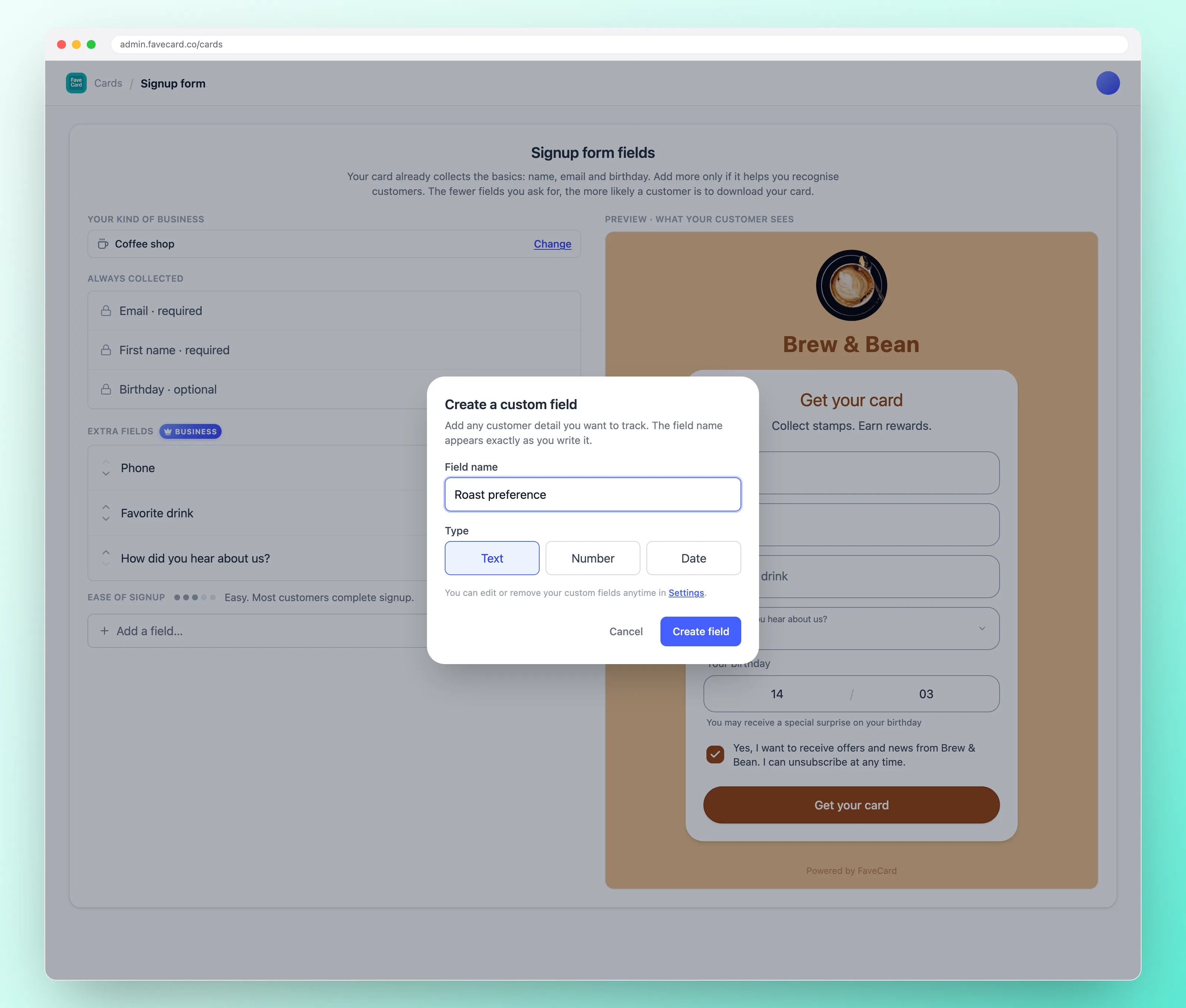
Two things worth knowing before you write one. Fixed answer lists belong to the ready-made questions, because the options have to be defined and translated centrally, so your own question takes a typed answer rather than a dropdown. And a question you write yourself reaches customers exactly as you typed it, in your language, while the ready-made ones arrive in all 30. If a good share of your customers are visitors, that difference is the whole argument, so take a ready-made question over your own wording wherever one fits.
Choosing yours in five minutes
- Pick the one answer that would change what happens at your counter tomorrow. In a café, the drink. In a garage, the plate. In a salon, who they see.
- Add a second only if it is genuinely different from the first. Two questions that tell you the same thing cost twice and teach once.
- Leave both optional. Always.
- Look at the ease-of-signup reading before you save. If it has moved off Easy, take something out.
- Wait a month, then check whether anyone is using the answers. If your team never looks at them, the problem is not the question, it is that there was nothing to do with it. Swap it for one you will act on.
The point of all this is not a fuller database. It is that a customer walks in for the fourth time and somebody already knows what they want, without anyone having had to remember. That is a small thing to set up and a hard thing for a chain to copy. If you want the wider picture on keeping people coming back, start with how to get repeat customers.
Frequently Asked Questions
What questions should I ask customers when they join my loyalty programme?
Ask two or three questions that change what you do at the counter. In a café that is the favourite drink. In a salon it is who they usually see and what they usually book. In a garage it is the number plate. Skip anything you will never act on, and keep every question optional so a customer who would rather not answer still ends up with your card.
How many questions can I ask before customers drop off?
Treat two or three as normal and five as the ceiling, and make none of them required. Every extra question is another reason to abandon the signup, and a required question blocks the card completely until it is filled in. The card in the customer's hand is worth more than any single answer, so if you are unsure whether a question earns its place, leave it out.
Is it creepy to ask customers personal questions at signup?
It is when the business collects information the customer did not choose to give. Optional questions answered by the customer on their own phone are different: they decide what to share, they can share nothing and still get the card, and they know you have it because they typed it. Recognition earns its welcome when it makes service faster, not when it performs familiarity.
Should my staff write notes about customers instead?
Staff notes are the standard advice and they usually die. Owners on Reddit describe spreadsheets and note habits that hold for a couple of weeks and then stop, because the person at the counter is already busy. Letting the customer answer once at signup removes the ongoing task. Notes are still useful for one-off observations, but they should not be the system.
Can I add a question of my own?
Yes. Alongside the ready-made ones you can write up to five of your own, as text, a number or a date, for whatever your shop needs. Two trade-offs: you cannot build your own dropdown, and a question you write yourself appears exactly as you typed it, in your language, because only the ready-made ones ship translated into all 30.
Can I filter or segment my customers by their answers?
You can filter on a question you wrote yourself, with proper operators. The ready-made questions work differently: they are there for recognition at the counter, so the answer shows on each customer's profile and in a CSV export with a column for every question, rather than driving segments. Worth knowing before you design a form around a mailing list rather than around what happens when someone walks in.
Which plan includes signup form questions?
The extra signup questions and the answers on a customer's record are part of the FaveCard Business plan, and they are included during the free trial. On Free and Pro the form asks for a first name and an email, with an optional birthday. See the pricing page for what each plan covers.