



Restaurant CRM: What It Is and Who Needs One
What a restaurant CRM does, who genuinely needs one, and why most independent restaurants get more from the loyalty card they already run.
Key Takeaway:
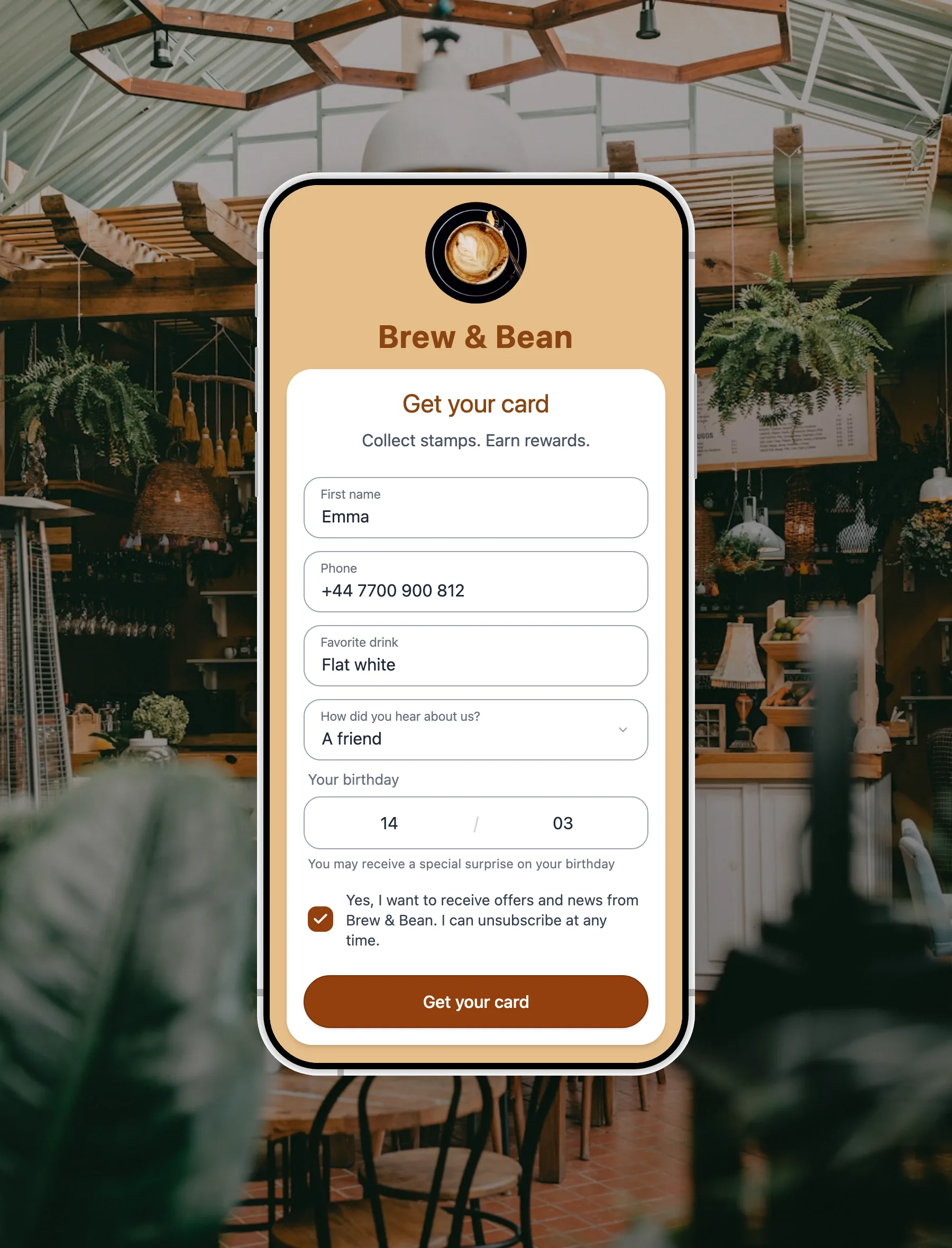
A restaurant CRM is a marketing system, and it repays you only if somebody is running it. Most independent restaurants want the other thing: to know a regular by their usual order and give them a reason to come back. FaveCard is a digital loyalty card rather than a CRM. The customer answers a couple of optional questions when they take the card, in their own language, and your floor staff see the answers on the next visit.
Last updated: August 2026
A restaurant CRM is software that keeps a record of individual guests and uses it to market to them: a guest profile with contact details and visit history, segments such as lapsed or high spend, email and SMS campaigns aimed at those segments, and reporting on what the campaigns produced. Most restaurants first meet one bundled inside a reservation platform or a till system rather than buying it separately. It is a genuinely useful tool for an operation with a marketing person and a list worth mailing, and a monthly bill for a guest database nobody opens for everyone else.
Key Takeaway: Before you shop for one, work out which job you are trying to do. Marketing to a list is a CRM job. Recognising the person in front of you and getting them back next week is a loyalty job, and the two are priced very differently.
Where FaveCard sits in this, so you can skip ahead if it is not what you came for. FaveCard is a digital loyalty card, not a CRM. It has no segments, no campaign builder and no marketing reporting. What it does is ask a new guest a couple of optional questions when they take your card, in their own language, and put the answers in front of whoever is serving them the next time they come in. If you want a list you can mail, you want a CRM. If you want the person on the floor to know that table nine always orders the same thing, read on.
What a restaurant CRM actually does
Strip away the category language and there are four jobs. Any product sold as a CRM for restaurants does some mix of them.
| The job | What it looks like in practice |
|---|---|
| The guest record | One row per guest: name, email, phone, visit count, spend, and whatever notes your team has typed. |
| Segmentation | Grouping that list by behaviour. Everyone who has not been in for 90 days. Everyone who spent over a certain amount. Everyone with a birthday in March. |
| Campaigns | Sending email or SMS to a segment, usually with an offer, and usually on a schedule. |
| Reporting | Answering “did that work”. Who opened, who booked, what the campaign was worth against what it cost. |
Only the first of those is about the guest in the room. The other three are about the list, which is the part most owners underestimate when they buy.
There are four common routes to owning one, and they behave differently:
- Bundled with your reservation platform. Guest profiles and notes attached to bookings. Strong if you take reservations for most covers. The record lives inside that platform, so it is worth checking what you can export before you rely on it.
- Bundled with your till. A customer directory built from card transactions and receipts. Cheap to start because you already pay for the till, and limited by the fact that a till knows what was bought, not who bought it, unless the guest identifies themselves.
- A general-purpose CRM. Built for salespeople working a pipeline of deals. Enormously capable, and shaped around a job that a restaurant does not have unless it sells events.
- An email marketing platform. Not sold as a CRM, but it holds a list, segments it and sends to it, which is three of the four jobs above. For a lot of restaurants this is the honest version of what they were about to buy.
Who a CRM for restaurants is genuinely built for
Five signals. They are not subtle, and if two or more describe you, a CRM is a reasonable purchase.
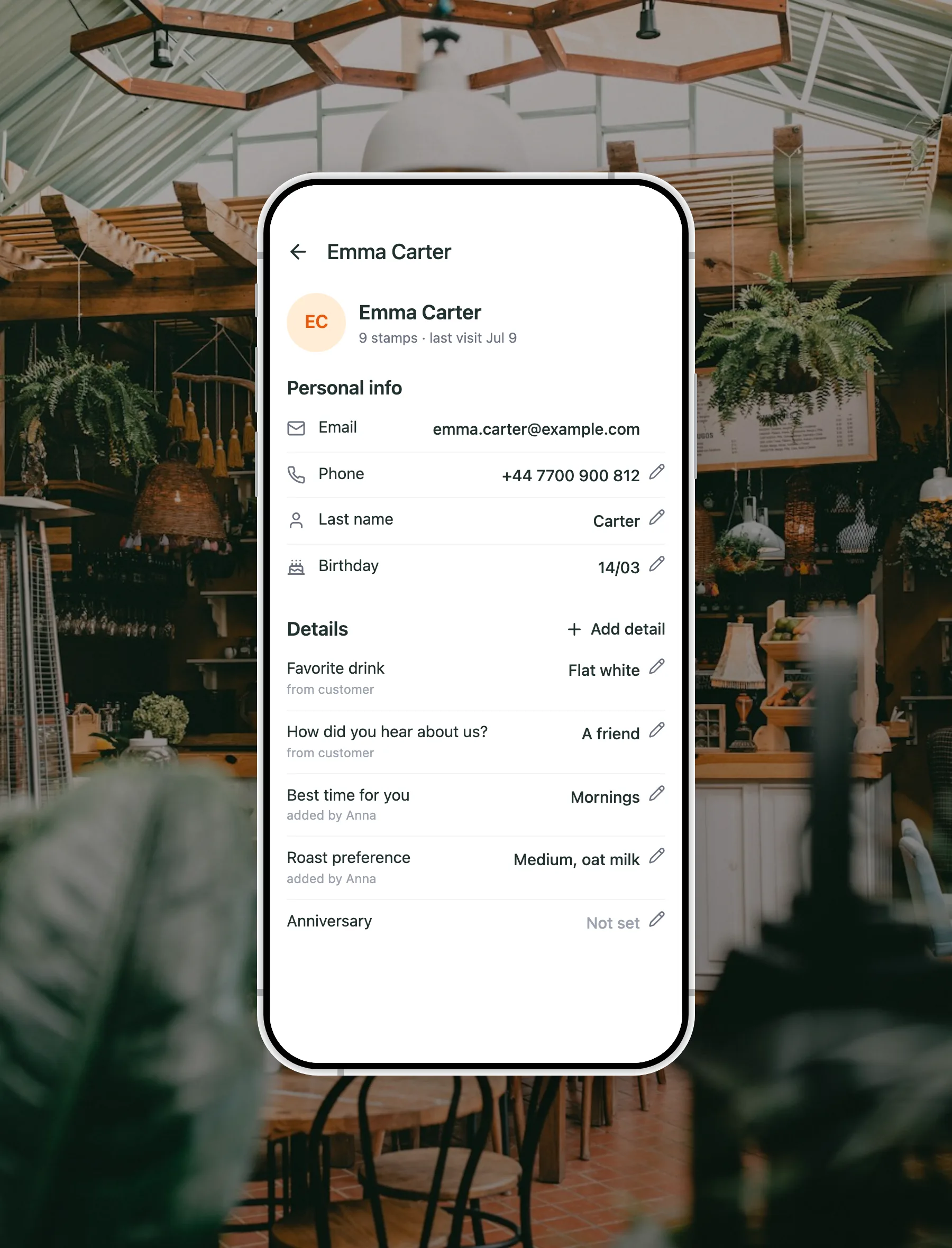
The same guest on the floor. Everyone on the team sees the Details and can add to them; contact details stay with the account owner.
- More than one site. The moment a guest can visit two of your venues and you want one record for them, you need something above the till.
- Delivery or online ordering is a large share of revenue. You already hold thousands of email addresses gathered by the ordering system, and a list that size is worth campaigning to.
- You sell events, private hire or large bookings. That is a real sales pipeline with enquiries, stages, quotes and follow-ups, and a pipeline is exactly what CRM software was invented for.
- Somebody has marketing in their job description. Even a day a week. A CRM is a tool, not a service, and an unattended one produces nothing.
- You already run campaigns and cannot tell what they earned. If you are sending offers and guessing at the result, reporting alone can justify the spend.
If none of those describe you, keep reading, because the rest of this is about the job you probably do have.
Who does not need one, which is most independent restaurants
Here is an owner in r/smallbusiness describing the position most single-site operators are in, in a thread about keeping track of regular customers:
“The problem: remembering everything about them. What they bought, what they like, who hasn’t been in for months, whose order’s ready. Right now it’s spread across WhatsApp, a couple spreadsheets, and whatever the staff happen to remember. Someone leaves and half of it walks out with them. […] Every CRM I’ve looked at is built for big teams and feels like way too much for a shop our size.”
That last sentence is the whole thing. It is not a budget objection. It is a fit objection, and it is correct. The software is built around a marketing operation, and what is being described is a memory problem at the counter.
Notice what is actually wanted in that list: what they like, and who has not been in for months. Two things, both of them about the guest in front of you or the guest who has stopped turning up. Neither of them requires segments, campaign reporting or a pipeline.
The job you are actually trying to do
It splits cleanly in two, and they are worth naming separately because they are solved by different things.
Recognition. Somebody walks in for the fourth time and your team already knows what they order. This is what guests notice and what they tell other people about. An owner in a thread on what improves repeat visits at bars and restaurants put the mechanism plainly:
“When staff remember a regular’s name or usual order, people feel ‘known’ and come back more often. Simple loyalty, not complex apps.”
Return. A reason to come back that survives the walk past your competitor. This is what a loyalty programme has always been for, and there is a fuller treatment of the structures in our guide to restaurant loyalty programmes.
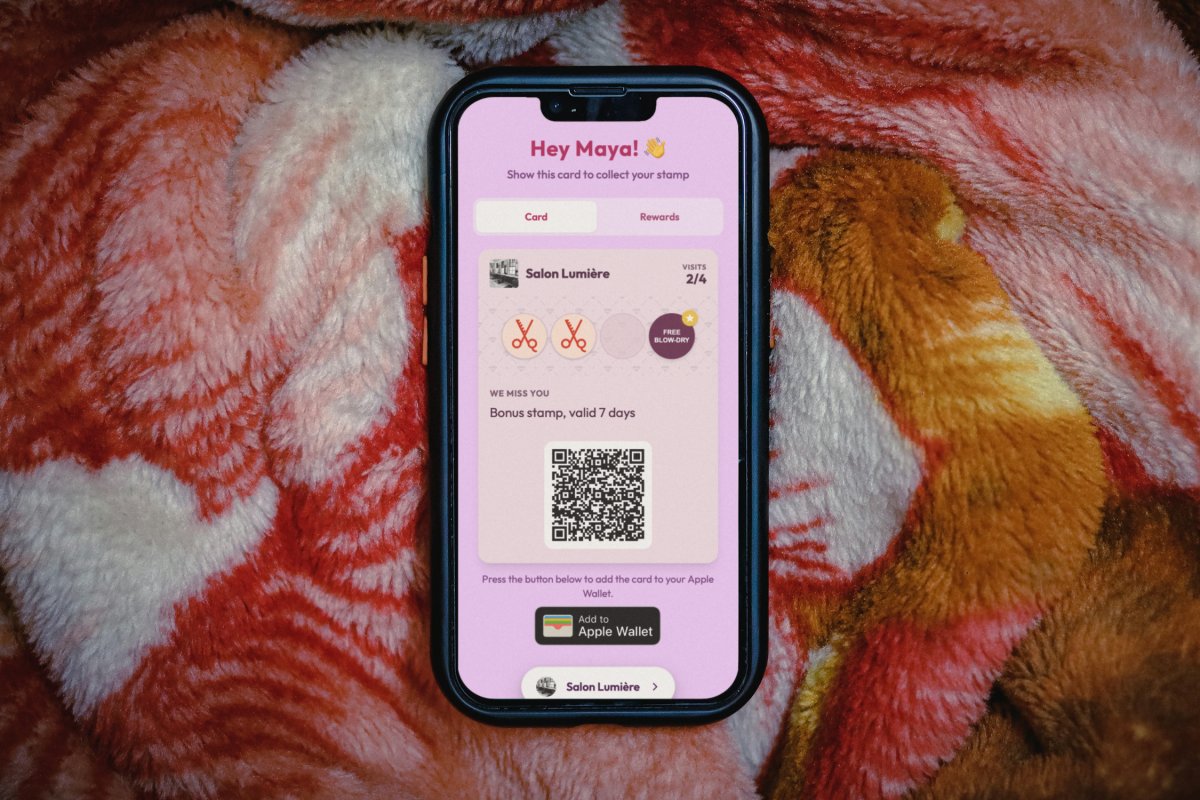
The interesting part is that once you are running a loyalty card, you already own the moment where recognition becomes possible. The guest is standing at your counter with their phone out, filling in a form, motivated, because a reward sits on the other side of it. That is the one moment in the entire relationship when they will happily tell you something about themselves.
What that looks like on a Thursday night
A curry house, half past eight, six tickets on the pass.
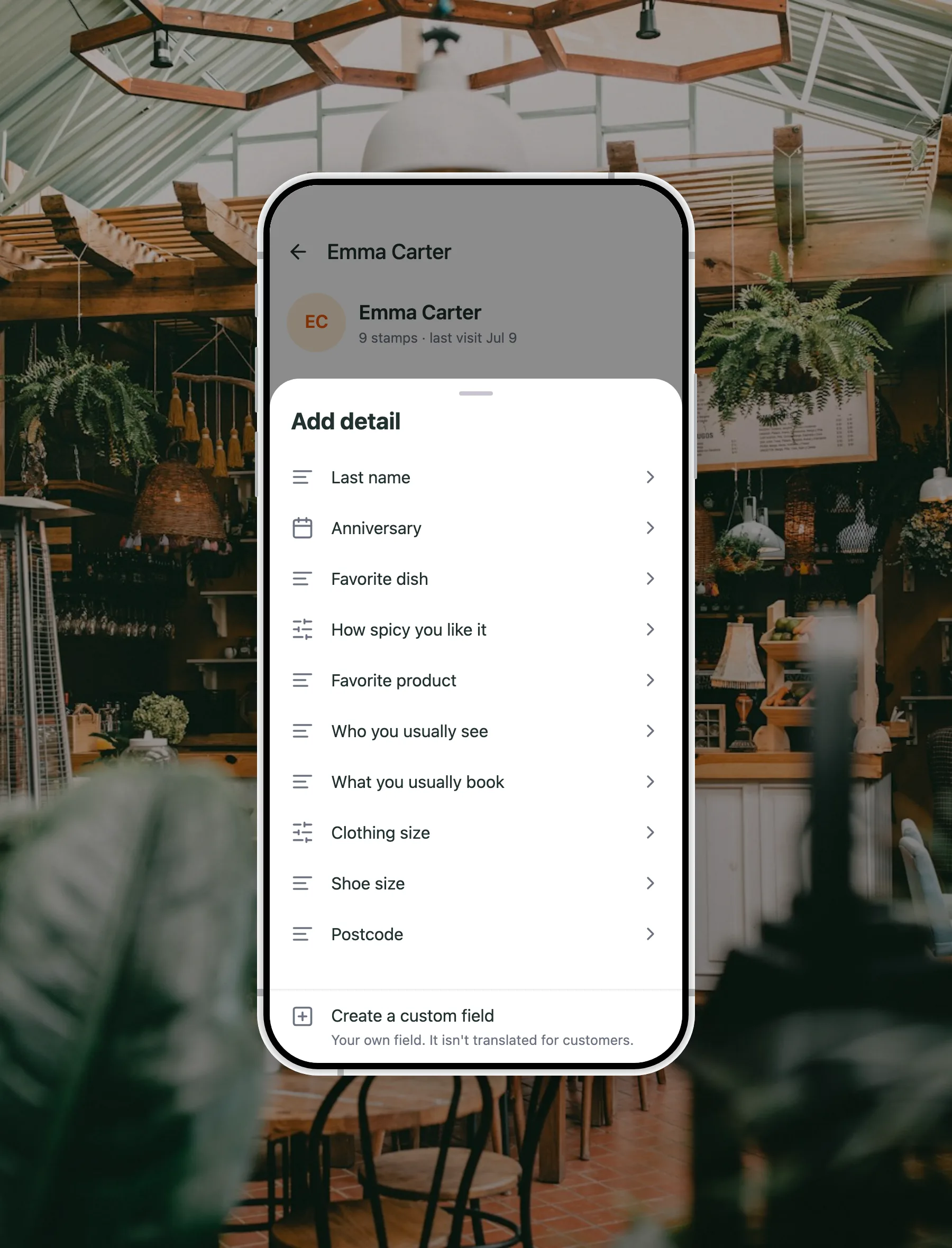
A guest scans their loyalty card at the till. Their first name is at the top of the screen. Further down the same screen, under a heading called Details, are two lines they typed themselves the first time they took the card:
- Favourite dish: lamb bhuna
- How spicy you like it: medium
Nobody asked “how hot do you want it?” and nobody guessed. The order goes to the kitchen right the first time, the exchange at the till is shorter, and the guest gets the thing they came for. That is not a loyalty gimmick, it is order accuracy at the busiest hour of the week, and it is worth more on a Thursday than any offer you could email.
Do the same in a takeaway and the gain is speed. Do it in a wine bar and it is the usual glass. The mechanic does not change: the guest answered once, and everyone on your team can see it, including the person who started last week.
The questions worth asking in a restaurant
You are asking at the counter, on a phone, in a queue, so the rule is two or three questions and never more than five, all of them optional. A required question does not get you data, it loses you the signup.
For food service, three earn their place:
| The question | What it changes | Answer type |
|---|---|---|
| Favourite dish | Whoever takes the order already knows what they come in for. | Typed |
| How spicy you like it | The kitchen gets it right first time instead of after a complaint. | Fixed choice: mild, medium, hot, extra hot |
| Anniversary | A second date in the year on the profile, and the one couples plan around. Your form already has the birthday. | Date |
Spice level is a fixed list on purpose, with no free-text box. That is not laziness, it is a boundary: a typed spice answer is where somebody writes about a medical condition, and health information has no business on a loyalty card. Anything touching health, beliefs, ethnicity or background is special-category data under Article 9 of the GDPR and belongs in a different system under a different process, if at all.
There are more than twenty ready-made questions to choose from, grouped by trade, in our guide to loyalty card signup questions. You should be using two or three of them.
One detail that matters more in hospitality than anywhere else: every ready-made question, and every option inside it, ships translated into 30 languages, and the language is picked by the guest’s own phone rather than by you. A visitor who does not read your language still understands what you are asking. If you write a question of your own instead, and you can write up to five, it reaches guests exactly as you typed it, in your language.
Where your team sees the answers
Scan a guest’s card and their first name appears at the top of the screen, on every plan and for every member of staff.
On the Business plan, the answers from the signup form sit further down that same screen under Details. Being straight about the layout, that is below the Add stamp button, so it is a scroll rather than a headline. Worth knowing before you build a service habit around it.
Contact details behave differently on purpose. A phone number or a last name is visible on an admin login and masked for everyone else, so the person on the till sees the usual order but not the phone number. If your plan is to reach guests between visits, that is a separate job with separate tools.
And if you run a self-service kiosk, there is no recognition moment at all: the guest scans and stamps themselves and nobody greets anybody. That is a fair trade for speed, but it means a form designed around a counter conversation is solving for a moment your restaurant does not have.
What this does not do, stated plainly
This is a guest record, not a marketing system, and the difference is the point of the whole article. So that nobody buys the wrong thing:
It does:
- Show every answer on that guest’s profile, labelled, and marked with whether the guest or your team supplied it.
- Let any member of your team correct an answer or add one later, without the owner’s login.
- Export to CSV with a column for every question, including questions you have since removed.
- Let you filter your customer list on a question you wrote yourself.
It does not:
- Filter or segment on the ready-made questions. They are for recognition at the table, not for slicing a list.
- Search or sort your customer list by an answer.
- Save segments, or drop an answer into a message as a merge tag.
- Trigger anything automatically when somebody answers.
- Produce any chart, report or breakdown of the answers. Even “how did you hear about us?” is read one profile at a time, or counted in the export.
- Offer an API, a webhook or a Zapier connection for the answers.
If your plan genuinely depends on segmenting a list and mailing it on a schedule, that is a CRM job and you should buy a CRM. If it depends on a guest walking in and being known, none of the six things above were ever going to be the mechanism.
Next step: see how FaveCard works for restaurants: the stamp card, rewards for your guests and how to set it up.
Setting it up in an evening
- Get the loyalty card running first. The card is what brings people back. The questions only matter because the card creates a moment to ask them.
- Pick one question that would change tomorrow’s service. In most kitchens that is the usual dish. In a curry house or a wings place, spice level beats it.
- Add a second only if it is genuinely different. Two questions that tell you the same thing cost twice and teach once.
- Leave both optional. Always. The card in the guest’s phone is worth more than any single answer.
- Brief the till. The answer is on the screen they already look at, but nobody uses what they have not been shown once.
- Check in a month. If nobody on the floor is looking at the answers, the question was not one you act on. Swap it.
The extra signup questions and the answers on a guest’s record are part of the FaveCard Business plan and are switched on during the free trial. On Free and Pro the form collects a first name, an email address and a birthday. The pricing page sets out what each plan includes, and there is a fuller explanation of the mechanic on the customer memory feature page.
When to revisit the CRM question
Buy one when the five signals earlier start describing you. A second site. An ordering list in the thousands. A private hire diary. Somebody with time to run campaigns and read the numbers. Those are real thresholds, and crossing them is a good problem.
Until then, the honest answer to “which restaurant CRM should I get” is usually that you do not need one yet. What you need is for the fourth visit to feel different from the first, and that is a card in a phone and two questions somebody answered in ten seconds while they were already standing at your till.
Frequently Asked Questions
What is a restaurant CRM?
A restaurant CRM is software that keeps a record of individual guests and uses it to market to them. It does four jobs: it stores a guest record with contact details and visit history, it groups guests into segments such as lapsed or high spend, it sends email and SMS campaigns to those segments, and it reports on what came back. Most restaurants meet one inside a reservation platform or a till system rather than buying it on its own.
Does a small restaurant need a CRM?
Usually not. A CRM earns its place when you have several sites to reconcile, a large ordering database to campaign to, an events or private hire pipeline, or somebody whose job includes marketing. A single site with mostly walk-in trade and nobody spare has a different problem: recognising a regular at the table and giving them a reason to return. A loyalty card with a couple of optional questions does that job without adding a system to run.
What is the difference between a restaurant CRM and a loyalty programme?
A CRM is built around outbound marketing: segment the list, send the campaign, measure the response. A loyalty programme is built around the visit: the guest carries a card, collects stamps or points, and earns a reward for coming back. They overlap on the guest record, which is why many restaurants find the card already covers the part of a CRM they were realistically going to use.
How do restaurants remember what a regular orders?
The common advice is to have staff write notes, and it rarely survives a busy service. The alternative is to let the guest answer once. When they take your digital loyalty card, the signup form can carry two or three optional questions such as the usual dish and how spicy they like it. The answers stay attached to the card, so the next person on the till sees them without anyone having to remember.
Is a restaurant CRM worth the money?
It depends on whether you have somebody to run it. A CRM is a tool that assumes an operator: someone to build segments, write campaigns and read the results. Restaurants that have that person get real value. Restaurants that do not tend to pay a monthly fee for a guest list nobody touches, which is the most common way this software fails in independent venues.
Can a loyalty card replace a restaurant CRM?
For recognition and repeat visits, often yes. For campaign marketing, no, and it is worth being clear about that. Answers a guest gives at signup sit on their profile and in a CSV export. They do not drive segments, automated messages or reports. If your plan depends on slicing a list and mailing it, you want a CRM. If it depends on a guest walking in and being known, you want the card.
Which FaveCard plan includes the extra signup questions?
The extra signup questions, and the answers on a guest's record, are part of the FaveCard Business plan and are included in the free trial. On Free and Pro the form asks for a first name, an email address and a birthday. See the pricing page for what each plan covers.