



Restaurant Marketing Tools: What You Need, What's Free
The marketing tools a restaurant or café needs, job by job: the free option, when to pay, prices checked in October 2026, and what to skip.
Key Takeaway:
Start with free tools for four jobs: Google and Apple listings, a review link, a way to collect guests' contacts with consent, and a social scheduler. Pay for a tool only when its free limit stops you or a paid feature saves you time every week.
Last updated: October 2026
Restaurant marketing tools are the apps an owner uses to get found online, collect reviews, bring guests back and post on social media. A single-location restaurant or café can cover all four jobs with free tools and pay only when a free limit gets in the way. All-in-one restaurant platforms bundle these jobs with online ordering or reservations. As of October 2026 they cost from $249 a month or are priced on request.
The short answer:
- Four jobs come first: a Google and Apple Maps listing, a review link that staff share, a way to collect guests’ contact details with their permission, and a posting routine for social media.
- All four can start free. Every price and free limit in this guide was read on the vendor’s own pricing page on 6 October 2026, in US dollars.
- Pay when a limit stops you. Mailchimp’s free plan holds 250 contacts, and Buffer’s free plan schedules 10 posts ahead on each of 3 channels. Until you hit limits like these, a paid plan buys little.
- Leave texts, paid ads and all-in-one platforms until the free jobs run every week.
This guide is about which tool does which job and what it costs. For what to do with the tools, see our restaurant marketing ideas or, for cafés, our coffee shop marketing ideas. We make FaveCard, a digital loyalty card and business page, and it appears below as a labelled example next to other options where it does the job.
What marketing tools does a small restaurant need?
A small restaurant needs four marketing tools: a free Google Business Profile to be found, a Google review link that staff share, a sign-up tool that collects guests’ contact details with consent, and a social media scheduler. Website, reservation, online ordering, text and ad tools come later, when the restaurant’s way of doing business needs them.
| Job | Start free with | Pay when |
|---|---|---|
| Get found on maps and search | Google Business Profile, Apple Business, a Yelp page | Rarely; ads are optional |
| Get reviews | The review link from your Google profile, printed as a QR code | You want the request sent automatically after a visit |
| Bring guests back | A loyalty card with a free plan, Mailchimp Free | Your list passes the free limit, or you want automatic messages |
| Post on social media | Meta Business Suite, Canva Free, Buffer Free | You post on more than 3 accounts or plan further ahead |
| Menu and links page | Square Online on Square Free, Linktree Free | You need your own domain or online ordering |
| Reservations and online orders | The phone, or your POS’s free ordering page | Bookings or online orders are a real share of revenue |
| Paid ads | Nothing | The four jobs above already run every week |
A restaurant CRM is the same guest list attached to a reservation system or a POS. Most single-site restaurants don’t need a separate one; our guide to restaurant CRMs explains who does.
Which restaurant marketing tools are free, and when is paying worth it?
The main free restaurant marketing tools are Google Business Profile and Apple Business for map listings, Meta Business Suite and Buffer’s free plan for social posts, and Mailchimp’s free plan for up to 250 email contacts. A single-location restaurant can run on these for months and pay only when it hits a free limit, or when a paid feature saves time every week.
These are the plans as listed on each vendor’s pricing page on 6 October 2026. Prices change often, so check the link before you buy.
| Tool (job) | Free plan | Cheapest paid plan |
|---|---|---|
| Google Business Profile (listing, reviews) | Free | None needed |
| Apple Business (Apple Maps listing) | Free | Apple Maps ads (no price published) |
| Yelp for Business (listing) | Free page | Ads from “as little as $5 per day on average” |
| Meta Business Suite (Facebook and Instagram) | Free | None needed |
| Buffer (scheduling) | 3 channels, 10 queued posts each | $5 a month per channel, billed yearly |
| Later (scheduling, link in bio) | None (14-day trial) | $18.75 a month, billed yearly |
| Mailchimp (email) | 250 contacts, 500 sends a month | Priced by list size |
| Klaviyo (email and texts) | 250 profiles, 500 emails a month | Priced by list size |
| Linktree (link page) | Unlimited basic links | $6 a month billed yearly, or $8 monthly |
| BonusQR (loyalty card) | Unlimited customers, 1 staff login | $19 a month |
| Loopy Loyalty (loyalty card) | None (15-day trial) | $25 a month |
| Stamp Me (loyalty card) | None (30-day trial) | $49 a month |
| Square (POS with loyalty, email, texts) | Square Free: POS and an online ordering site | Square Plus, $49 a month per location |
Several “best tools” lists still repeat older numbers. Some give Mailchimp’s free plan as 500 contacts, when its pricing page says “Limit of 250 contacts.” Others list Square Loyalty as a separate $45 plan, but Square’s pricing page now lists loyalty under Square Plus. Canva has a free plan and a paid Canva Pro; we couldn’t load its pricing page, so there is no Canva price here.
FaveCard, which we make, has a free plan with a digital stamp card that opens in the guest’s phone browser. Apple and Google Wallet cards, automatic review requests and Wallet messages are on paid plans, and new accounts get those tools free until their first 30 customers join (as of October 2026). Amounts are on the pricing page.
When paying is worth it, by job:
- Email: when your list passes 250 contacts, or you want to schedule and test emails.
- Social: when you manage more than 3 accounts or want more than 10 posts lined up per account.
- Loyalty card: when you want the card in Apple or Google Wallet, messages to card holders, or review requests sent for you.
- Website: when you need your own domain or online ordering that your POS doesn’t give you.
How do restaurants get found on Google, Apple Maps and Yelp?
Restaurants get found through free map listings: a Google Business Profile, an Apple Business listing for Apple Maps and a claimed Yelp page, each with current hours, a menu link, recent photos and a button to book or order. Google still matters most, but less than it did. In BrightLocal’s Local Consumer Review Survey 2026 of 1,002 US adults, Google’s share as a place to read reviews fell from 83% to 71% in a year, Apple Maps nearly doubled to 27%, and use of ChatGPT and other AI tools for local recommendations rose from 6% to 45%.
Three things to know in 2026:
- Apple Business replaced Apple Business Connect on 14 April 2026. Apple announced it as a free service in the US and more than 200 countries and regions, and it is where you now manage how your restaurant appears in Apple Maps.
- Yelp’s business page is free. Yelp says its ads cost “as little as $5 per day on average”, which is about $150 a month. Fix the free page before you pay.
- AI assistants answer “where should I eat” questions from what they find online. Keep your name, address, hours and menu link identical on Google, Apple, Yelp and your own page, so every source tells the same story.
What to put on those listings is in part 1 of our restaurant marketing ideas.
Which tools help a restaurant get more Google reviews?
To get more Google reviews, a restaurant needs its free Google review link printed as a QR code on tables and receipts, and staff who ask guests in person. Paid tools add an automatic request after each visit. Asking works: in BrightLocal’s 2026 survey, 83% of people who were asked to leave a review went on to leave one.
Volume and freshness both count. In the same survey, 47% of consumers won’t use a business with fewer than 20 reviews, 74% look for reviews written in the last three months, and 89% expect owners to respond. You can reply free in Google Business Profile.
| Tool | What it does | Cost (October 2026) |
|---|---|---|
| Google review link + QR code | Opens your review form in one tap | Free (make a review QR code) |
| Square Marketing | Automatic email or text asking for a Google review after a sale | Part of Square Plus |
| SevenRooms, Malou | Review monitoring and replies inside a larger platform | Price on request |
Two rules apply to every tool. Google doesn’t allow rewards in exchange for reviews, and it doesn’t allow asking only the guests you expect to be happy. Our guide on whether you can incentivize Google reviews covers what is allowed, and how to ask for Google reviews has the wording.
Example: FaveCard. When a guest redeems a reward, their card shows “Loved your visit?” with a “Leave a review on Google” button, and an email with the same request follows two hours later. Every guest who redeems gets it, whatever they thought of the meal, so staff don’t have to remember to ask (Business plan and free trial).
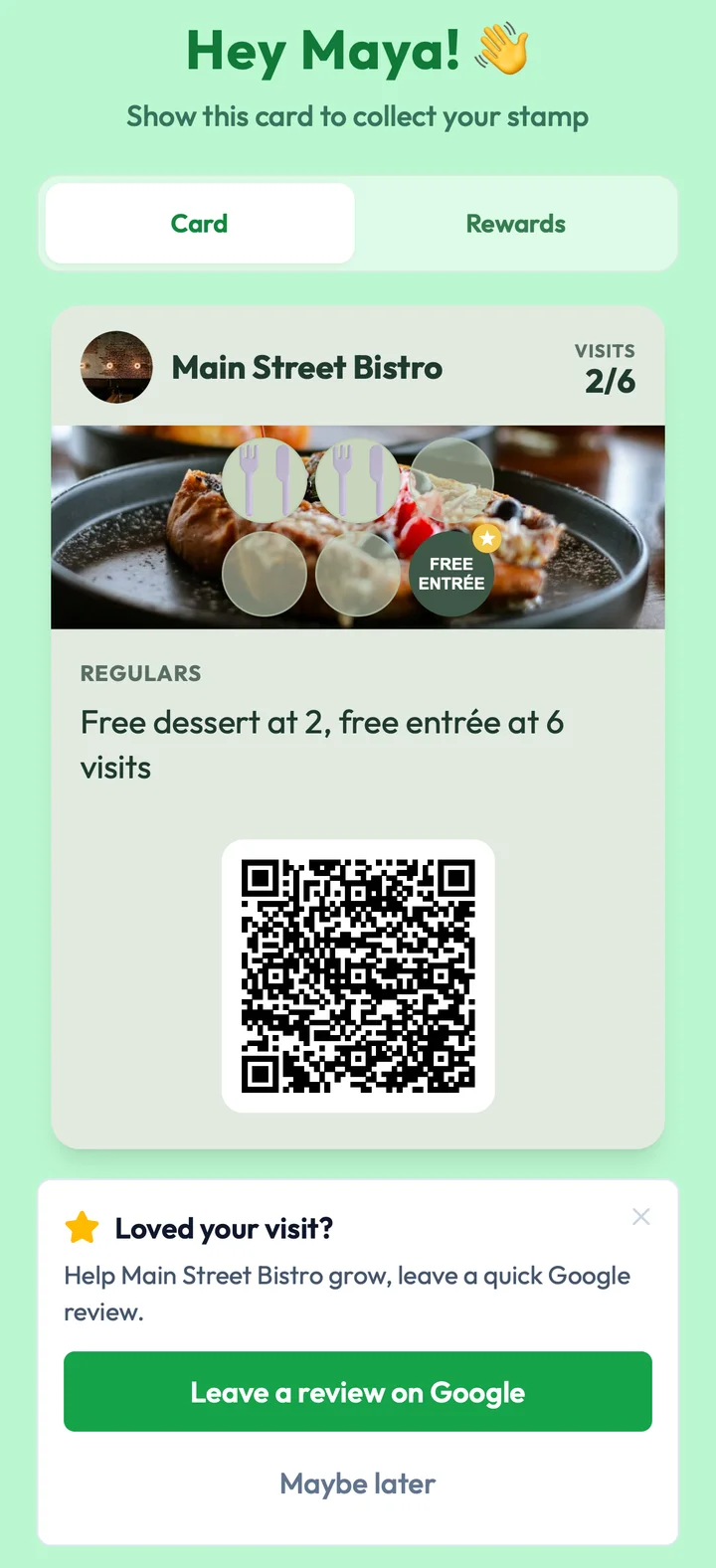
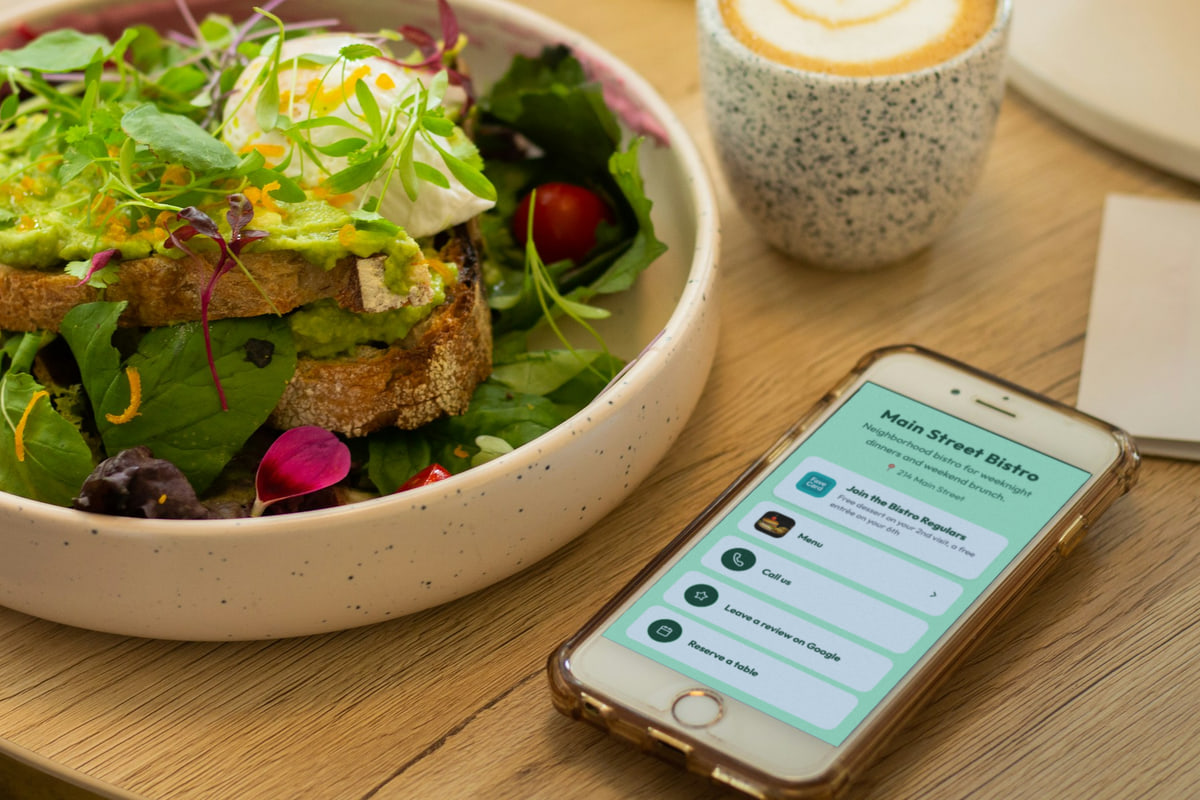
Main Street Bistro, a sample restaurant we set up in FaveCard: a 6-visit card with a free dessert at the 2nd visit and a free entrée at the 6th, shown after the dessert was redeemed, with the review request below it.
How do you build a customer list you’re allowed to message?
A restaurant builds a customer list it may message by offering a loyalty card or sign-up at the counter that asks for an email address, gives guests a reason to join and has an unticked box for offers. Phone numbers and emails collected for orders or reservations are not permission to send marketing.
Guests do join when the reason is good. The National Restaurant Association’s 2024 technology report found that 81% of consumers who weren’t in a loyalty program would join one at a favorite restaurant, and among those prospective members 39% would rather use a card and 33% an app.
Owners say the list is the point. In an r/restaurantowners thread about Toast Loyalty in January 2026, one commenter put it this way:
“the real value of loyalty programs has less to do with incentivizing customers with freebies and giving them a reason to give you their contact information so that you can do direct marketing”
And in a 2024 thread on text marketing, a guest’s view of the alternative:
“If a restaurant just randomly texted me from the number I put in on toast I would never return, unless I explicitly said they could.”
The tools that collect a list are loyalty card apps (BonusQR, Loopy Loyalty, Stamp Me, FaveCard), the loyalty built into your POS (Square, Toast, Clover) and sign-up forms in your email tool. How to set up the program itself is in our guide to restaurant loyalty programs.
Example: FaveCard. The card sign-up asks for an email address and a first name, with an optional birthday and the offers box unticked. On the Business plan and the trial, card holders export as a CSV with a consent column, ready for Mailchimp or another email tool. More in how to build an email list.
Email, text or Wallet messages: which should a restaurant use?
For a restaurant, email is the cheapest channel for news and events, texts are the fastest but cost money per message and can feel intrusive even to guests who opted in, and Wallet messages update a loyalty card already saved on the guest’s phone. Most independents do well with one or two emails a month plus one channel for same-day offers.
| Channel | Cost (October 2026) | Best for |
|---|---|---|
| Free up to 250 contacts on Mailchimp or Klaviyo | Monthly news, events, a new menu | |
| Text (SMS) | About $29 to $39 a month for 500 texts, plus carrier fees | Same-day offers, birthdays |
| Wallet message | Included in some loyalty card apps | A short offer on a card the guest already saved |
Text prices as listed in October 2026: Textedly charges $29 a month for 500 messages, SimpleTexting about $39 a month for 500 credits billed yearly plus a $4 one-time carrier registration and carrier fees, and Square Plus includes 500 texts a month, then 3¢ each. Every text channel needs guests who opted in to texts. Wallet messages reach only guests who saved the card and allowed notifications.
Texts split owners more than any other channel. In the Reddit and Square Seller Community threads about restaurant and café marketing we read for this guide in October 2026, 13 commenters talked about texts and 10 of them were wary or against. Two replies in the same 2024 r/restaurantowners thread sum it up:
“It works great to drive a few extra covers. Don’t spam people though.”
“This is how to make enemies of customers. Do not do this if you like money.”
For email, one commenter in a 2024 thread asked the question every restaurant should ask itself: “Are you telling engaging stories about your restaurant 1-2 times a month, or spamming a ‘10% off appetizers’ promotion 5 times a week?”
FaveCard’s Wallet messages (Business plan and trial) work this way, with no app. Our guide on how to reach customers between visits compares them with texts and email.
Which social media tools do restaurants and cafés use?
Most restaurants and cafés need three free social media tools: Meta Business Suite to post and reply on Facebook and Instagram, Canva to design menus and promo graphics, and Buffer to schedule posts ahead. Instagram and Facebook came up in the owner threads we read more often than any tool except texts.
- Meta Business Suite is free and schedules posts and stories on your Facebook Page and Instagram account, with one inbox for messages and comments.
- Buffer is free for 3 channels with 10 scheduled posts each. The paid Essentials plan is $5 a month per channel, billed yearly.
- Later has no free plan. Its Starter plan is $18.75 a month billed yearly and includes up to 30 posts per profile a month and a link-in-bio page.
- Canva has a free plan for posts, stories and printed menus.
In many cafés, a barista runs Instagram. One commenter in a 2023 r/barista thread on coffee shop marketing described their routine: “we use a scheduling platform like Later.com to load them all in, and I’ve been using ChatGPT to help with captions,” adding that “At most it takes a few hours to schedule for the month ahead.”
Does a restaurant need a website, a link page or both?
A restaurant needs one page it controls with the menu, hours, address and buttons to book or order. For many independents, the free website from their POS or a link page is enough, and a full restaurant website platform pays off mainly when it also takes online orders.
| Option | What you get | Cost (October 2026) |
|---|---|---|
| Square Online on Square Free | An online ordering page or basic website | Free; you pay processing fees on orders |
| Linktree | A link page for your Instagram bio | Free, or $6 a month billed yearly |
| Owner.com | Website, online ordering, app and marketing | $249 a month plus a 5% restaurant fee per order, or $499 a month flat |
| BentoBox | Restaurant website | Now sold only to Clover POS customers |
| Your own site (Squarespace, Wix and similar) | Full control and your own domain | A monthly plan |
Owner.com’s own pricing page recommends its flat $499 plan for “restaurants at $5k+/mo in online sales.” Below that, the $249 plan with the 5% fee per order costs less. Whichever page you choose, print one QR code that opens it and keep the page up to date, so you never reprint the code. See one QR code for your menu, reviews and loyalty card and our free link-in-bio tools.
Example: FaveCard. The business page puts the loyalty card button first and adds a reservation link, call buttons, a “Leave a review on Google” link and guest Wi-Fi, all on every plan. A menu section needs the Business plan or the trial. Orders and bookings stay in the tools you already use: the buttons open them.
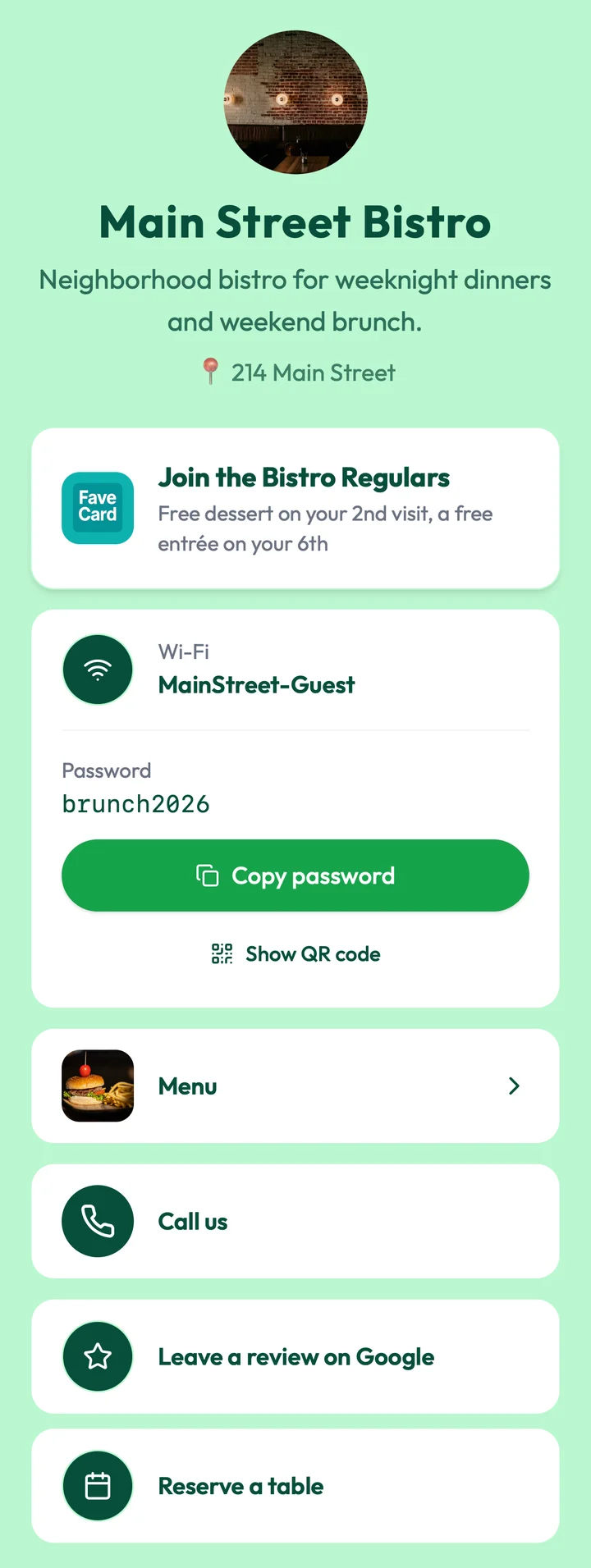
The same sample restaurant’s page: the loyalty card button first, then guest Wi-Fi with a copy button, the menu, a call button, the Google review link and a button to reserve a table.
Your POS’s marketing, an all-in-one platform or separate tools?
A restaurant should use the marketing built into its POS when it covers what the restaurant needs at a price it already pays, choose an all-in-one platform when online orders or reservations drive the business, and use separate tools to keep costs low and keep its guest list if it changes POS.
Square shows what a POS bundle looks like: Square Plus, at $49 a month per location, lists a loyalty program, “unlimited email marketing campaigns” and 500 texts a month, then 3¢ per text. Toast and Clover sell their own loyalty and marketing; we compared them in our reviews of Toast loyalty, Square loyalty and Clover loyalty.
Bundles are convenient, and some owners pay for more than they use. “Toast talks about having lots of features, but I don’t want almost any of them,” one commenter wrote in a 2023 r/restaurantowners thread about POS software.
Before you sign, add up the costs that don’t show in the headline price:
| Cost | Example (vendor pricing pages, October 2026) |
|---|---|
| Fee per online order | Owner.com: 5% per order on the $249 plan |
| Fee on prepaid bookings | Resy: from $289 a month; the Tock-powered Essential plan adds 3% on prepayments |
| Setup fee | SevenRooms: a one-time setup fee plus a fee on pre-sales through its booking widgets |
| Price per location or device | Square: plans priced per location; the Kiosk app $50 a month per device |
| Price per social account | Buffer: $5 a month per channel |
| Text registration and carrier fees | SimpleTexting: $4 one-time registration plus carrier fees per message |
Are paid ads worth it for a small restaurant or café?
Paid ads are worth testing for a small restaurant or café only after its listings, reviews and a way to bring guests back are in place, because ads buy first visits and those tools turn visitors into regulars. Start with a small daily cap and count where new guests come from.
The options a single location usually tries are Google ads shown in Maps, Yelp Ads, boosted Facebook and Instagram posts, and, from 2026, ads on Apple Maps, which Apple announced for the US and Canada without publishing a price.
Owners’ experience is mixed. In a 2024 r/restaurantowners thread, an owner wrote “i tried google ads but had no result at all”, and another commenter suggested a campaign through the Google Business Profile “and it’ll get shown to people in maps”, adding: “Start small like 20 bucks a day.” At $20 a day, that is about $600 a month, more than a year of most of the single-job tools above. Give a test four weeks and a fixed budget, and ask new guests how they found you.
What changes for a café or coffee shop?
A café needs the same four jobs as a restaurant, weighted differently: guests come more often and spend less per visit, so a fast loyalty sign-up at the counter, Instagram and a Google listing matter most, while reservation and ordering platforms rarely do.
- A shorter card, earned faster. FaveCard’s card editor asks “How often do your customers visit?” Answering “A few times a week,” with coffee shops, bakeries and lunch spots as examples, suggests 8 stamps; “Every 1-2 weeks,” with restaurants as the example, suggests 6. Both use free rewards rather than discounts. Our guides to the coffee shop loyalty program and how many stamps a card should have explain why.
- Social media is often a barista’s job. Give one person the account, an hour or two a week and a free scheduler.
- Ordering: if most sales are takeaway, the online ordering page in your POS may be all you need.
- Usually skip: reservation systems, all-in-one restaurant platforms, and texts priced per message, which take many small tickets to pay back.
For café tactics, see our coffee shop marketing ideas.
How do you know which tool is working?
A restaurant can tell a marketing tool is working when that tool’s one number moves month to month: calls and direction requests from the Google profile, new reviews, new loyalty sign-ups and returning guests, and email clicks. Asking new guests how they heard about you fills the gaps.
| Tool | The number to watch |
|---|---|
| Google Business Profile | Calls, direction requests and website clicks |
| Review link | New reviews this month, and your replies |
| Loyalty card | New sign-ups and guests who came back |
| Clicks, not just opens | |
| Ads | New guests who mention the ad, against what you spent |
Without a number, owners guess. “i have no data but feeling wise it felt like i paid something like 35€ per customer,” one restaurant owner wrote in a 2024 r/restaurantowners thread on marketing tools.
A sign-up question does that for you. FaveCard, for example, suggests “How did you hear about us?” as an optional sign-up question for restaurants, with the answers A friend, Social media, Walked by, Search and Other (Business plan and trial).
In what order should you set the tools up?
A restaurant should set up its free marketing tools one job a week for four weeks: map listings, then reviews, then a way to collect guests’ contacts, then a social posting routine. Email comes once the list grows, and paid tools or ads only after all four jobs have run for a month.
| When | What to set up |
|---|---|
| Week 1 | Google Business Profile, Apple Business and Yelp: hours, menu link, photos, booking or order button |
| Week 2 | Your review link as a QR code at tables and on receipts; reply to reviews from the last three months |
| Week 3 | A loyalty card or sign-up with an unticked box for offers; staff offer it when guests pay |
| Week 4 | Meta Business Suite, Canva and Buffer; plan two or three posts a week |
| Month 2 | Your first email, once the list has a few dozen people; then one or two a month |
| Month 3 | Check each tool’s number; upgrade where a free limit stops you, or test ads with a daily cap |
If you’d like the loyalty card, the review request and a menu page in one place, you can create a FaveCard loyalty card for free and compare plans on the pricing page. Owners can also see how FaveCard works for restaurants.
Frequently Asked Questions
What is the best marketing software for a small restaurant?
No single program is best for every small restaurant. Most independents get further with four free or cheap tools, one per job: a Google Business Profile to be found, a review link that staff share, a loyalty card or sign-up form that collects contacts with consent, and a social media scheduler. An all-in-one restaurant platform starts to make sense when online orders or reservations are a large part of revenue.
How much should a small restaurant spend on marketing tools?
A single-location restaurant can start at $0, because Google Business Profile, Apple Business, Meta Business Suite and the free plans of Buffer and Mailchimp cover the basics. As of October 2026, single-job tools cost about $5 to $50 a month each at their smallest paid tier, while all-in-one restaurant platforms start at $249 a month (Owner.com) or are priced on request.
Is SMS marketing worth it for a restaurant?
Texts can fill tables on a slow night, but they cost money per message and annoy guests who never asked for them. As of October 2026, 500 texts a month cost about $29 to $39 with dedicated tools, plus carrier fees, or come included in Square Plus. Text only guests who ticked a box for texts, and start with email or Wallet messages if your list is small.
Are free marketing tools good enough for a restaurant?
Yes, for the first months. Free plans cover listings, review links, posting on two or three social accounts and emailing up to 250 contacts. Upgrade when a limit actually stops you, for example when your email list passes 250 people or you want review requests sent automatically after every visit.
Do I need a separate marketing tool if my POS already has one?
Not if the built-in tool covers what you need. Square, for example, lists loyalty, email campaigns and 500 texts a month in its Square Plus plan at $49 a month per location (as of October 2026). Separate tools make sense when the POS bundle costs more than the jobs you use, or when you want to keep your guest list if you change POS.
What marketing tools does a coffee shop need?
A coffee shop needs a Google Business Profile, a quick loyalty card sign-up at the counter, Instagram with a simple design and scheduling app, and a review link. Guests visit more often and spend less than at a restaurant, so reservation platforms, paid ads and per-message texts rarely pay back for a café.